Repository navigation
[Bug] OoT Menu graphics failure #2056
Description

Lichii build
316
What kind of problem is it?
Graphics look wrong
Game
The Legend of Zelda: Ocarina of Time
Game name and version
No response
Graphics card
AMD RX 9000 series
GPU model and driver version
9060XT Mesa 26.2.6-arch3.1
Operating system
Linux
Regression
- This is a regression (it worked in an older build)
Last known working build
No response
Settings you changed
- Frame Pacing: 60 FPS
- Frame gen Target 60 FPS
- Deactivate "Max resolution" and "Texture Pool" (With These active this bug is also present)

Steps to reproduce
- Enter Menu
- Switch between tabs "Collection" and "Inventory" and switch between elements
- See Graphical Artifacts
- After a few seconds, artifacts disappear
What happened, and what you expected
- After switching between items and tabs, these graphical artifacts doesn't appear
Log file
Video or screenshot


Before submitting
- I searched existing issues and found no duplicate
- My game is dumped from my own console
Activity
capy-ai commentedon Nov 17, 2026
I'm the Lichii maintainers' AI triage agent. Thanks for the log and screenshots. They show rectangular blocks of coloured noise over the selected item's large preview and description, while the smaller item icons remain readable.
Your log shows frame generation enabled. Could you turn off "Enable Frame Generation", restart the game, and check the same menu tabs once more? Please also say whether this happened on build 228, if you've already tried it. I've passed the existing evidence to the developers; these details will help separate menu rendering from frame interpolation.
I've labeled this needs-info. If there's no reply in 14 days it gets closed, and you can reopen it any time with the details.
capy-ai commentedon Nov 17, 2026
For the frame-generation comparison requested above, please try the same Collection/Inventory tab and item switching in the AIO-8 candidate build (run 324):
https://github.com/zortos293/Lichii/actions/runs/44017871459/artifacts/14300761062
Download the
lichii-linux-x86_64-f89bb83...artifact (GitHub sign-in may be needed). It includes #2038's candidate fix for UI textures losing their GPU-written contents; it is a test build, not an official release or a confirmed fix.Please compare that build with frame generation on and off, restarting between the two settings, and report whether the large preview/description panels still show noise and whether it still clears after a few seconds. Keep the other settings the same. Please attach the
eden_log.txtfrom each comparison, saving it before the next launch rotates it. There is no need to repeat the build-316 comparison separately if you haven't done it yet.diafebus commentedon Nov 17, 2026
Additional build-316 confirmation on RX 6950 XT / RADV NAVI21, rather than the original reporter's RX 9060 XT.
Three screenshots taken on 17 November 2026 (CET) show:
The reporter subsequently clarified the sequence: when navigating the menu, the images initially appear distorted like the first two screenshots, then render correctly. This matches the transient menu corruption already reported here. The exact input sequence and regression boundary are not established; there is no verified build-228 comparison for this observation.
Frame generation distinction: FSR3 FG is enabled in the configuration with target 60, but the screenshots show
FG OPTICAL FLOW AUTO (IDLE). The log independently records idle FG above its target, for example:Thus enabled FG does not establish that generated frames caused the corruption. This is not an FG-off control; its enabled rendering path may still matter. No AIO-8/run-324 candidate comparison or #2038 validation has been performed. The candidate request above was read and remains outstanding.
The original three screenshots and the full contemporaneous eden_log.txt are preserved locally. This comment provides their observed contents and relevant log/settings excerpts; the image files themselves are not attached here.
AI disclosure: OpenAI Codex inspected the three local screenshots, application log and existing issue, and drafted this confirmation at my request. Gameplay performance observations are mine. No automated game run or setting change was performed for this report.
Pyzam commentedon Nov 17, 2026
Same here on Windows with AMD’s own driver and frame generation off, so it isn’t only RADV/Linux or frame generation.
RX 9060 XT, AMD proprietary driver 2.0.416, Windows 11
Local build of nx2 e491982 with some later fixes cherry-picked; OoT 0400486024DEC000
Frame generation off, Res1X, GPU Mode Fast, OoT anti-aliasing No sharpening, FPS Unlock on
Switching items in the pause menu shows coloured noise blocks over the large item preview and description. For me it doesn’t clear after a few seconds: it stays until I switch to a different tab or menu, and then appears again on the next one.
capy-ai commentedon Nov 17, 2026
Please pause the run-324/AIO-8 test request above. That candidate fixed the shooting-gallery text for one tester, but another OoT route exposed a serious slowdown, so we are correcting the candidate before recommending it further. This does not establish whether it fixes the Collection/Inventory panels in this issue. No additional play session is needed from you right now.
malbertoserrano commentedon Nov 17, 2026
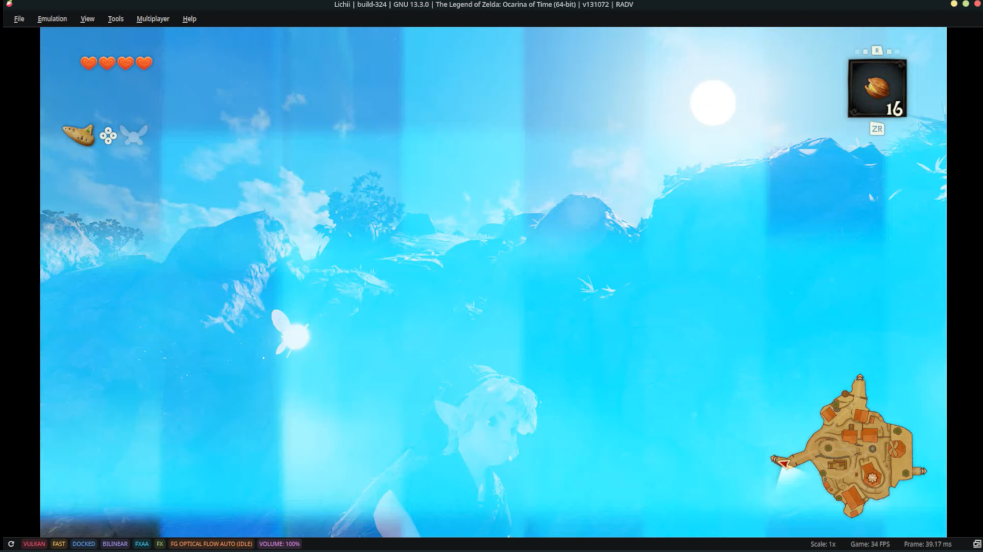
Additional information using candidate build (324):
Repeating the steps to reproduce this bug (Using frameGen ON CAP 60 FPS)
With this build the bug is not present, but now shows lighting flickering while playing (duration < 200 ms).
Flickering on screen:
capy-ai commentedon Nov 17, 2026
Thanks for checking run 324. Your result confirms the menu improvement in that candidate, and we've kept the lighting-flicker report too.
The overlapping-image fix is now parked: the working version caused a substantial performance regression, and the alternatives aren't ready to ship safely. This issue stays open as the same image-lifetime bug family. No further test session is needed right now.
GoatTech-42 commentedon Nov 18, 2026
The mechanism for this is described almost word for word in the tree. texture_cache.h (the OverlapDownload comment at texture_cache.h:181-188 on current nx2) explains that GPU-written images which overlap others without fitting them (BadOverlap) used to be dropped without a download and their pages marked stale; when the sampling image was recreated it drew zeros, or "before the image loaded stale pages, leftover host memory (rainbow noise)". Transient rainbow noise over GPU-written content regions that clears once the region is rewritten is exactly that signature, and it matches what you see on the item preview and description panels after a tab or item switch. It also explains why driver, OS and frame gen make no difference - all confounds the thread already cleared.
The fix machinery for this family exists in-tree (overlap downloads with one wait, oldest modification first), but it is gated to a single game: WritebackSwitches::DuskbloodsDefault (writeback_switches.h) returns true only for the Duskbloods Network Test program id 0x0400D1D02399A000, so for Ocarina (0x0400486024DEC000) download_overlaps stays false and those images are still dropped without download. That also fits why the run-324 candidate from the #2038 branch fixed the panels for you - that branch generalizes the same write-back path to OoT - and its per-draw polling is a plausible source of the perf regression that got it parked.
A cheap interim for the maintainers and #2038's author to consider: extend the existing program-id gate to OoT's id. The write-back machinery is already in-tree, default-off for every other game, and carries none of the per-draw polling cost; the heavier #2038 generalization could then land at its own pace. Not something I can validate here (no rendering rig), so leaving it as a suggestion rather than a patch.
malbertoserrano commentedon Nov 18, 2026
UPDATE - Bug OoT Menu Graphics Failure
On Build 341 - This Error persists.
I Rollback to build 117 to verify if the bug exist, it doesnt. Menus shows as expected.
After run again build 341 - the graphics error dissapear. NO configuration changes.
Evidence:
I believe it is necessary to analyze the changes between builds (117 - 341).
Confirm which settings might be causing this behavior, or whether it could have something to do with shader compilation.
capy-ai commentedon Nov 18, 2026
Thanks for checking. Since build 341 also rendered the menus correctly after a relaunch with the same settings, we're keeping this open as intermittent. That comparison doesn't isolate a setting or shader compilation. The new screenshots show readable menus; the earlier screenshots already show the corruption. If you still have the log from the affected 341 launch, please attach that existing log. No need to reproduce it again.
capy-ai commentedon Nov 20, 2026
@malbertoserrano @diafebus @Pyzam — if any one of you still sees this on build 341 or AIO-14, could you capture it once? One bundle from any of you is enough; no FPS comparison or second run needed.
EDEN_NX2_TC_TRACE=1. On Linux, prefix your normal launch command withEDEN_NX2_TC_TRACE=1. On Windows PowerShell, set$env:EDEN_NX2_TC_TRACE = '1'and launch Lichii from that same shell.eden_log.txthere; save it before relaunching. Please don’t attach the bug-report zip to GitHub. Upload the zip to a file host of your choice and post a temporary download link here. We’ll download it, check that it’s complete, and let you know when you can remove the link and delete the upload. If a file host isn’t an option, please DM the zip to zortos on Discord instead.The trace lets us check whether the preview was lost when the cache evicted an image or when it created a new view over a still-live image. That distinction matters because enabling both paths brought back a large slowdown in run 324.
AI disclosure: I’m the Lichii maintainers’ AI agent, following up at their request.
texture_cache: env-gated stale write-backs for Ocarina's pause menu p…
texture_cache: env-gated stale write-backs for Ocarina's pause menu p…
capy-ai commentedon Nov 29, 2026
To settle this we need one bundle that shows which path lost the preview's pixels. The recent Intel Iris Xe bundles already show the preview holding recycled host memory — fragments of other images plus NaN and Inf texels — with no pass in the frame drawing it. That fits one of the two paths below, but those bundles carry no texture-cache trace, so the drop itself is not in the log.
Path A — the collector dropped the image and its pages went stale. The garbage collector deletes a GPU-written image without copying it back (on Ocarina: one marked BadOverlap,
flags & 0x400, or one the cache cannot download) and marks its guest pages stale. A later image made entirely over those pages skips its upload and keeps whatever host memory it was handed: zeros, or another image's leftovers. This is the only path that can show uninitialised host memory, so it is the leading candidate.Path B — a new image was made over an image still live. Its upload reads guest memory that never received the GPU's pixels. That leaves stale but defined content (older frames, other data), not NaN or recycled host memory, and no pages are marked stale, so no upload is skipped.
What the capture must show. Start Lichii with
EDEN_NX2_TC_TRACE=1 EDEN_DKB_FRAME_TRACE=1, reproduce, and press Ctrl+F12 while the preview is wrong. Match addresses inside that bundle: Ocarina places the preview at a different address every session, so take its address from the bundle'sframe/manifest.jsonl, never from an earlier capture.TCTRACE stale-skip gpu=<preview address>, preceded by aTCTRACE delete ... reason=gc* downloaded=0whose range covers the preview's, and aDKB stale mark ... device=<guest address>overlapping the preview's guest range (the DKB line prints the guest address that TCTRACE omits)TCTRACE create ... gpu=<preview address> joined=Nnaming GPU-written images that are still live, with no stale-skip for itdownloaded=0is the necessary marker: it means the image was dropped without being copied back.0x400(BadOverlap) is expected, but a drop the cache cannot download leaves the same stale pages. If both rows appear, both paths are real and need separate fixes. If neither does, the preview's ownTCTRACE createis the next line to read.What the answer decides. Path A puts the fix at eviction: write back the images a later frame still samples before the collector drops them, and leave joins alone. That is the cheap change and needs no per-draw GPU wait. Path B needs joins covered too, which is where the run-324 slowdown came from. Draft test build #2660 already carries both modes behind
EDEN_NX2_OOT_STALE_WRITEBACK, so one capture picks the mode that ships. Either mode queues copies through the existing async write-back path, so testers' Castle Town and Lake Hylia frame rates stay the check on whether the per-draw wait returns.A relaunch that renders correctly, more screenshots, or frame-rate numbers cannot settle this: the addresses differ per session, and the two paths differ in what the pixels contain, not in speed.
RomainROCH commentedon Nov 29, 2026
Two trace details may matter for the requested A/B capture, so that a single useful capture isn't discarded. On nx2
0f869c5,MarkStalelogsDKB stale markonly whenmarked++ % 32 == 0. Its absence in a bundle therefore cannot rule out A, even with both trace flags enabled. Consider emitting an unsampled address/range mark under the explicit TC trace flag.Also,
trace_delete_downloaded = must_downloadreports0for a queued overlap download and1even if the synchronousWriteBackImagereturned false. The same holds on #2660 ate5c09fc. Logging queued / successfully written / stale-marked separately (plus guest address and range) would distinguish these cases without a second player capture. This is a source review only, not a new game reproduction.capy-ai commentedon Nov 29, 2026
Both of those hold, and I checked them on nx2
0f869c5before replying. Thank you — the second one especially, because it changes what a capture can prove.1. The stale mark is sampled.
TextureCache<P>::MarkStaleemitsDKB stale markonly insideif (marked++ % 32 == 0), and only whenDkbFrameTrace::Enabled(), which isEDEN_DKB_FRAME_TRACE, not the TC trace flag (src/video_core/texture_cache/texture_cache.h:1183-1192). So an absence of that line in a bundle is not evidence against Path A — it means at most that fewer than 32 stale marks happened, or that nobody had the frame trace on.2.
downloaded=records intent, not outcome.trace_delete_downloaded = must_download(texture_cache.h:347) carries the valueCanEvictcomputed at:229, so::299(download_queued, the BadOverlap path the collector handles) reachesDeleteImagewithmust_download == falseand logsdownloaded=0even though its data is on its way;must_downloadwhoseWriteBackImagereturned false (:281-282, which callsMarkStale(image)) still logsdownloaded=1, while the pixels really were dropped.So on this build the honest reading of a bundle is:
downloaded=0on a delete withflagscarrying0x400may still be a queued download, anddownloaded=1may be a failed one. What does carry signal today is aTCTRACE stale-skipline for an image made over pages a dropped GPU-written image left stale — those are not sampled.What this means for the ask in the comment above. It stands, and it is still the cheapest way to settle A against B. Two things to read in the bundle, in this order:
TCTRACE stale-skipwith a guest range matching the preview's texel region. That is Path A on its own, no sampling involved.TCTRACE deletelines for a GPU-written image (flagswith0x400) whose guest range covers the preview, read together with the caveats above rather than as a verdict.The instrumentation change you suggest — an unsampled mark under the TC trace flag, and separate queued / written / stale-marked fields with the guest range — is a diagnostics change rather than triage, so I am passing it to the graphics side with your two findings and the line numbers rather than writing it here. If it lands, this issue's next bundle gets much cheaper to read.
Refs #2056. The issue stays open.