Releases: xpipe-io/xpipe
22.9

- Add integration for Passwork password manager
- Fix Hetzner cloud entry always showing up in connection search
Downloads
You can find all downloadable artifacts below attached to this release. For installation instructions, see the installation guide.
All artifacts are signed by Christopher Schnick (2E21 05AB FDBA C0EB)
22.8
- Fix multi identities not correctly retaining non-synced identities when edited on another system
- Multi identities now show and preserve the order of inaccessible identities as well
- Fix powershell command failure detection being broken in some places, leading to various issues in powershell environments
- Fix NullPointer when executing automated browser actions
- Fix rare storage race condition
Downloads
You can find all downloadable artifacts below attached to this release. For installation instructions, see the installation guide.
All artifacts are signed by Christopher Schnick (2E21 05AB FDBA C0EB)
22.7
- Make connection filter apply after typing to provide a better user experience
- Fix yubikey and pkcs#11 integration being broken with wrong environment variable setup
- Improve hcloud docs and clarify sync behaviour for config
- Fix tailnet integration not properly switching between tailnets with the same account
- Fix kubectl check failing when adding a new cluster even though it was installed
- Fix freeze when connecting to remote Windows systems when the PTB had been used for connecting before
- Fix exception when copying empty file browser selection
- Fix exception when opening terminal in file browser overview
- Fix various translations
Downloads
You can find all downloadable artifacts below attached to this release. For installation instructions, see the installation guide.
All artifacts are signed by Christopher Schnick (2E21 05AB FDBA C0EB)
22.6
- Rework MCP server with custom system prompt to improve overall handling
- Add option to add kubernetes clusters from the creation menu
- Improve custom password manager command handling and support json output
- Fix high GPU usage on loading screen on some Linux systems
- Fix xpipe CLI launch command not running custom scripts and prompts
- Fix vmware integration actions not working if no identity has been set for VM
- Fix bitwarden integration not showing root cause error messages due to missing directory
- Fix sudo terminal open not working on some older Linux systems
- Fix various NullPointers
Downloads
You can find all downloadable artifacts below attached to this release. For installation instructions, see the installation guide.
All artifacts are signed by Christopher Schnick (2E21 05AB FDBA C0EB)
22.5
- Add automatic fallback to disable hardware acceleration on Linux when the graphics driver had issues
- Fix password manager agent option not working and not showing key list when used for git SSH auth
- Fix rare concurrent modification exception on initial startup
- Scripts and script categories can now be moved
- The sample scripts category can now be deleted
- Fix run script menu not showing nested categories
- The latest Warp Terminal update broke opening scripts. It is currently unusable and is marked as not-recommended anymore
Downloads
You can find all downloadable artifacts below attached to this release. For installation instructions, see the installation guide.
All artifacts are signed by Christopher Schnick (2E21 05AB FDBA C0EB)
22.4
- Fix issues with gateway configurations for SSH connections. Gateways were not handled properly and caused various issues with missing configuration options and services not tunneling correctly
- Fix old incus/LXD entries not launching correctly
- Fix displayed incus/LXD network information not updating correctly
- Fix Windows rendering performance degradation
- Fix rare shell init race condition
- Fix various NullPointers
- Add more documentation links
Downloads
You can find all downloadable artifacts below attached to this release. For installation instructions, see the installation guide.
All artifacts are signed by Christopher Schnick (2E21 05AB FDBA C0EB)
22.3
- Add more documentation links and content
- Fix bundled executables, e.g. hcloud, not taking priority over existing installed ones
- Fix bitwarden sync button not showing proper error message when bw CLI was not installed
- Fix terminal logging failing with generic error on Windows when powershell was unavailable
- Fix various NullPointers
Downloads
You can find all downloadable artifacts below attached to this release. For installation instructions, see the installation guide.
All artifacts are signed by Christopher Schnick (2E21 05AB FDBA C0EB)
22.2
- Rework workspaces settings category to be more intuitive
- Update documentation for v22 changes to password managers and identities
- Fix SSH connections failing when a custom SSH executable was added to the PATH from a directory with spaces
- Fix connection filter sometimes jumping to wrong category when only one entry matched
- Fix selected category being reset on restart
- Fix various NullPointers
Downloads
You can find all downloadable artifacts below attached to this release. For installation instructions, see the installation guide.
All artifacts are signed by Christopher Schnick (2E21 05AB FDBA C0EB)
22.1
- Add setting to hide connection names from git vault when the entire vault encryption was enabled
- Add new MCP server endpoint call_api to send requests to the HTTP API via MCP
- Fix various incus/LXD actions being broken when using multiple projects
- Fix choco update check being broken on Windows
- Fix bitwarden sync button staying disabled after sync failure
- Fix NullPointer for PsSessions when no gateway was set
- Fix zellij being launched with wrong TERM environment variable
- Fix various NullPointers
Downloads
You can find all downloadable artifacts below attached to this release. For installation instructions, see the installation guide.
All artifacts are signed by Christopher Schnick (2E21 05AB FDBA C0EB)
22.0
Multi identities
In a team vault environment, different users might want to use different local identities to connect to the same system. Or you maybe just want to be able to quickly switch between different logins for a system. With multi identities, you can do this now:

These identities allow you to choose which available identity should be used. For team vaults, it will automatically choose an available local identity when other referenced identities are not available to the current user, allowing each vault user to use their own local identity.
Password managers + SSH agents
This release comes with a much improved integration for password managers that offer SSH agent support. This currently includes 1Password, Bitwarden, KeePassXC, Keeper, and Proton Pass. To enable this feature, go to the password manager settings and enable the SSH key retrieval option:
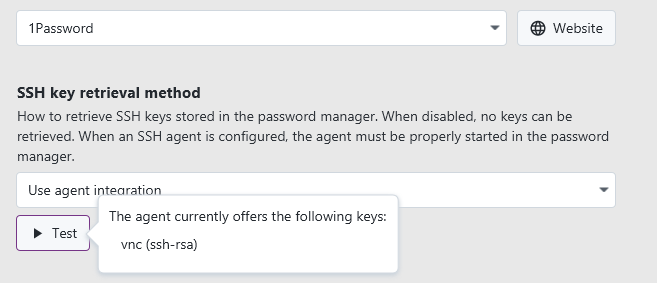
The password manager agent is automatically detected, so you don't have to configure anything socket-related.
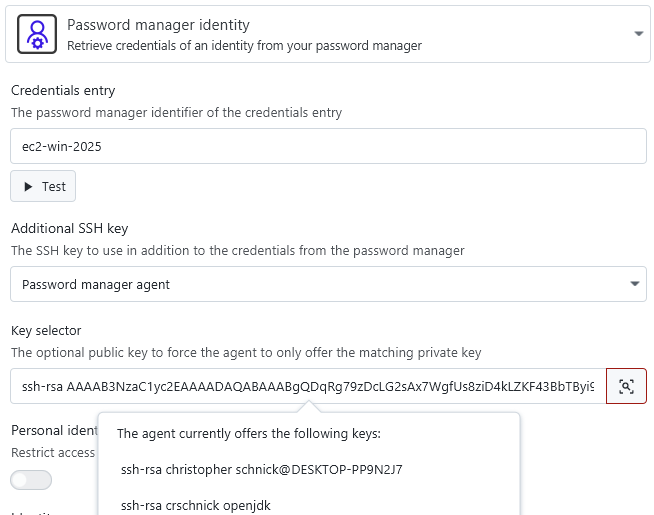
The password manager identities support retrieving user+pass credentials and a key via the agent in one place:
For other types of identities, there is also now a new option to use the password manager agent:
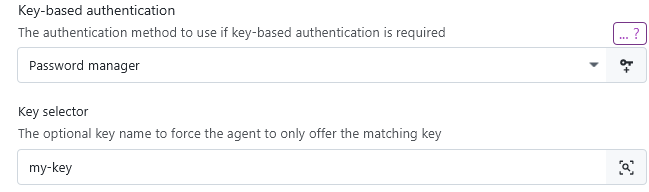
The password manager agent key field also accepts key names (if the password manager supports that) to accommodate for changing keys.
The password manager option is a simpler replacement for the previous custom SSH agent option, which still exists for other types of agents. If you use the custom agent option, you will have to adapt your existing identities to use the password manager identity option instead.
Password manager improvements
In addition to agent improvements, the password manager support also has been improved across the board:
- Add support for multiple 1password accounts
- Add support for Bitwarden flatpak and macOS App Store installations
- Add support for KeePassXC flatpak
- Add support for Proton Pass password manager
- Add support for hashicorp vault to retrieve secrets
- Fix Keeper SMS handling when CLI had a different login duration configured
- Fix Keeper issues on macOS and add support for Keeper App Store installations
Incus/LXD improvements
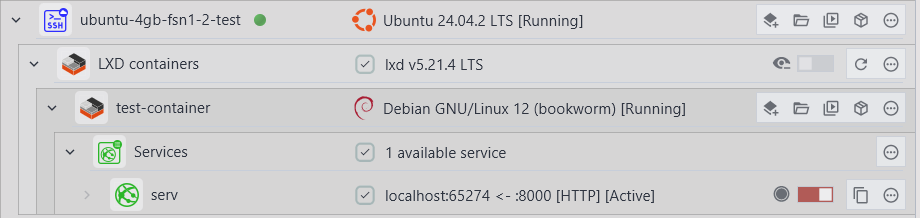
This releases adds support for detecting containers from all available incus/LXD projects, which are essentially the same concept as namespaces.
Furthermore, there is now networking support for containers, meaning that if the container advertises an IP address, XPipe can automatically use it to open services. This also allows you to create things like direct RDP/VNC connections to containers:
Podman quadlets
The state of podman containers is now handled better for podman quadlets. They now automatically recognize the associated systemd unit file and give you the option to modify it:
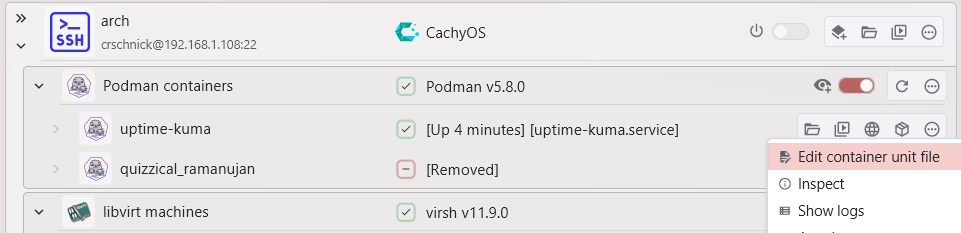
Furthermore, the container restart action will now properly restart any systemd service if the container was associated with one.
Category icons
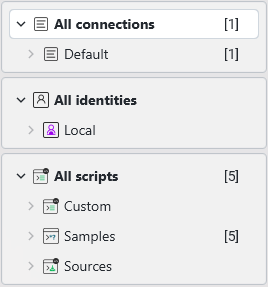
You can now assign custom icons to categories as well. This works the same way as it does for connections:
Advanced filter bar
The search text field has been upgraded with more capabilities. It now supports direct launches, e.g. typing ssh user@host will automatically launch the associated connection if it already exists or alternatively open a new quick connect dialog where you can instantly connect to a new system with minimal effort:
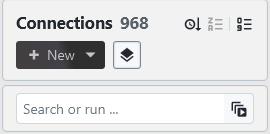
The filtering performance also has been improved, so any filter changes now update the connection list faster and cause less lag.
Other
- Implement various performance improvements
- Fix light/dark theme transitions being laggy
- Fix application window on Windows taking long to close
- Fix various possible shell state corruptions
- Improve timeout handling for shells to allow for a quicker shell init
- Fix SSH being broken when a custom alias to a modified ssh command was set in a shell rc file
- Fix shell scripts for mixed environments, e.g. a powershell script in cmd environment, not properly running
- The SSH connection property
proxyin the API has been renamed togatewayto be more consistent with other connections - Add ctrl+t shortcut for terminal dock
- Fix VMware VM connection freezing if no encryption password was specified when it was required
- Fix VMware VMs being removed when not running and moved to another directory
- Fix application window background fill being wrong on Windows ARM
- Plus a lot of smaller fixes across the board which are not individually listed here
Downloads
You can find all downloadable artifacts below attached to this release. For installation instructions, see the installation guide.
All artifacts are signed by Christopher Schnick (2E21 05AB FDBA C0EB)