
This Artificial Intelligence application was designed to enhance the user's indoor plant experience. It offers personalized recommendations for houseplants tailored to the user's needs and preferences, along with a comprehensive tracking system to help them manage and care for their plants. By simplifying the plant selection and care process, Releaf not only elevates the living or work environment but also promotes mental well-being, making plant ownership effortless and enjoyable.
Backend: JavaScript, Axios, Node.js
Frontend: React, HTML, CSS
Plant API: https://perenual.com/docs/api
Local Database: PostgreSQL
- The user can create a new account. When the user enters login credentials, if the user login credentials are correct, the user will be able to log in and the account information will be stored in a local database.
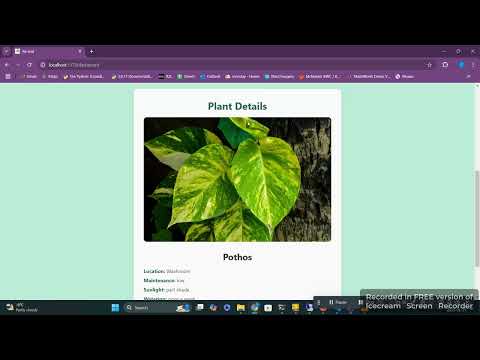
- In the Dashboard section, the user can add the plant name and location it is located in their house to get information on how to take care of the plant. The information includes: maintenance, sunlight exposure tolerance, watering schedule, lifespan, health benefits and one general tip. The user can add and remove a plant card. If the user has an account, the search history will be saved to the local database.
- In the Query section's search bar, the user writes about the desired plant they want to buy in future. The program outputs the top three recommended plants with the plant's common name, scientific name, and a picture of the plant.
Below is a demonstration of how to use the application:
Click the thumbnail to watch the video on YouTube.
- Creating an account and sign-in: The local database is designed with PostgreSQL. The user table contains the user ID, user name, hidden password, etc. The user authentication is enabled through cookies.
- User dashboard: When the user uploads a plant name and plant location in the house, the Axios API makes a call to Perenual API that gets the correct data the user is looking for from a public database with data on 10000+ plants and sends that data to Axios API. Axios API then makes a call to Cohere API and it receives the call. According to the specific prompt (written by us), Cohere APU collects the 3 best plant names and plant properties and corresponding plant images. If the plant name field or any other property field is blank, ignore that plant and increment the number of iterations of the for loop by 1.
- User query: When the user writes to the search bar, Axios API makes a call to the Cohere API. Cohere API does a web search, retrieves data from the web search, organizes and formats the data and sends the data to Axios API and Axios API returns the collected data (plant's common name, scientific name, watering schedule and sunlight exposure tolerance) to the user.
Follow these steps to set up the project and run it on your local machine.
Ensure the following are installed on your system:
- Node.js (v16+ recommended)
- PostgreSQL (installed and running)
- Git (optional, for cloning the repository)
Clone the repository to your local machine and navigate to the project folder:
git clone https://github.com/tridibbanik17/DeltaHacks2025.git
cd ./DeltaHacks2025Navigate to the backend directory:
cd ./backendInstall backend dependencies:
npm installConfigure the .env file:
Create a .env file in the backend directory if it doesn't already exist.
Add the following values to the file:
DB_PASS='deltahacks'
PLANT_API_KEY='sk-kj1z6783d86da43888202'
ORIGIN='http://localhost:5173'
Ensure the database is correctly set up:
Open PostgreSQL and create a database named DeltaHacks2025:
CREATE DATABASE DeltaHacks2025;Update the credentials in db.js if your database username or host is different.
Start the backend server:
node server.jsYou should see:
Connection has been established successfully
Server is running on port 5000
Navigate to the frontend directory:
cd ../frontendInstall frontend dependencies:
npm installStart the development server:
npm run devThe frontend server should start, typically at http://localhost:5173.
Backend Verification: Test the backend API endpoints using a tool like Postman or cURL. Example endpoint to test: http://localhost:5000/auth.
Frontend Verification: Open the frontend in a browser (e.g., http://localhost:5173) and confirm the UI loads correctly.
Database Verification: Use a database management tool like pgAdmin to verify the DeltaHacks2025 database is populated correctly after testing the application. You’re all set!
 Landing Page
 Sign-up option
 Query page where users can enter their preferences
 Adding a plant pop-up
 Query responses with top three plant recommendations
 Generate plant details
 Homepage with links to informative external articles