Skip to content

Fix copied WSL skill commands on Windows - #13552

Open
OrcaWin wants to merge 4 commits into
stablyai:mainfrom
OrcaWin:OrcaWin/sta-3735-windows-repro
Open

Fix copied WSL skill commands on Windows#13552
OrcaWin wants to merge 4 commits into
stablyai:mainfrom
OrcaWin:OrcaWin/sta-3735-windows-repro

Conversation

@OrcaWin

@OrcaWin OrcaWin commented Aug 10, 2026

Copy link
Copy Markdown
Collaborator

Summary

  • keep copied WSL skill commands native to the target POSIX shell
  • preserve Orca's PowerShell-to-WSL wrapper for the setup terminal it opens
  • carry the selected runtime through Settings, onboarding, feature walls, and Linear setup surfaces

Reproduction and root cause

On native Windows with WSL Ubuntu selected, the generated 1,188-character command began with PowerShell's & { ... }. Orca's inline setup pane correctly opened PowerShell and accepted that draft, but Copy command exposed the same PowerShell-only string; pasting it into Ubuntu Bash failed immediately at the leading & with exit code 2.

The command builder was serving both clipboard and Orca-owned terminal destinations despite their different shell dialects. This change keeps the clipboard value as the 73-character npx skills ... command and applies the selected-distro PowerShell wrapper only at the setup-terminal boundary.

Validation

  • 102 relevant Vitest tests passed; one Unix-only case is skipped on Windows
  • added coverage for clipboard text, PowerShell setup-terminal wrapping, distro preservation, Settings, onboarding, and Linear setup
  • changed-file formatting and all three Oxlint scans passed
  • web typecheck and max-lines ratchet passed
  • real Ubuntu Bash parse-only check of the copied command returned exit code 0
  • Electron dev build on native Windows visibly showed the bare copy command and the wsl.exe -d 'Ubuntu' wrapper in Orca's inline PowerShell terminal; the real Copy action wrote the bare command to the clipboard

The installation payload was intentionally not executed because that would mutate global agent-skill state.

Risk

The wrapper remains conditional on a local Windows client, WSL runtime, and PowerShell-owned setup terminal. Host, macOS, Linux, remote/SSH, WSL distro selection, and folder-workspace routing retain their existing paths.

STA-3735

@OrcaWin

OrcaWin commented Aug 10, 2026

Copy link
Copy Markdown
Collaborator Author

Native Windows Electron validation

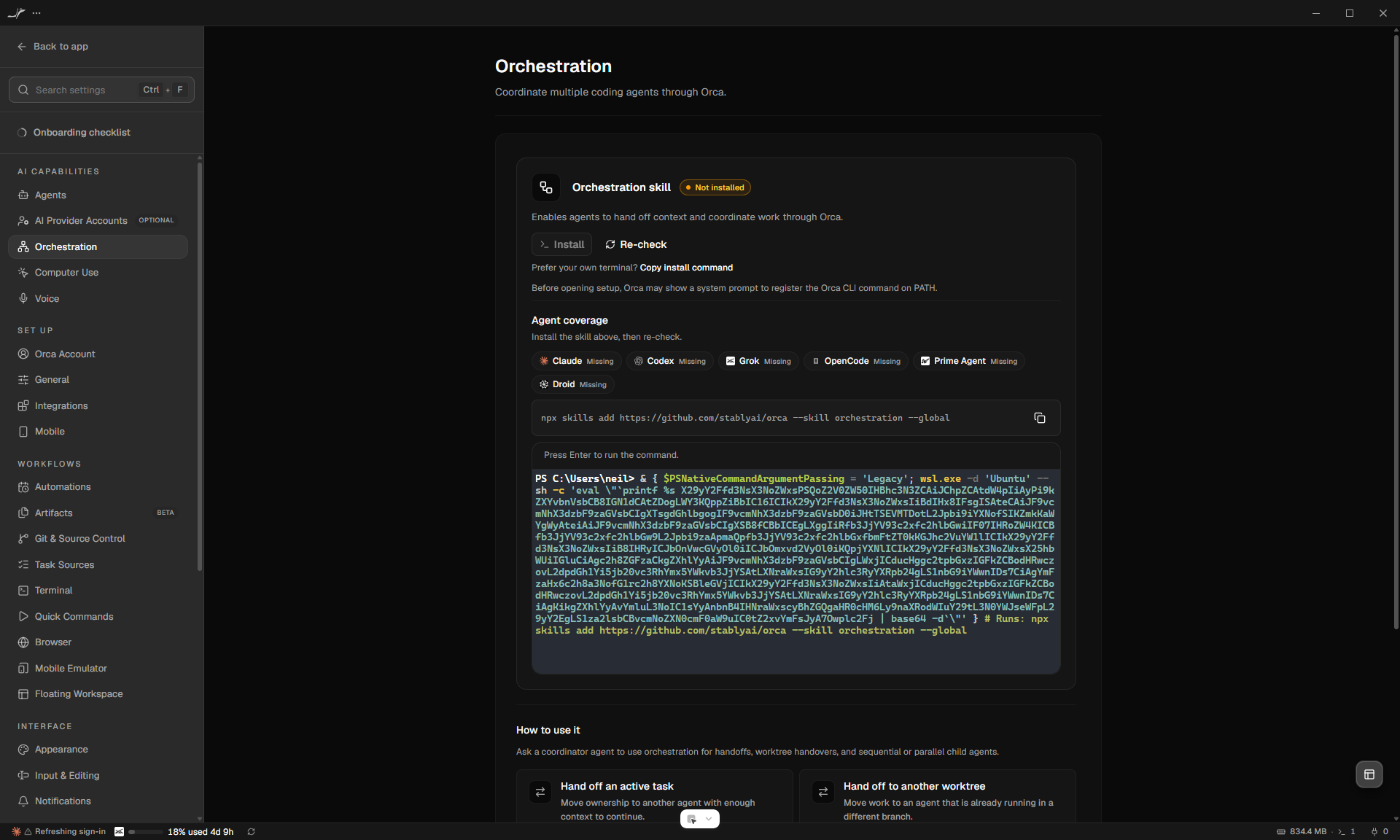
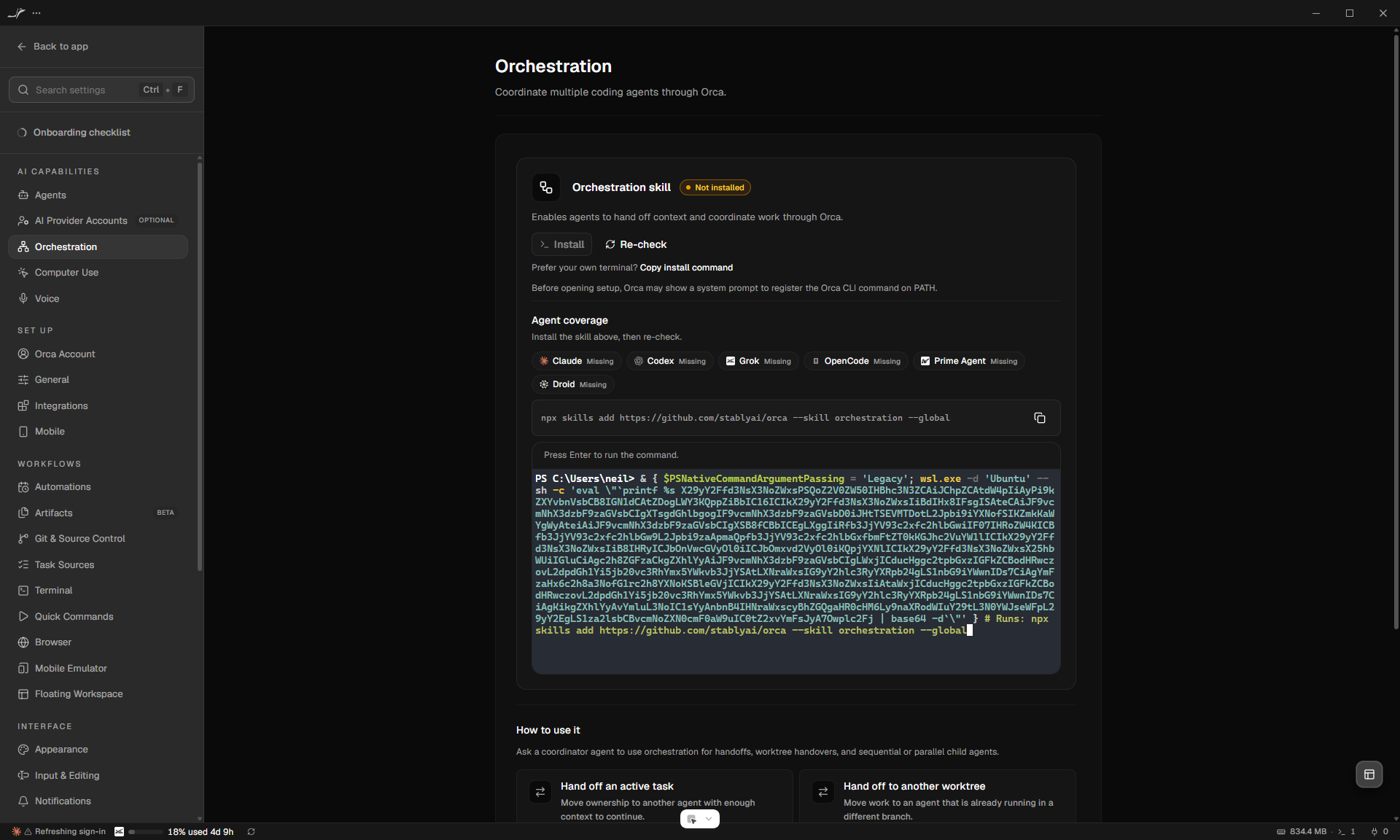
Full Orca Settings window showing the shell-native copied command above the PowerShell-owned WSL setup terminal

This is the full, uncropped Orca window after selecting the WSL Ubuntu runtime and clicking Install in the real CLI skill setup panel. The command row visibly contains the bare npx skills add ... --global command, while the inline terminal visibly contains a PowerShell draft that targets wsl.exe -d 'Ubuntu'; CDP inspection confirmed the app identity was OrcaWin/sta-3735-windows-repro, and exercising the real Copy command action wrote the same 73-character bare command to the clipboard.

Dev launch mode reports launch_mode_unavailable and normally hides this panel, so validation temporarily exposed only that existing visibility guard before hot reload. That validation-only adjustment was reverted before testing and is absent from commit 6664370039; the install draft was not executed because doing so would mutate global skill state.

@coderabbitai

coderabbitai Bot commented Aug 10, 2026

Copy link
Copy Markdown
Contributor

Review Change Stack

No actionable comments were generated in the recent review. 🎉

ℹ️ Recent review info
⚙️ Run configuration

Configuration used: Repository UI

Review profile: CHILL

Plan: Pro Plus

Run ID: 06fe1ad2-6e65-402b-86ba-f1a8e2d1d7dd

📥 Commits

Reviewing files that changed from the base of the PR and between 8aa81bd and 6ac33ff.

📒 Files selected for processing (3)
  • src/renderer/src/components/settings/AgentSkillSetupPanel.test.tsx
  • src/renderer/src/components/settings/AgentSkillSetupPanel.tsx
  • src/renderer/src/components/settings/agent-skill-terminal-snapshot.ts

📝 Walkthrough

Walkthrough

Skill setup flows now pass the selected agent runtime to AgentSkillSetupPanel. Runtime-specific commands are built separately from terminal shell wrappers. Windows WSL terminals now receive generated wsl.exe commands, while clipboard actions retain normalized POSIX commands. WSL, host fallback, captured runtime, duplicate-wrapper, and non-Windows scenarios receive updated test coverage.

🚥 Pre-merge checks | ✅ 4 | ❌ 1

❌ Failed checks (1 warning)

Check name Status Explanation Resolution
Docstring Coverage ⚠️ Warning Docstring coverage is 18.18% which is insufficient. The required threshold is 80.00%. Write docstrings for the functions missing them to satisfy the coverage threshold.
✅ Passed checks (4 passed)
Check name Status Explanation
Title check ✅ Passed The title clearly identifies the primary change: fixing copied WSL skill commands on Windows.
Description check ✅ Passed The description clearly explains the user-visible fix, root cause, validation, affected platforms, and risk, although several template headings are omitted.
Linked Issues check ✅ Passed Check skipped because no linked issues were found for this pull request.
Out of Scope Changes check ✅ Passed Check skipped because no linked issues were found for this pull request.

Thanks for using CodeRabbit! It's free for OSS, and your support helps us grow. If you like it, consider giving us a shout-out.

❤️ Share

Comment @coderabbitai help to get the list of available commands.

@coderabbitai coderabbitai Bot left a comment

Copy link
Copy Markdown
Contributor

Choose a reason for hiding this comment

The reason will be displayed to describe this comment to others. Learn more.

Actionable comments posted: 1


ℹ️ Review info
⚙️ Run configuration

Configuration used: Repository UI

Review profile: CHILL

Plan: Pro Plus

Run ID: 2616c540-1212-4717-bc8c-64edfb37dc93

📥 Commits

Reviewing files that changed from the base of the PR and between bbcf89e and 6664370.

📒 Files selected for processing (25)
  • src/renderer/src/components/feature-tips/CliSkillSetupTerminal.tsx
  • src/renderer/src/components/feature-wall/BrowserUseSkillSetupCard.tsx
  • src/renderer/src/components/floating-terminal/FloatingTerminalOrchestrationDialog.tsx
  • src/renderer/src/components/onboarding/FeatureSetupInlineTerminal.test.tsx
  • src/renderer/src/components/onboarding/FeatureSetupInlineTerminal.tsx
  • src/renderer/src/components/onboarding/onboarding-feature-setup.test.ts
  • src/renderer/src/components/settings/AgentSkillSetupPanel.test.tsx
  • src/renderer/src/components/settings/AgentSkillSetupPanel.tsx
  • src/renderer/src/components/settings/BrowserUsePane.tsx
  • src/renderer/src/components/settings/BrowserUseSkillStep.tsx
  • src/renderer/src/components/settings/CliSection.test.tsx
  • src/renderer/src/components/settings/CliSection.tsx
  • src/renderer/src/components/settings/CliSkillRuntimeSetup.test.tsx
  • src/renderer/src/components/settings/CliSkillRuntimeSetup.tsx
  • src/renderer/src/components/settings/ComputerUseSkillSetupPanel.tsx
  • src/renderer/src/components/settings/EphemeralVmsPane.tsx
  • src/renderer/src/components/settings/LinearAgentSkillPane.tsx
  • src/renderer/src/components/settings/OrchestrationPane.tsx
  • src/renderer/src/components/settings/OrchestrationSetupCard.tsx
  • src/renderer/src/components/settings/TaskSourceLinearSetup.tsx
  • src/renderer/src/components/settings/agent-skill-setup-panel-props.ts
  • src/renderer/src/components/settings/use-linear-agent-skill-setup.ts
  • src/renderer/src/components/sidebar/LinearAgentSkillSetupDialog.tsx
  • src/renderer/src/components/sidebar/LinearAgentSkillSetupPrompt.test.tsx
  • src/renderer/src/components/sidebar/LinearAgentSkillSetupPrompt.tsx

Comment thread src/renderer/src/components/feature-tips/CliSkillSetupTerminal.tsx Outdated
@OrcaWin

OrcaWin commented Aug 10, 2026

Copy link
Copy Markdown
Collaborator Author

STA-3735 Windows Electron QA (post-review)

Verdict: PASS (with noted gaps)
Exact head validated: 6ac33ff31fc32382dfc734f203039a4bb1bd3e8d
Method: Electron CDP (playwright-cli on REMOTE_DEBUGGING_PORT=9336 only). No Computer Use. No product-code edits. Install payload intentionally not executed.

Focused Vitest

CliSkillRuntimeSetup, AgentSkillSetupPanel, CliSkillSetupTerminal, CliSection, FeatureSetupInlineTerminal58 passed, 1 skipped (pin / retry / repair-fallback covered).

E2E (Settings → Orchestration skill, default runtime WSL/Ubuntu)

Check Result
Copy command is bare npx skills add ... --skill orchestration --global (no PowerShell wrap) PASS — clipboard len 78; Ubuntu bash -n exit 0
Install opens pwsh setup terminal with wsl.exe -d 'Ubuntu' draft; panel <code> stays bare PASS
Open terminal frozen after settings Ubuntu→Fedora PASS — still wsl.exe -d 'Ubuntu'
Missing WSL distro (Fedora) surfaces repair + disables Install PASS
Missing-WSL host fallback + retry snapshot PASS (unit); live paths partial (see report)

Screenshots

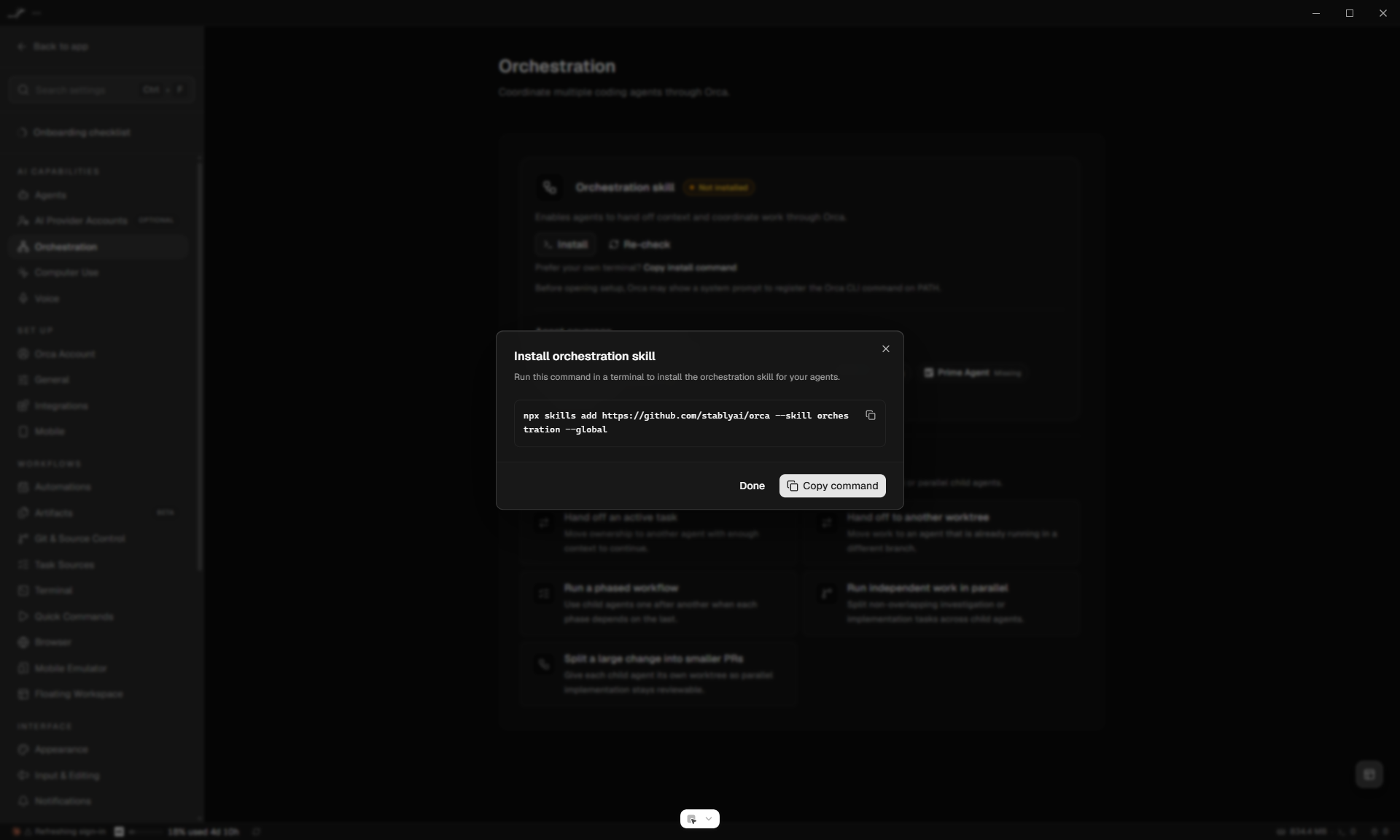
Copy dialog — bare POSIX npx (no & { ... }):

Copy command dialog showing bare npx skills add for orchestration

Setup terminal — PowerShell draft wraps WSL Ubuntu; visible command stays bare:

Setup terminal open with PowerShell WSL Ubuntu wrap draft

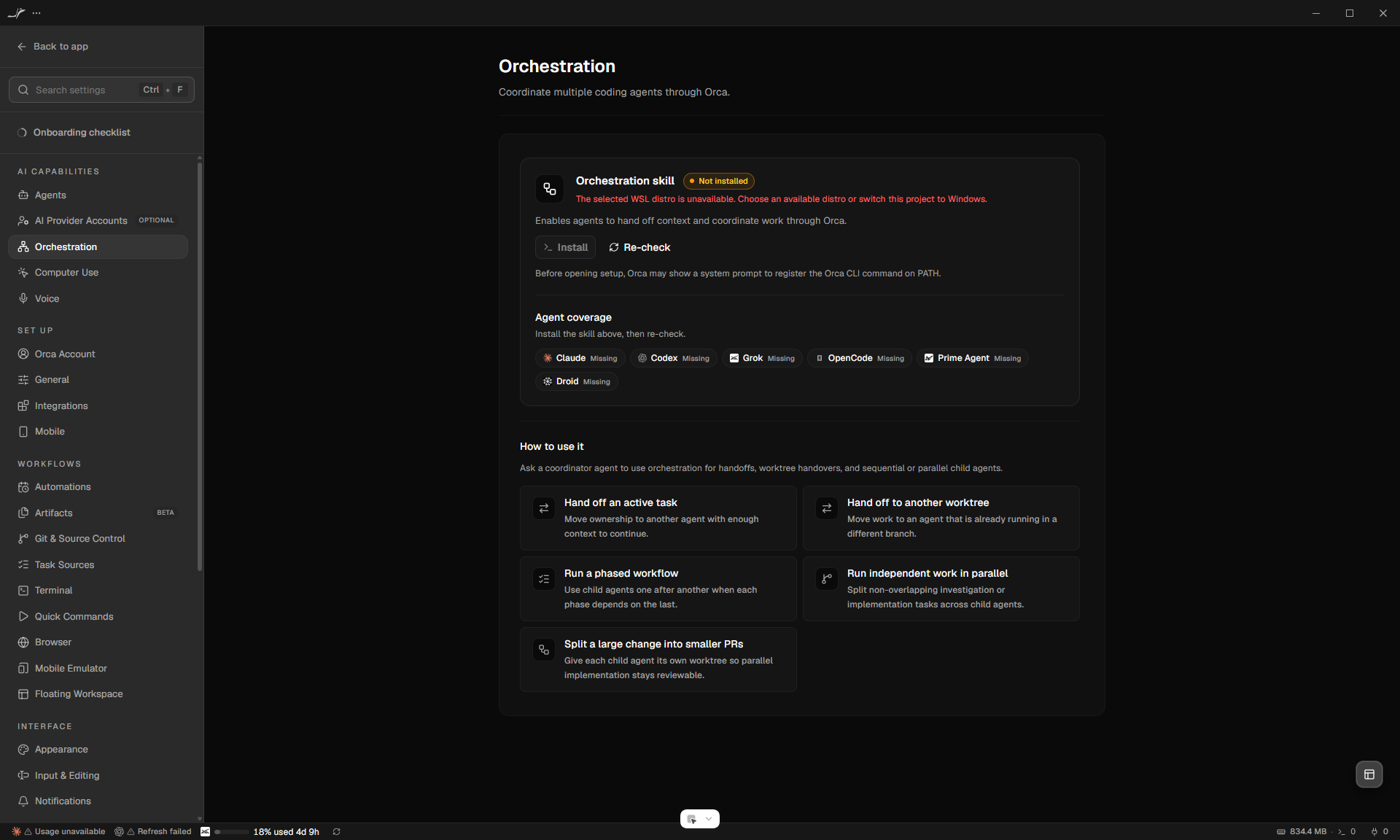
Missing WSL distro (Fedora) — repair message, Install disabled:

Missing WSL distro Fedora unavailable Install disabled

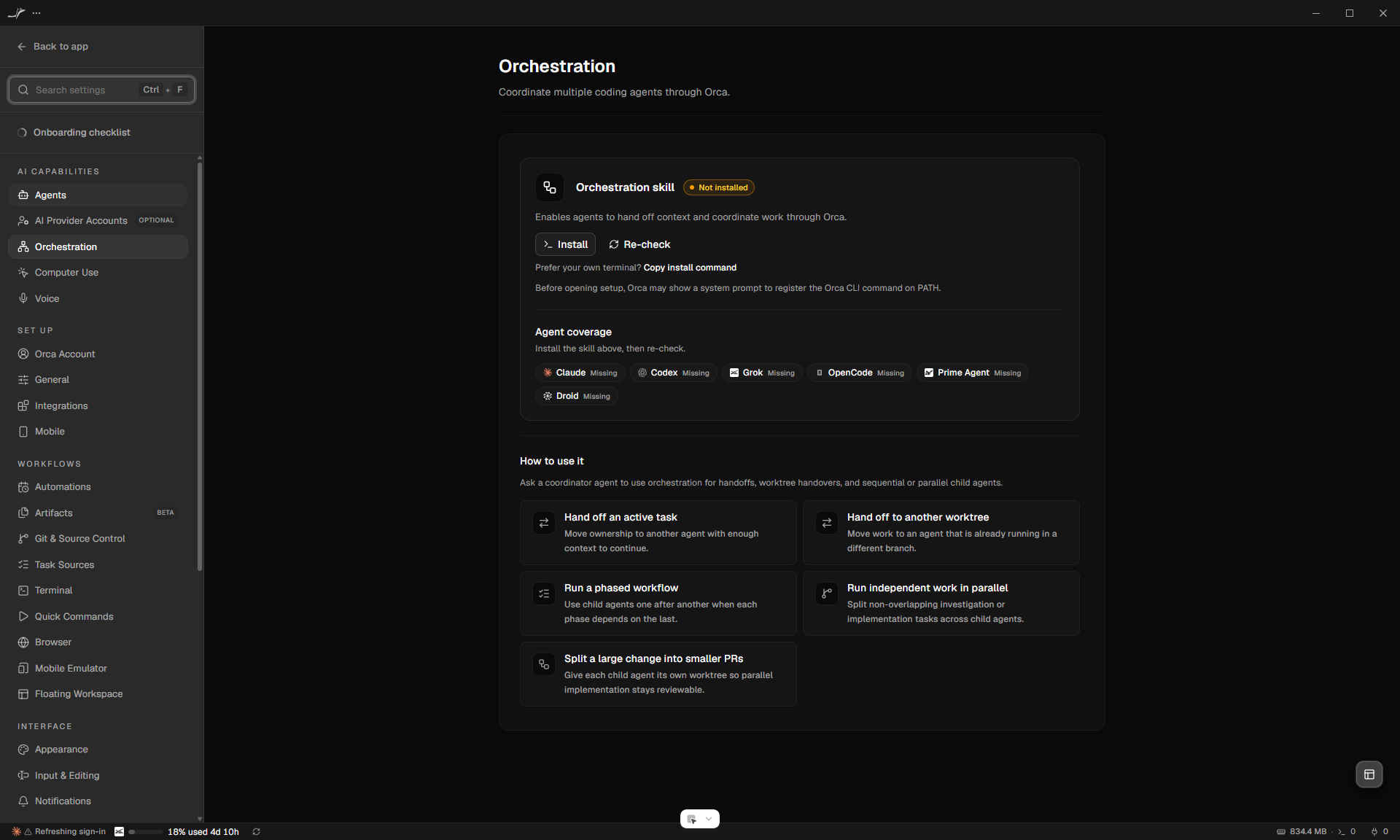
Orchestration skill panel (WSL/Ubuntu selected):

Orchestration skill panel with WSL Ubuntu runtime

Final setup terminal (Ubuntu wrap, post-renderer check):

Final setup terminal Ubuntu wrap

Evidence (recoverable, evidence-only)

gh image session-token upload remains unavailable on this Windows host (browser cookie stores locked / missing); images published to the OrcaWin evidence-only orphan branch instead (not on the PR product branch).

Gaps (not regressions of this PR)

  1. Dev electron-vite launch hides Settings → General → Orca CLI → Agent skills via launch_mode_unavailable; Orchestration skill exercised as the shared AgentSkillSetupPanel surface.
  2. Live Retry / feature-tip host-fallback not fully re-shown; unit coverage is strong.
  3. Install payload not executed end-to-end (by design).

Conclusion

At 6ac33ff31fc32382dfc734f203039a4bb1bd3e8d, Windows/WSL skill-command split, open-terminal pin, and repair UI hold under real Windows Electron CDP for the Orchestration skill setup path.

Sign up for free to join this conversation on GitHub. Already have an account? Sign in to comment

Labels

None yet

Projects

None yet

Development

Successfully merging this pull request may close these issues.

2 participants