


Stremio FTP is a self-hosted Stremio source addon that lets users stream movies and series episodes from one or more FTP/FTPS servers through a single private Stremio manifest. It exposes a web configuration portal where a user saves FTP credentials, scans each FTP library, and receives a private Stremio manifest URL.
By default this is a stream-source addon: open a movie or episode from another Stremio catalog, and this addon appears as a streaming option when the clicked title is found in the indexed FTP library. Profiles can also enable optional FTP catalogs so indexed movies, series, anime, and folder-grouped Other files appear in Stremio with TMDB posters and metadata where possible. All FTP catalogs support Stremio search; the Other catalog searches folder groups without calling TMDB at catalog-load time.
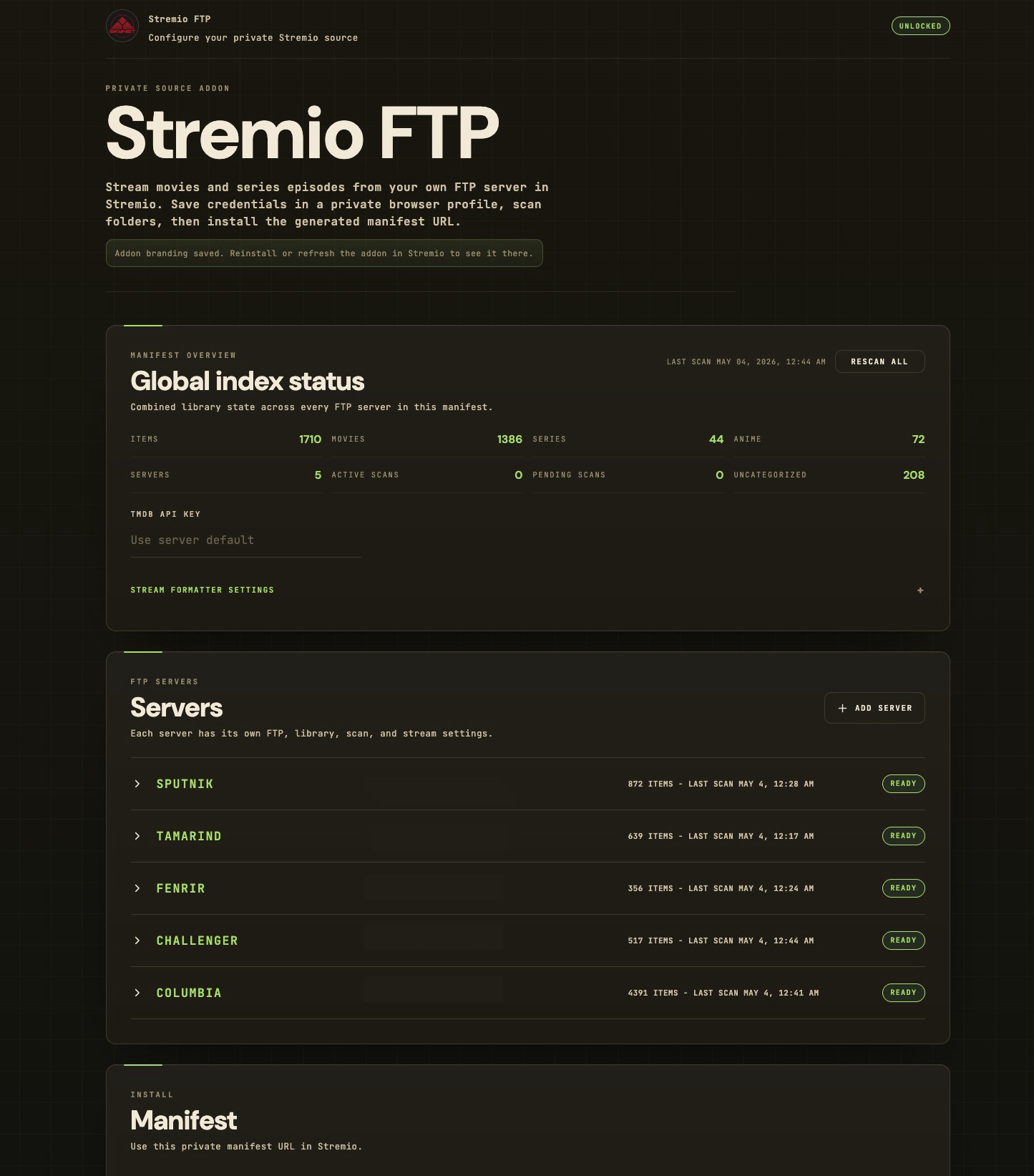
- Web configuration portal at
/configure, with setup-token entry for private deployments - Per-user profiles using browser UID plus passphrase, with no signup system
- Multiple FTP servers per manifest, each with its own FTP, library, catalog, scan, and stream settings
- Sequential per-manifest scans so one user profile does not open scan connections to several FTP servers at once
- Encrypted FTP credential storage
- FTP, explicit FTPS, and implicit FTPS support through
basic-ftp - Optional invalid-certificate allowance for self-signed or seedbox FTP certificates
- Movies and series episode filename parsing
- Manual, scheduled, and delayed auto-start background index refreshes from the portal
- Halt control for active scans
- Persisted scan progress with reload-safe status, progress bar, approximate ETA, and improved repeated-scan estimates from prior successful scans
- Automatic delayed retry for transient FTP disconnects such as FIN/reset/timeout errors
- Optional movie, series, anime, and folder-grouped Other catalogs generated from the indexed FTP library
- Stremio catalog search for Movies, Series, Anime, and Other
- Optional TMDB metadata enrichment for catalog posters, descriptions, and artwork
- Global TMDB API key, plus per-server content type toggles, folder-layout hint, and proxy/direct FTP stream delivery mode
- Private per-profile manifest URLs for Stremio
- HTTP range proxy streaming from FTP to Stremio
- JSON import/export of profile settings, including a credential-stripped sharing mode and automatic downgrades for server-side limits
- Docker and Docker Compose deployment
- SQLite persistence in
CONFIG_DIR
- Use this only with media you own, are licensed to access, or are otherwise legally allowed to stream.
- Catalogs are off by default per profile. Enable
Show catalogs in Stremioin the portal if you want this addon to expose browsable FTP catalogs. - The
Othercatalog is folder-grouped. It includes indexed videos that cannot be resolved by TMDB under the enabled Movies, Series, or Anime options, plus catalog-enabled servers where Movies, Series, and Anime are all disabled. DisableShow uncategorizedto exclude that server from Other. - Typed catalog search uses already-persisted movie, series, and anime metadata. Other catalog search filters folder names, underlying filenames, parsed titles, and parsed years. Catalog loads and searches do not call TMDB live.
- TMDB enrichment requires
TMDB_API_KEY. Without it, catalog items that already have IMDb IDs can still appear with basic title/year metadata but no TMDB poster art. - After changing FTP or library settings, click
Save FTP settings. The server schedules a delayed scan for that FTP server about 5 minutes later, unless you manually clickRescanfirst. - Scans run in a background queue. New files do not appear as Stremio source options until the next manual or scheduled scan finishes.
- Scan progress and ETA are best-effort because FTP servers do not provide a full recursive item count before traversal. After a successful scan, later scans use the previous traversal size as a better progress baseline.
- If an FTP server closes the connection mid-scan, the failed job message notes the delayed retry and the server is requeued for a later rescan.
- Proxy streaming is the default and recommended mode. Direct FTP mode sends FTP URLs to Stremio clients; it may not work in every client, can expose FTP credentials in stream URLs, and explicit FTPS support varies by client. When supported, playback bypasses addon-server bandwidth and speed limits.
- The manifest install token is shown when a profile is created. The server stores only a hash of it, so unlocking an existing profile can load FTP settings but cannot reconstruct an old install URL.
- The generated manifest URL can stream indexed files for that profile. Keep it private.
- Changing
CONFIG_ENCRYPTION_KEYafter profiles exist will make saved FTP credentials undecryptable. - If your FTP server has thousands of files, scanning
/can take time. Prefer the narrowest root folders that contain your media. - Filename matching is best-effort. Include clear title/year patterns for movies and
S01E02style patterns for episodes when possible.
- Node.js 22+ for local development
- Docker for container deployment
- A publicly reachable HTTPS URL for Stremio clients
- Outbound network access from the addon server to your FTP host and port
For a typical VPS deployment, put the container behind Nginx, Caddy, Traefik, or Cloudflare Tunnel. Stremio clients must be able to reach BASE_URL.
Required:
BASE_URL=https://stremio-ftp.example.com
CONFIG_ENCRYPTION_KEY=replace-with-a-stable-random-secret-at-least-32-characters
Optional:
PORT=7000
CONFIG_DIR=/config
SETUP_TOKEN=replace-with-a-stable-random-secret-at-least-16-characters
STREMIO_FTP_SETUP_TOKEN=alternate-name-for-SETUP_TOKEN
ALLOW_PUBLIC_PROFILE_API=false
TMDB_API_KEY=optional-tmdb-api-key-for-catalog-metadata
LOG_LEVEL=info
CRAWLER_CONCURRENCY=2
FTP_TIMEOUT_MS=15000
FTP_MAX_CONNECTIONS=3
MAX_ON_DEMAND_SEARCH_MS=4500
PROFILE_RATE_LIMIT_WINDOW_MS=600000
PROFILE_RATE_LIMIT_MAX=20
SCAN_GLOBAL_CONCURRENCY=2
SCAN_QUEUE_MAX=50
SCAN_MIN_RESCAN_INTERVAL_MINUTES=0
SCAN_COOLDOWN_MS=900000
SCAN_JOB_TIMEOUT_MS=1800000
SCAN_SCHEDULER_INTERVAL_MS=60000
SCAN_PROGRESS_AVERAGE_ITEMS=2000
SCAN_TRANSIENT_RETRY_DELAY_MS=300000
MAX_FTP_SERVERS_PER_PROFILE=0
DISABLE_PROXY_STREAMS=false
EMPTY_PROFILE_CLEANUP_DAYS=7
EMPTY_PROFILE_CLEANUP_INTERVAL_MS=604800000
Notes:
BASE_URLmust be the public origin, without a trailing slash.CONFIG_ENCRYPTION_KEYmust stay stable across container rebuilds and restarts.SETUP_TOKENprotects/configureand profile-management APIs. It is required unlessALLOW_PUBLIC_PROFILE_API=true.STREMIO_FTP_SETUP_TOKENis accepted as an alternate name forSETUP_TOKEN.ALLOW_PUBLIC_PROFILE_API=truepreserves the older no-token behavior for trusted or otherwise restricted deployments. If enabled, anyone who can reach the hosted addon can create profiles and submit FTP settings.TMDB_API_KEYis optional. Set it if users will enable the FTP catalog option and you want posters, backdrops, descriptions, and release years from TMDB. Users can override it per profile in the portal.- SQLite is stored at
$CONFIG_DIR/stremio-ftp.sqlite. FTP_MAX_CONNECTIONSlimits simultaneous FTP sessions per distinct FTP credential key. Lower it for hosts with strict connection caps.PROFILE_RATE_LIMIT_MAXlimits profile create/unlock attempts per client IP per rate-limit window.SCAN_GLOBAL_CONCURRENCYlimits simultaneous FTP scans across the whole instance. Default2is sized for public instances where the average catalog is around 2,000 media files.SCAN_QUEUE_MAXlimits queued scans waiting for workers. Default50.SCAN_MIN_RESCAN_INTERVAL_MINUTESsets the minimum automatic rescan frequency users may save. Default0allows every listed option.SCAN_COOLDOWN_MSprevents repeated manual rescans for the same profile. Default900000or 15 minutes. Scheduled scans are still locked per profile and respect global concurrency.SCAN_JOB_TIMEOUT_MSis reserved for scan timeout policy and defaults to1800000or 30 minutes.SCAN_SCHEDULER_INTERVAL_MScontrols how often the server checks for due scheduled scans. Default60000or 1 minute.SCAN_PROGRESS_AVERAGE_ITEMSis the denominator used for the first-pass progress estimate until the crawler has seen more entries. Default2000.SCAN_TRANSIENT_RETRY_DELAY_MScontrols delayed retries after transient FTP disconnects such as FIN/reset/timeout errors. Default300000or 5 minutes. Set0to disable these retries.MAX_FTP_SERVERS_PER_PROFILEcaps how many FTP servers each profile may keep. Default0removes the cap. Imported settings beyond the cap are dropped automatically.DISABLE_PROXY_STREAMS=trueforces every profile to deliver streams as direct FTP URLs. Saved customizations and imported settings are coerced todirect. Set per profile cannot opt back in.EMPTY_PROFILE_CLEANUP_DAYSdeletes profiles older than this many days that have no FTP server configured. Default7. Set0to disable. Cleanup runs at startup and again everyEMPTY_PROFILE_CLEANUP_INTERVAL_MSmilliseconds (default604800000, one week).
Create .env:
BASE_URL=https://stremio-ftp.example.com
CONFIG_ENCRYPTION_KEY=replace-with-output-from-openssl-rand-hex-32
SETUP_TOKEN=replace-with-output-from-openssl-rand-hex-24
ALLOW_PUBLIC_PROFILE_API=false
TMDB_API_KEY=
PORT=7000
CONFIG_DIR=/config
LOG_LEVEL=info
CRAWLER_CONCURRENCY=2
FTP_TIMEOUT_MS=15000
FTP_MAX_CONNECTIONS=3
MAX_ON_DEMAND_SEARCH_MS=4500
PROFILE_RATE_LIMIT_WINDOW_MS=600000
PROFILE_RATE_LIMIT_MAX=20
SCAN_GLOBAL_CONCURRENCY=2
SCAN_QUEUE_MAX=50
SCAN_MIN_RESCAN_INTERVAL_MINUTES=0
SCAN_COOLDOWN_MS=900000
SCAN_JOB_TIMEOUT_MS=1800000
SCAN_SCHEDULER_INTERVAL_MS=60000
SCAN_PROGRESS_AVERAGE_ITEMS=2000
SCAN_TRANSIENT_RETRY_DELAY_MS=300000
Generate strong secrets:
openssl rand -hex 32
openssl rand -hex 24
Start the addon:
docker compose up -d --buildCheck health:
curl https://stremio-ftp.example.com/healthOpen the portal:
https://stremio-ftp.example.com/configure
If SETUP_TOKEN is set, enter it in the portal unlock form. Older ?setup=... links are still imported by the browser and immediately removed from the address bar, but new deployments should avoid putting setup tokens in URLs.
- Enter a passphrase in Profile setup. Optionally click
Import settingsto load a previously exported JSON file before creating the profile. When settings are staged for import, onlyCreate profileis available;Unlock profileis disabled until the staged import is cleared. - Click
Create profile. The portal creates the profile, applies any imported customization, and persists imported servers that already include credentials. Servers imported without credentials appear pre-filled so you can supply username and password, then clickSave FTP settingsper server. - Fill in FTP settings for
Server 1(or any imported server still missing credentials): host, port, username, password, TLS mode, certificate setting, and root paths. - Click
Test connection. - Click
Rescan. The scan runs in the background; you can leave and come back to see the latest persisted status. If needed, clickHalt scanwhile it is active. - Optionally enable
Show catalogs in Stremio. - If catalogs are enabled, choose the content types on that server: Movies, Series, Anime, and
Show uncategorized, and set a global TMDB key if you want TMDB posters and richer catalog metadata. If you leave Movies, Series, and Anime disabled while keeping catalogs enabled, that server is treated as an Other-only catalog source unlessShow uncategorizedis disabled. - Choose the library layout hint: auto detect, organized by folders, or a single folder of files.
- Keep
Proxy through addonstream delivery unless you specifically want Stremio clients to receive direct FTP URLs. - Click
Save FTP settingsafter changing FTP or library options. A delayed auto-scan is scheduled about 5 minutes later so you can keep editing without immediately locking the form behind a scan. - Choose an optional rescan frequency: manual only, every 6 hours, every 12 hours, daily, or weekly.
- Add more FTP servers if needed. They are scanned sequentially, and duplicate movie/episode matches appear as multiple stream options in Stremio.
- Install the generated Stremio manifest URL.
- The manifest panel includes
Export settingsto download the current profile (customization + servers) as a JSON file. LeaveStrip username & passwordchecked when sharing the file with someone else; uncheck it to keep a private backup that can restore credentials on a future import.
For an existing browser profile:
- Open
/configureand enter the setup token if prompted. - Enter the same browser UID and passphrase.
- Click
Unlock profile. - Saved FTP settings load into the form. The password field stays blank even when a saved password exists.
- Leave the password field blank to keep the saved password when testing or saving.
The portal remembers the last browser UID, passphrase, and manifest URL in that browser's local storage so repeat visits load the profile automatically. Use this only on trusted devices.
The addon advertises Stremio's optional search extra on all four FTP catalogs:
- Movies, Series, and Anime search already-enriched catalog metadata stored during scanning.
- Other search preserves folder grouping and matches folder names, filenames inside each folder, parsed titles, and parsed years.
- Search never triggers live TMDB requests during Stremio catalog browsing. TMDB work happens during scan-time enrichment and resumes on later scans if transient errors interrupt it.
- Other entries without poster art use
/assets/default-folder-poster.png, a transparent PNG folder-outline poster for Stremio clients that do not render SVG artwork.
Root paths can be newline- or comma-separated.
Examples:
/Movies
/TV
or:
/
Scanning / works, but for large servers it is slower and more likely to include unrelated files. Prefer specific media folders when possible.
Install dependencies:
npm installRun development server:
BASE_URL=http://127.0.0.1:7000 \
CONFIG_ENCRYPTION_KEY=0123456789abcdef0123456789abcdef \
SETUP_TOKEN=dev-setup-token-123456 \
TMDB_API_KEY= \
CONFIG_DIR=.config \
PORT=7000 \
npm run dev
Build and start production output:
npm run build
BASE_URL=http://127.0.0.1:7000 \
CONFIG_ENCRYPTION_KEY=0123456789abcdef0123456789abcdef \
SETUP_TOKEN=dev-setup-token-123456 \
TMDB_API_KEY= \
CONFIG_DIR=.config \
PORT=7000 \
npm start
Run checks:
npm test
npm run build
npm audit --omit=devNginx example:
server {
    listen 443 ssl http2;
    server_name stremio-ftp.example.com;

    ssl_certificate /etc/letsencrypt/live/stremio-ftp.example.com/fullchain.pem;
    ssl_certificate_key /etc/letsencrypt/live/stremio-ftp.example.com/privkey.pem;

    location / {
        proxy_pass http://127.0.0.1:7000;
        proxy_http_version 1.1;
        proxy_set_header Host $host;
        proxy_set_header X-Forwarded-Proto $scheme;
        proxy_set_header X-Forwarded-For $proxy_add_x_forwarded_for;
    }
}
If Docker publishes to loopback, use:
ports:
- "127.0.0.1:7000:7000"Paste this into an AI coding or server agent after replacing the placeholders:
Set up the Stremio FTP addon on this Linux server.

Repository: https://github.com/skynet01/stremio-ftp
Public URL: https://YOUR_DOMAIN_HERE
Internal port: 7000

Requirements:
1. Install Docker and Docker Compose if missing.
2. Clone or update the repository at /opt/stremio-ftp.
3. Create a persistent .env file with:
   - BASE_URL=https://YOUR_DOMAIN_HERE
   - CONFIG_ENCRYPTION_KEY=<generate with: openssl rand -hex 32>
   - SETUP_TOKEN=<generate with: openssl rand -hex 24>
   - ALLOW_PUBLIC_PROFILE_API=false
   - TMDB_API_KEY=<optional; required for TMDB catalog posters and rich metadata>
   - PORT=7000
   - CONFIG_DIR=/config
   - LOG_LEVEL=info
   - CRAWLER_CONCURRENCY=2
   - FTP_TIMEOUT_MS=15000
   - MAX_ON_DEMAND_SEARCH_MS=4500
   - PROFILE_RATE_LIMIT_WINDOW_MS=600000
   - PROFILE_RATE_LIMIT_MAX=20
4. Build and run with Docker Compose.
5. Put the app behind HTTPS using Nginx, Caddy, Traefik, or the existing reverse proxy.
6. Make sure the public URL forwards to the container and /health returns JSON.
7. Make sure outbound egress from the server allows FTP/FTPS to the user FTP host and port.
8. Print the setup portal URL:
   https://YOUR_DOMAIN_HERE/configure
   Tell the operator to enter SETUP_TOKEN in the portal unlock form.
9. Do not rotate CONFIG_ENCRYPTION_KEY after profiles are created.
10. Do not expose SETUP_TOKEN publicly. Only set ALLOW_PUBLIC_PROFILE_API=true for trusted or network-restricted deployments that intentionally need the older public profile API behavior.

After setup, verify:
- curl https://YOUR_DOMAIN_HERE/health
- The configure page loads.
- A profile can be created.
- FTP settings can be saved, tested, and rescanned.
Unable to connect to FTP server
- Confirm host, port, username, and password in FileZilla or another FTP client.
- Confirm TLS mode: disabled, explicit TLS, or implicit TLS.
- Enable
Allow invalid certificateonly when the server uses a self-signed or otherwise invalid certificate. - Confirm the VPS firewall and cloud egress rules allow outbound access to the FTP host and port.
Rescan returns 0 files
- Confirm the root path exists on the FTP server.
- Try
/once to verify traversal, then narrow to/Movies,/TV, or similar. - Confirm files have supported video extensions and parseable names.
- Prefer filenames containing movie year or episode markers such as
S01E02.
Addon installs but no streams appear
- The clicked Stremio title must match an indexed FTP file.
- Run
Rescanafter saving FTP settings. - Make sure
BASE_URLis the public HTTPS URL. - Keep the manifest URL private and reinstall if you created a new profile.
Saved settings load but password field is blank
- This is intentional. The portal never displays the stored FTP password.
- Leave the password field blank to keep the stored password.
- Enter a new password only when rotating FTP credentials.