Samsar Gallery is the public video library for creations made with Samsar. It turns published Samsar videos into a responsive, searchable catalogue with personalized discovery, social interactions, and indexable video pages.
Open the Gallery · Create with Samsar · Read the API docs
The interface adapts the catalogue and player to the device and to each video's aspect ratio.
| Surface | Desktop | Mobile |
|---|---|---|
| Gallery | Recommendation-ranked portrait features, landscape video grids, search, and category browsing. | A compact mixed-format library followed by an immersive, aspect-specific feed. |
| Video page | A responsive player with details, comments, social actions, and related videos. | Full-screen portrait playback or a landscape-aware player with touch-friendly actions, details, and recommendations. |
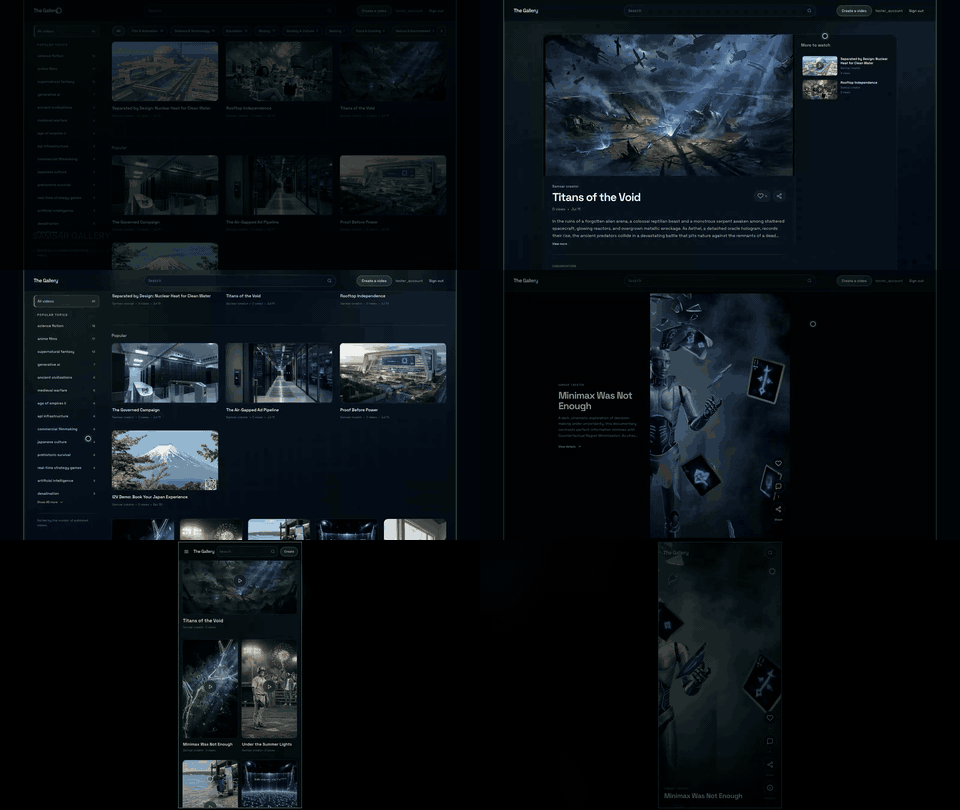
- Fully responsive — purpose-built layouts for desktop, mobile portrait, and mobile landscape, with dedicated experiences for
16:9,9:16, and square videos. - Automatic catalogue — published videos are classified into shared categories and reusable topics from their prompts, transcripts, and semantic neighbours.
- Hybrid search — combines semantic similarity with title, topic, category, tag, creator, description, popularity, and freshness signals.
- Relevant recommendations — blends the current video, recent watch history, completion quality, engagement, and trending signals while maintaining creator variety.
- Adaptive discovery — recommendation feeds preserve the selected video's format so portrait and landscape viewing remain coherent.
- Community interactions — authentication, likes, comments, shares, view counts, watch progress, and completion tracking are built in.
- Server-rendered video pages — every publication receives a canonical
/video/{publicationId}page with dynamic metadata, Open Graph previews,VideoObjectstructured data, and a stable share URL. - Search-engine ready — dynamic
robots.txtandsitemap.xmlroutes expose new public videos without rebuilding the Gallery. - No-rebuild publishing — administrators can publish, edit, and remove Gallery entries from
/admin; the source video session remains separate. - Private server integration —
samsar-jsand the Samsar API key stay on the Next.js server. Personalized viewer IDs are signed before they reach the Gallery index. - Resilient feeds — recommendations fall back to the public catalogue if the recommendation service is temporarily unavailable.
| Layer | Responsibility |
|---|---|
| Next.js App Router | Responsive Gallery UI, server-rendered video pages, metadata, route handlers, sitemap, and robots rules. |
| Samsar public API | Publications, authentication, interactions, comments, and administration. |
| Samsar Gallery service | Catalogue classification, embeddings, hybrid search, recommendations, and watch history. |
samsar-js |
Server-side client for authenticated Gallery service requests. |
Gallery search, recommendations, publishing, and interaction data pass through this application's route handlers. Authentication uses the Samsar public API, while privileged Gallery service calls use the API key only on the server.
- Node.js 20 or newer.
- npm.
- A Samsar account and API key.
- Create an account or sign in.
- Add credits or configure automatic recharge under Billing.
- Open API Keys, create a key, and copy it.
Treat this as a server secret. Never commit it or expose it through a NEXT_PUBLIC_* variable.
cp .env.example .env.localSet the two required values in .env.local:
SAMSAR_API_KEY=your_server_api_key
GALLERY_VIEWER_SALT=your_random_secret
Generate a strong viewer salt with:
openssl rand -hex 32NEXT_PUBLIC_SITE_URL is optional locally and defaults to https://gallery.samsar.one. Set it to http://localhost:3000 when you need local canonical and share URLs.
npm ci
npm run dev
Open http://localhost:3000. Email-and-password authentication is the most reliable local sign-in method; hosted OAuth callbacks may not accept a localhost origin.
The simplest publishing flow uses the built-in Gallery administration page:
- Finish rendering a video in Samsar Studio and copy its video session ID.
- Open
/adminon your Gallery deployment and sign in with a Samsar administrator account. - Select Add publication, paste the completed session ID, and add or review the title, description, creator handle, tags, aspect ratio, poster, and original prompt.
- Select Publish video.
The publication appears in the public feed and receives a canonical /video/{publicationId} page. The dynamic sitemap sees it without a Gallery rebuild; the processor updates that publication's search embedding and catalogue classification asynchronously when it is first accessed.
Editing changes the public metadata. Removing a publication hides it from the Gallery without deleting its source Samsar video session.
For programmatic publishing, use the Samsar Publications API.
- Import the repository into Vercel. If it is part of a larger checkout, set the project root to
samsar-gallery. - Add
SAMSAR_API_KEYandGALLERY_VIEWER_SALTto the Production environment. - Set
NEXT_PUBLIC_SITE_URLto the final public origin, such ashttps://gallery.samsar.one. - Deploy with the standard Next.js build command:
npm run build.
Gallery builds do not refresh the complete embedding index. Each publication is checked and updated independently by the processor's background access workflow.
Provide the same environment variables, then run:
npm ci
npm run build
npm start
The production server listens on port 3000 by default. Set PORT if the host requires another port.
The Gallery index stores public publication records and watch history in the dedicated SamsarGallery database. It refreshes incrementally: changed publications are embedded again, unchanged records are skipped, and removed publications are taken out of the active index.
The processor permits one refresh after the index becomes stale, currently after one hour. Concurrent or early refresh requests return without starting duplicate work. A refresh is requested after production builds and once per browser session, so no Vercel cron is required.
For signed-in visitors, the application derives a one-way viewer identifier from the Samsar user ID and GALLERY_VIEWER_SALT. Raw Samsar user IDs are not sent to the Gallery index.
Public Gallery routes and indexing metadata are currently English-only; the application does not generate localized or language-prefixed video URLs.
| Area | Path | Purpose |
|---|---|---|
| Pages and route handlers | app |
Gallery, search, video, admin, API, metadata, sitemap, and robots routes. |
| Interface components | components |
Responsive catalogue, player, navigation, authentication, comments, and admin UI. |
| Server and data utilities | lib |
Samsar API access, authentication, normalization, public fetches, types, and site URLs. |
| Operational scripts | scripts |
Gallery embedding sync and landing-site sitemap refresh. |
| Static assets | public |
Favicon and social preview fallback. |
| Command | Purpose |
|---|---|
npm run dev |
Start the local Next.js development server. |
npm run build |
Create a production build, then request an incremental Gallery index sync. |
npm start |
Serve the production build. |
npm run lint |
Run the Next.js ESLint checks. |
npm run refresh:landing-sitemap |
Regenerate the sibling Samsar landing site's blog sitemap when that project is available. |
Samsar Gallery is available under the MIT License.