Inline feedback for agent-generated code. Export structured payloads your agent can act on.



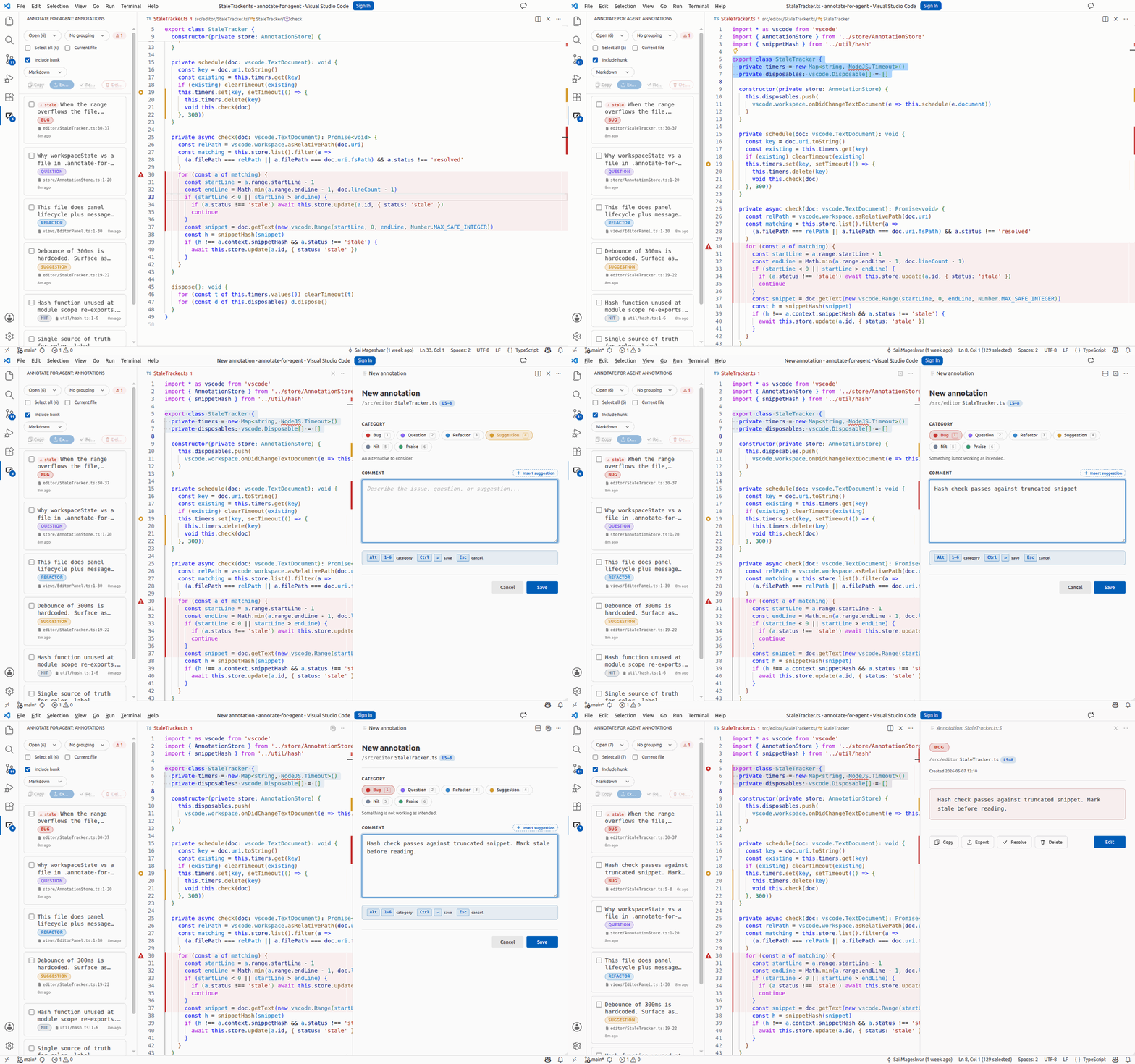
Select. Annotate. Export. Your agent picks up exactly what you meant.
The agent writes the diff. You review it. You spot six things — a wrong null check, a missing return, an off-by-one, three nits. Today: copy the file path, retype the line range, paste the snippet, type the feedback. Six times. By the third one you've forgotten the first.
Annotate for Agent turns the editor into the feedback surface.
| 1 Select Highlight the lines. Ctrl Shift A |
2 Annotate Pick a category. Type the feedback. Six colors. Six shortcuts. |
3 Export Markdown · JSON · CSV. Hand it to the agent. |
The export is one structured block per note — path, range, snippet, category, feedback. The agent parses it cleanly and acts on each block. No copy-paste tax. No lost context.
ext install SaiMageshvar.annotate-for-agent
Or grab it from the Visual Studio Marketplace.
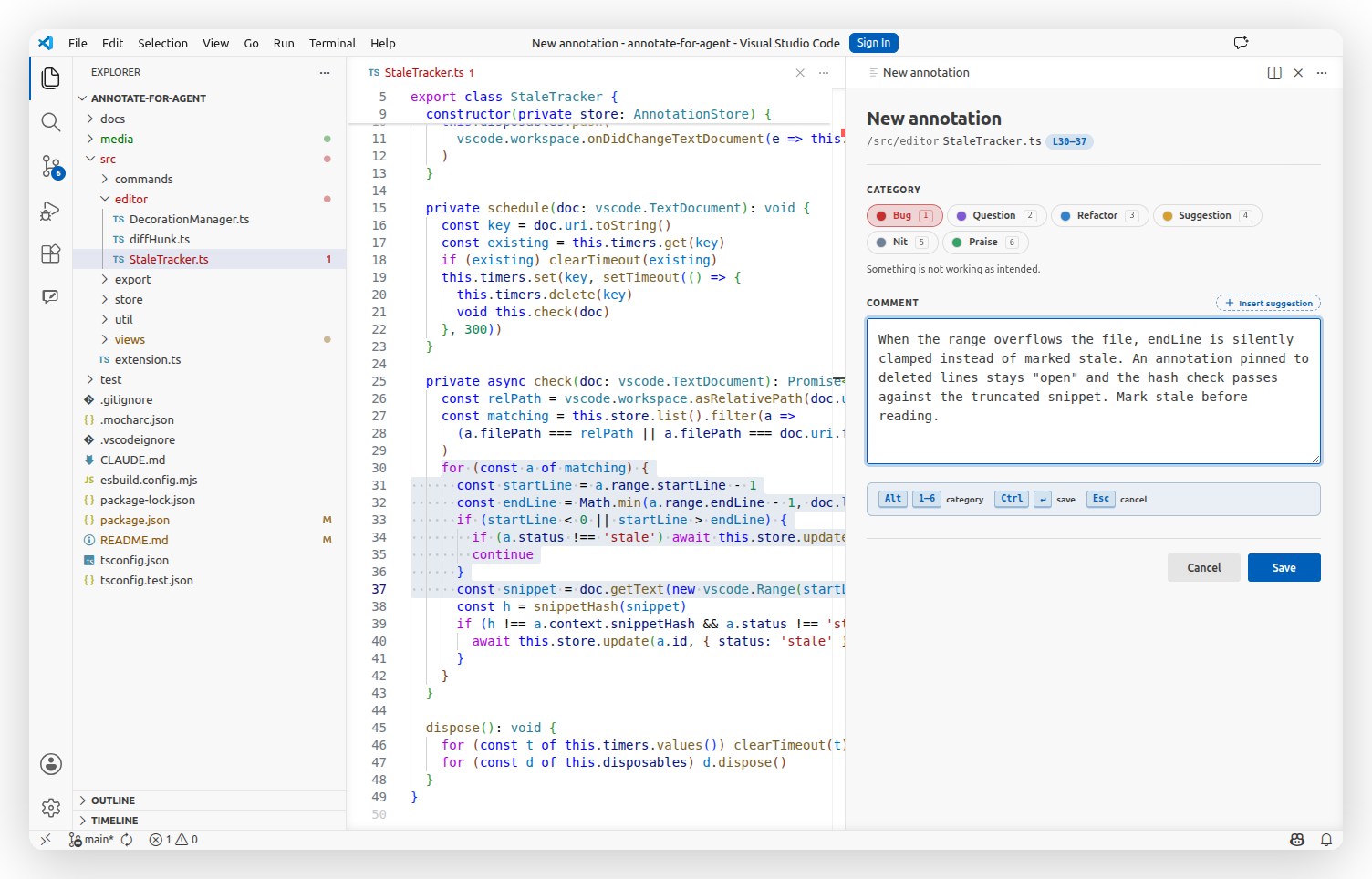
Panel — for substantive feedback. Ctrl Shift A opens a rich form beside your code: multi-line comment, fenced ```suggestion block at one click, @ to reference any file in the workspace.
Quick — for triage. Ctrl Shift Q drops a native QuickPick. Number key picks the category, enter confirms, one-line feedback, done — two keystrokes. Mid-type, Ctrl Enter escalates to the full panel without losing what you typed.
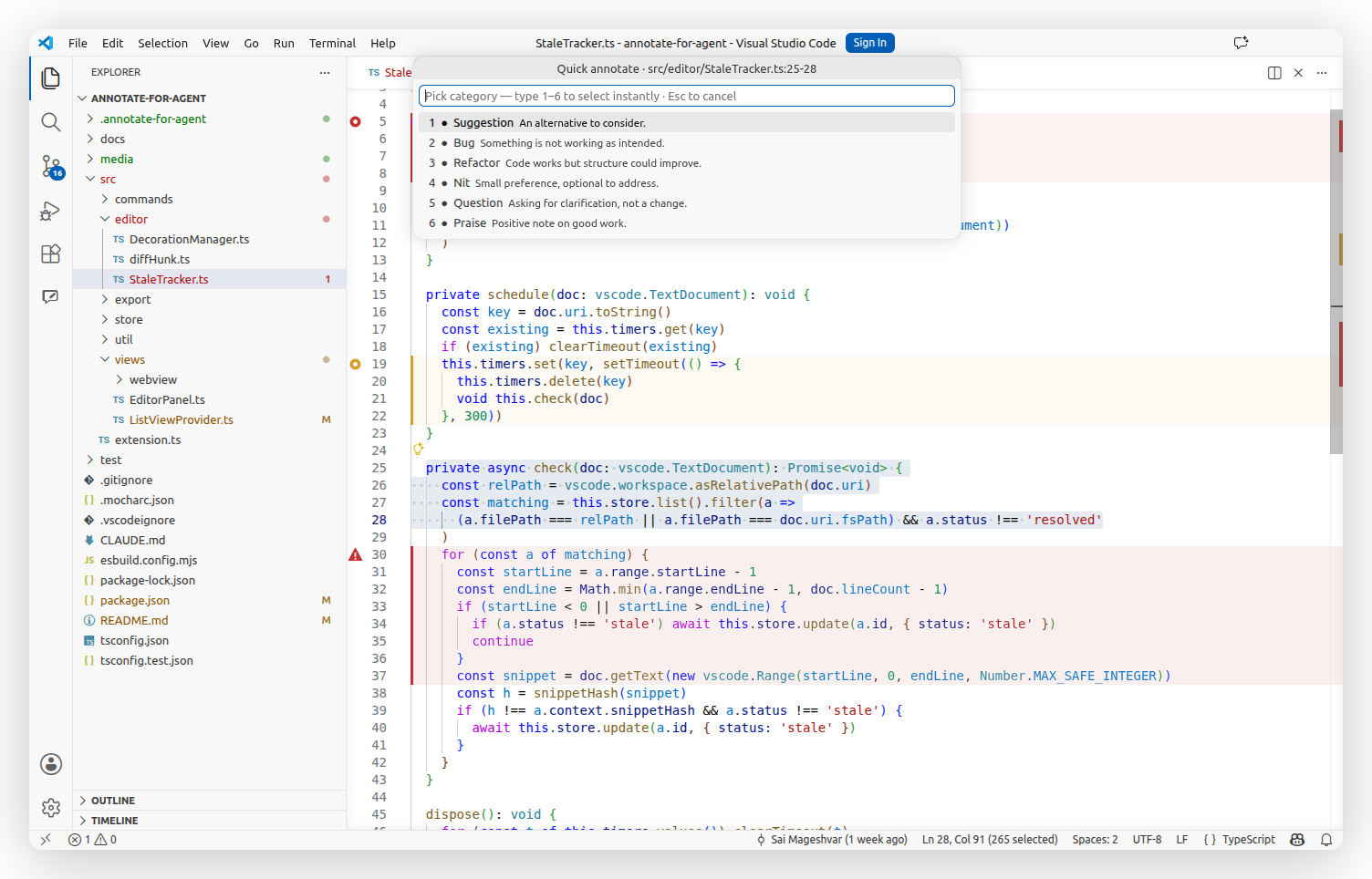
Six categories, each with its own color and shortcut:
Alt+1 🔴 Bug · Alt+2 🟣 Question · Alt+3 🔵 Refactor · Alt+4 🟡 Suggestion · Alt+5 ⚪ Nit · Alt+6 🟢 Praise
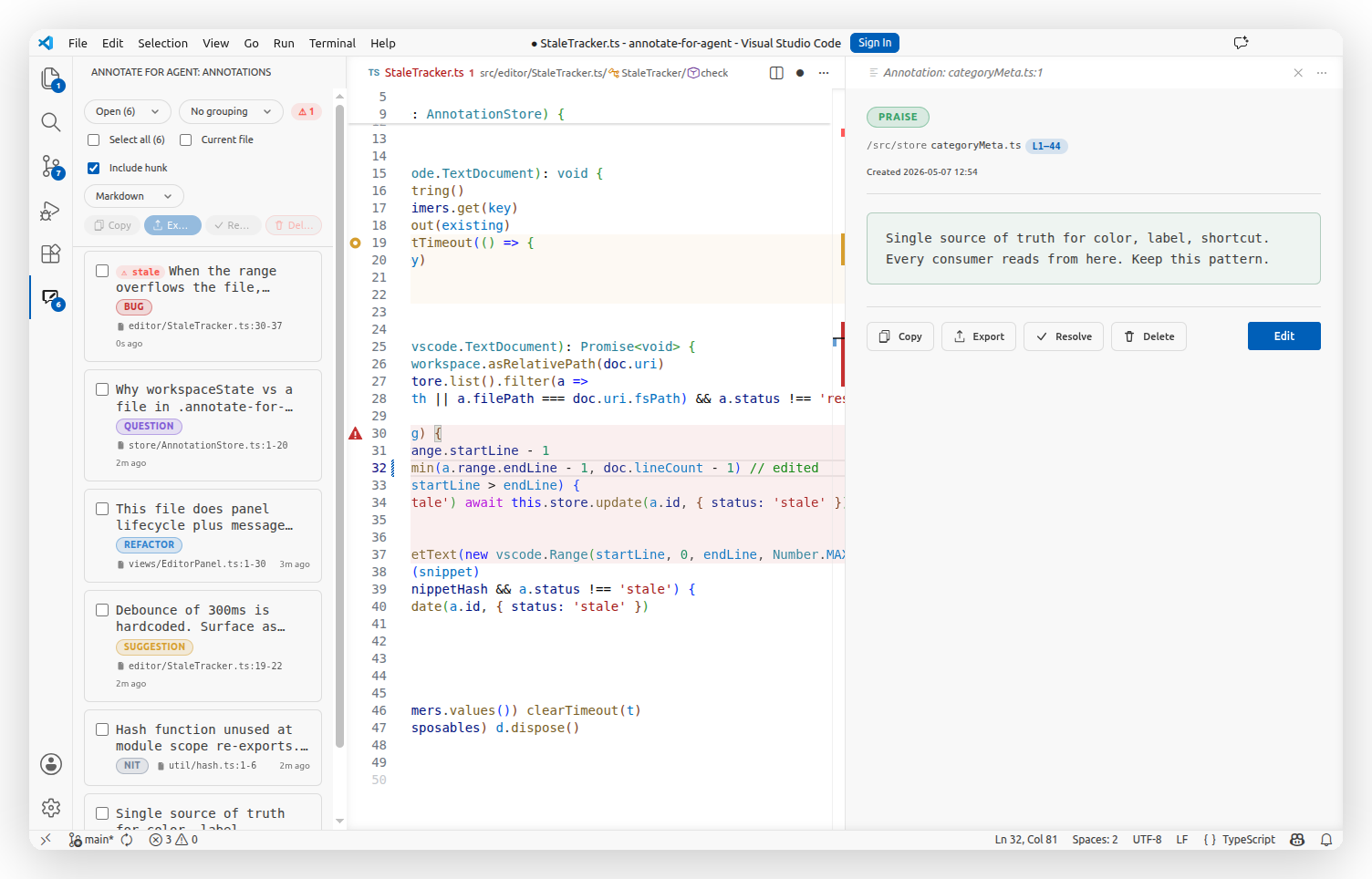
Colored gutter dots mark every annotated line. The sidebar groups by file, category, or status. Bulk-select to resolve, reopen, copy, or export.
Edit code under an existing annotation? It flips to stale automatically — orange triangle in the gutter, dotted border on the card, count in the toolbar. You see the drift before the agent does.
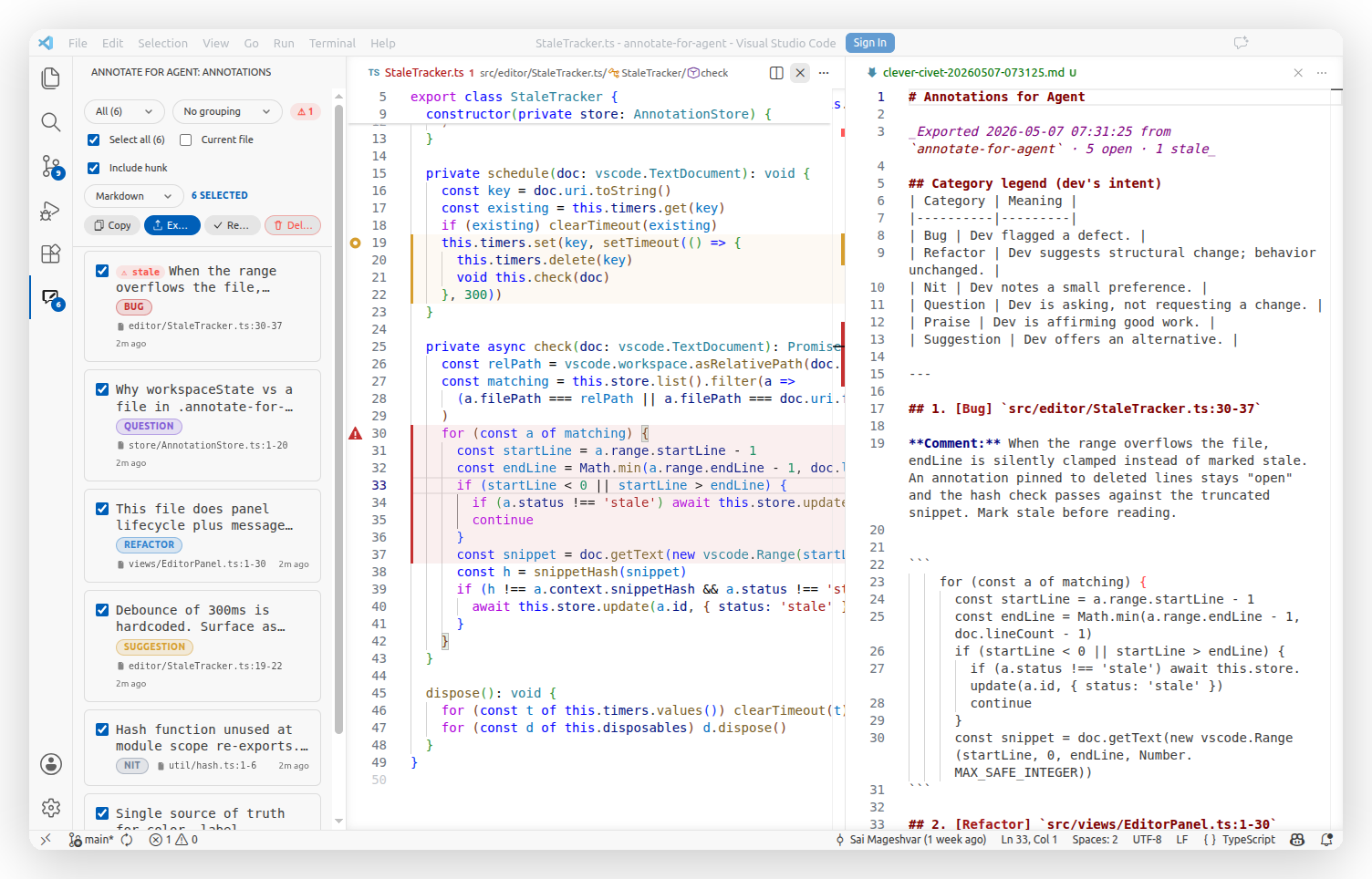
One click writes a Markdown / JSON / CSV file to .annotate-for-agent/exports/. Same content lands on your clipboard. Point your agent at the file. Done.
### src/editor/StaleTracker.ts:30-37

```ts
for (const a of matching) {
  const startLine = a.range.startLine - 1
  const endLine = Math.min(a.range.endLine - 1, doc.lineCount - 1)
  if (startLine < 0 || startLine > endLine) {
    if (a.status !== 'stale') await this.store.update(a.id, { status: 'stale' })
    continue
  }
  const snippet = doc.getText(new vscode.Range(startLine, 0, endLine, Number.MAX_SAFE_INTEGER))
```

**Category:** Bug
**Feedback:** When the range overflows the file, `endLine` is silently clamped instead of marked stale. An annotation pinned to deleted lines stays "open" and the hash check passes against the truncated snippet. Mark stale before reading.
Each block is path-anchored, language-tagged, and self-contained. Switch to JSON / CSV via annotateForAgent.defaultFormat.
| Action | Shortcut |
|---|---|
| Annotate (default mode) | Ctrl / Cmd + Shift + A |
| Quick capture | Ctrl / Cmd + Shift + Q |
| Escalate quick capture → panel | Ctrl / Cmd + Enter |
| Pick category | Alt + 1 … 6 |
| Save annotation | Ctrl / Cmd + Enter |
| Cancel annotation | Esc |
Nine settings — sensible defaults, tweak as you like
| Key | Default | What it does |
|---|---|---|
annotateForAgent.defaultMode |
panel |
panel for rich form, quick for QuickPick + InputBox. |
annotateForAgent.defaultFormat |
markdown |
Export format: markdown / json / csv. |
annotateForAgent.exportDir |
.annotate-for-agent/exports |
Workspace-relative export folder. |
annotateForAgent.includeCodeHunk |
false |
Embed the snippet inside the export block. |
annotateForAgent.includeCategoryLegend |
true |
Prepend a category legend to Markdown exports. |
annotateForAgent.autoResolveOnExport |
false |
Mark annotations resolved as soon as they're exported. |
annotateForAgent.showResolved |
false |
Show resolved cards in the sidebar list. |
annotateForAgent.filterCurrentFile |
false |
Show only annotations for the active file. |
annotateForAgent.quickCapture.defaultCategory |
Suggestion |
Category preselected at the top of the Quick Capture picker. |
Drag the Annotations view from the activity bar to the Secondary Side Bar on the right (right-click → Move View). File tree on the left, code in the middle, annotations on the right — review at a glance, click any card to jump straight to the line.

Report an issue · Source · License
Built for the era when most code gets written by an agent and reviewed by you.