 Wuhan deepin Technology Co.,Ltd.
Image Viewer auto-hide toolbar #3198
NjlsShade
started this conversation in
Features Request & Ideas | 特性请求 & 头脑风暴

Replies: 4 comments

|
@meiyixiang : 需求是希望工具栏可以自动隐藏(比如当点击图片的时候,或者鼠标几秒没有移动的时候),以免遮挡图片,影响图像的查看。 |
0 replies

|
Thank you for your suggestions. I have recorded and fed back to the product, and hope to support it as soon as possible |
0 replies
|
This is probably get fixed in v20.6 release with |
0 replies
|
Version 20.6 supports hiding but only hides toolbars when you need to slide the scroll wheel |
0 replies
Sign up for free
to join this conversation on GitHub.
Already have an account?
Sign in to comment


Uh oh!
There was an error while loading. Please reload this page.
SUMMARY | 问题概要
The toolbar in Image Viewer can sometimes obscure the bottom of images you're trying to view, the toolbar should be hideable by clicking the image content (Similar to other photo viewers like the one in Windows 11) or automatically when the mouse does not move over the window for some time.
OBSERVED RESULT | 观察到的结果
Text at the bottom of this image is not visible:
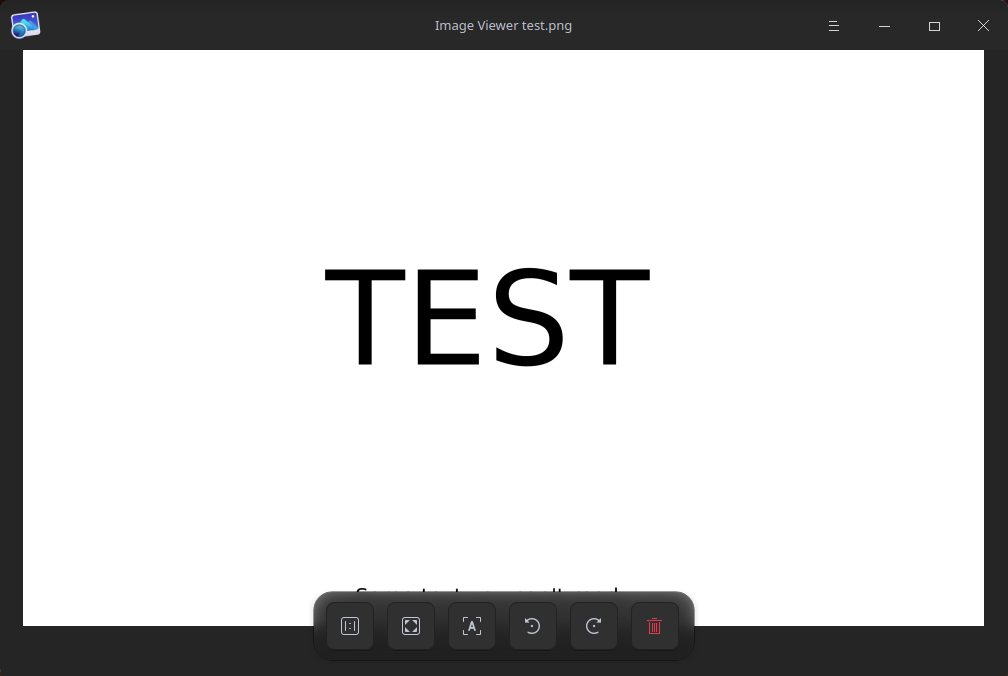
Source image:

SOFTWARE/OS VERSIONS | 软件/系统版本信息
Using the latest deepin 20.5. Image Viewer 5.8.13.
All reactions