


Pin your API certificates so the app refuses connections that don’t match — including traffic through Charles, Proxyman, or other MITM proxies.
// After install + ssl_config.json + native rebuild:
// fetch / axios to pinned hosts are protected automatically.
import { isSSLManagerAvailable } from 'react-native-ssl-manager'

console.log(isSSLManagerAvailable()) // true after a native rebuild- 🔒 Certificate / public-key pinning for your API hosts
- ⚡ Zero JS required for normal traffic — pins apply at app launch
- 📱 iOS (TrustKit) + Android (Network Security Config + OkHttp)
- 🧩 Expo config plugin — prebuild copies config into native projects
- 🛠️ CLI — extract pins, verify drift in CI, monorepo helpers
- 🛰️ Optional OTA pin updates (signed Ed25519 bundles)
- 🧪 Audit mode — report mismatches without blocking (safe rollout)
- ⚙️ Built as a Nitro Module (New Architecture)
Important
v2 requires the New Architecture and peer dependency
react-native-nitro-modules (≥ 0.35).
Changing ssl_config.json always needs a native rebuild — Metro reload is not enough.
Coming from v1? JS API is unchanged → MIGRATION.md.
| Minimum | |
|---|---|
| React Native | 0.75+ (New Architecture) |
react-native-nitro-modules |
≥ 0.35 |
| Expo | SDK 52+ (New Architecture) |
| iOS | 13+ |
| Android | API 21+ |
| Node | 18+ |
npm install react-native-ssl-manager react-native-nitro-modules
cd ios && pod installnpx expo install react-native-ssl-manager react-native-nitro-modulesAdd the config plugin to app.json / app.config.js:
{
  "expo": {
    "plugins": [
      ["react-native-ssl-manager", { "sslConfigPath": "./ssl_config.json" }]
    ]
  }
}
Then generate native projects and run a development build (not Expo Go):
npx expo prebuild
npx expo run:ios
# or
npx expo run:android
pnpm / monorepos: install in the app package (the one that builds the binary), not only the workspace root. See Monorepo & pnpm.
In your app root (next to package.json / app.json):
npx react-native-ssl-manager pins api.example.comPaste the output into ssl_config.json:
{
  "sha256Keys": {
    "api.example.com": [
      "sha256/AAAAAAAAAAAAAAAAAAAAAAAAAAAAAAAAAAAAAAAAAAA=",
      "sha256/BBBBBBBBBBBBBBBBBBBBBBBBBBBBBBBBBBBBBBBBBBB="
    ]
  }
}
Rules
- Host only:
api.example.com— nothttps://… - At least two pins per domain (current + backup) so a cert rotation doesn’t lock users out
- Use real pins from the CLI for production — placeholders won’t protect anything
# Expo
npx expo prebuild
npx expo run:ios   # or run:android

# Bare RN
cd ios && pod install && cd ..
npx react-native run-ios
After that, pinning is on at launch for fetch / axios and other covered stacks. You don’t wrap each request.
# Pins still match the live server? (great for CI)
npx react-native-ssl-manager verify
import { isSSLManagerAvailable, getPinnedDomains } from 'react-native-ssl-manager'
isSSLManagerAvailable() // must be true after native rebuild
await getPinnedDomains() // e.g. ['api.example.com']Sanity check with Proxyman / Charles
| Pinning | MITM proxy | Your API |
|---|---|---|
| ON (default) | On | Should fail TLS |
| OFF | On | May succeed (proxy can inspect) |
| ON | Off | Should succeed if pins match |
On iOS, after setUseSSLPinning(…), force-quit and reopen the app so TrustKit fully applies.
Most apps never call the JS API for day-to-day traffic. Use it for debug toggles, listeners, or runtime config.
import {
  isSSLManagerAvailable,
  setUseSSLPinning,
  getUseSSLPinning,
  setSSLConfig,
  getPinnedDomains,
  addPinningFailureListener,
} from 'react-native-ssl-manager'

if (!isSSLManagerAvailable()) {
  // Native module not linked → rebuild the app
}

await setUseSSLPinning(true)          // default is already true
const on = await getUseSSLPinning()
const domains = await getPinnedDomains()

const stop = addPinningFailureListener((event) => {
  // { host, enforced, servedPins, message, timestamp }
  console.warn('pin failure', event)
})
// later: stop()Report mismatches without blocking:
{
  "sha256Keys": {
    "api.example.com": ["sha256/CURRENT...=", "sha256/BACKUP...="]
  },
  "domains": {
    "api.example.com": { "enforcePinning": false }
  }
}
Switch "enforcePinning": true when ready.
{
  "sha256Keys": {
    "api.example.com": ["sha256/AAAA...=", "sha256/BBBB...="]
  },
  "domains": {
    "api.example.com": {
      "enforcePinning": true,
      "expirationDate": "2027-12-31",
      "includeSubdomains": true
    }
  },
  "reportUris": ["https://example.com/pin-failures"]
}| Field | Default | Description |
|---|---|---|
enforcePinning |
true |
false = audit only |
expirationDate |
— | YYYY-MM-DD; after this date, pin fails open |
includeSubdomains |
true |
Apply pins to subdomains |
reportUris |
— | Optional HTTPS failure report endpoints |
| Option | Default | Description |
|---|---|---|
sslConfigPath |
ssl_config.json |
Path relative to app root |
enableAndroid |
true |
NSC + assets |
enableIOS |
true |
Bundle config into the iOS app |
npx react-native-ssl-manager <command>
# alias: ssl-manager| Command | Purpose |
|---|---|
pins <host> |
Print live SPKI pins + config snippet |
pins --pem cert.pem |
Pin from a local PEM |
verify [--config …] |
Fail CI when live chain matches none of the pins |
keygen / sign |
Author signed OTA pin bundles |
| Stack | Platform | Covered |
|---|---|---|
fetch / axios |
iOS | ✅ TrustKit |
URLSession libs |
iOS | ✅ |
fetch / axios |
Android | ✅ OkHttp + NSC |
| Coil / Glide / Ktor (OkHttp) | Android | ✅ |
| Android WebView | Android | ✅ NSC |
| Cronet | Android | |
Custom TrustManager / Ktor CIO |
Android | ❌ |
| Mistake | Fix |
|---|---|
| Only Metro reload after editing pins | Rebuild native app |
Missing react-native-nitro-modules |
Install peer + rebuild |
| New Architecture disabled | Enable New Arch (v2 requirement) |
| Single pin per host | Always ship ≥ 2 pins |
https:// in domain key |
Use host only: api.example.com |
| Expo without config plugin | Add plugin → prebuild → run |
| pnpm: installed only at monorepo root | Install in the app package |
| iOS toggle seems ignored | Force-quit and reopen |
Install into the package that builds the native app:
pnpm add react-native-ssl-manager react-native-nitro-modules --filter your-app
cd apps/your-app
# ssl_config.json + Expo plugin live here
npx expo prebuild --clean
The postinstall step detects monorepo / pnpm-isolated node_modules and skips
the brittle Gradle apply from line automatically. You can opt out entirely:
# Skip postinstall (e.g. CI, or you wire Gradle up yourself)
export SSL_MANAGER_SKIP_POSTINSTALL=1
Bare Android (no Expo) in a monorepo: reference the plugin by resolved path
in android/app/build.gradle — require.resolve works across pnpm/hoisted
layouts:
apply from: new File(
  ["node", "-e", "process.stdout.write(require.resolve('react-native-ssl-manager/package.json'))"]
    .execute().text.trim(),
  "../android/ssl-pinning-setup.gradle"
)| Symptom | Likely fix |
|---|---|
isSSLManagerAvailable() is false |
Link Nitro, enable New Arch, rebuild |
| All pinned calls fail after cert rotate | pins + update config + rebuild (or OTA) |
| iOS pin toggle does nothing | Kill app and relaunch |
Expo Xcode error adding ssl_config.json |
Upgrade library; npx expo prebuild --clean |
| Metro fails on Android debug | Keep localhost / 10.0.2.2 cleartext in NSC |
| pnpm Android path issues | Use the Expo plugin, or the resolved-path Gradle snippet; skip postinstall |
| API | Description |
|---|---|
isSSLManagerAvailable(): boolean |
Native module linked? |
setUseSSLPinning(boolean): Promise<void> |
On/off (iOS: next launch) |
getUseSSLPinning(): Promise<boolean> |
Current flag (default true) |
setSSLConfig(config | string): Promise<void> |
Runtime config (iOS: next launch) |
getPinnedDomains(): Promise<string[]> |
Active domains |
addPinningFailureListener(fn): () => void |
Subscribe; returns unsubscribe |
updatePinsFromUrl(url, { publicKey }): Promise<OtaResult> |
Fetch + verify + apply a signed OTA bundle |
applySignedPinBundle(bundle, { publicKey }): Promise<OtaResult> |
Verify + apply a bundle you already fetched |
isExpired(date, now): boolean |
Helper: has a YYYY-MM-DD expirationDate passed? |
TypeScript types
interface SslPinningConfig {
  sha256Keys: { [domain: string]: string[] }
  domains?: {
    [domain: string]: {
      enforcePinning?: boolean
      expirationDate?: string // YYYY-MM-DD
      includeSubdomains?: boolean
    }
  }
  reportUris?: string[]
}

interface PinningFailureEvent {
  host: string
  enforced: boolean
  servedPins: string[]
  message: string
  timestamp: number
}OTA pin rotation (signed bundles)
Rotate pins without shipping an app update. You publish a small JSON bundle, signed with an Ed25519 key; the app fetches it and applies it only if the signature (and freshness) check out. The private key stays offline — only the public key is embedded in the app.
Step 1 — generate a keypair once (offline / CI secret):
npx react-native-ssl-manager keygen
# → writes ssl-manager-ota.key.pem (PRIVATE — keep it out of git)
# → prints the public key (base64) to embed in the app
Step 2 — sign your config into a bundle (in CI, on each rotation):
npx react-native-ssl-manager sign \
  --config ssl_config.json \
  --key ssl-manager-ota.key.pem \
  --expires-in 30d \
  --out ssl-pins-bundle.json
# host ssl-pins-bundle.json on any HTTPS URL (CDN, S3, your API)
The bundle is just signed JSON — nothing secret, safe to serve publicly:
{
  "payload": "<base64 of the JSON below>",
  "signature": "<base64 Ed25519 signature over the payload bytes>"
}Step 3 — apply it from the app:
import { updatePinsFromUrl } from 'react-native-ssl-manager'

await updatePinsFromUrl('https://cdn.example.com/ssl-pins-bundle.json', {
  publicKey: 'Z8S8T6o…=',        // from `keygen` — safe to ship in the app
  maxAgeMs: 7 * 24 * 3600 * 1000, // also reject bundles older than 7 days
})
updatePinsFromUrl = fetch → verify → apply. If you'd rather control the
networking (caching, retries, a bundle delivered over your own channel or a push
payload), fetch the bundle yourself and call the verify-and-apply half directly:
import { applySignedPinBundle } from 'react-native-ssl-manager'

const bundle = await myTransport.getPinBundle() // { payload, signature }
await applySignedPinBundle(bundle, { publicKey: 'Z8S8T6o…=' })
Both verify the Ed25519 signature against publicKey, then check freshness
(expiresAt / maxAgeMs) and reject a bundle older than the last one applied
this session (anti-rollback). On any failure the active config is left
untouched and the call rejects with an OtaError.code:
| Code | Meaning |
|---|---|
OTA_FETCH_FAILED |
Couldn't download the bundle (network / HTTP error) |
OTA_INVALID_BUNDLE |
Malformed JSON / base64 |
OTA_INVALID_SIGNATURE |
Signature doesn't match publicKey |
OTA_EXPIRED |
Past expiresAt, or older than maxAgeMs |
OTA_ROLLBACK |
Older than the bundle already applied this session |
Lower level still?
verifyOtaBundle(bundle, { publicKey })(from the same package) verifies and returns the config without touching pinning, so you can apply it yourself viasetSSLConfig(config). That's the exact seam if you prefer your own crypto/transport around a plainsetSSLConfig.
`expirationDate` vs OTA freshness — two different clocks
These sound similar but are unrelated:
-
domains.<host>.expirationDate(inssl_config.json) is a per-domain fail-open date: after it passes, pinning for that host stops being enforced so an abandoned install never bricks. The exportedisExpired(date, now)helper just tells you whether such a date has passed — use it for your own UI / telemetry, e.g. to nudge a rotation:import { isExpired } from 'react-native-ssl-manager' const expiresOn = '2026-12-31' if (isExpired(expiresOn, Date.now())) { // pinning for this domain has failed open — fetch fresh pins await updatePinsFromUrl(BUNDLE_URL, { publicKey: OTA_PUBLIC_KEY }) }
-
OTA freshness (
expiresAt/maxAgeMson a signed bundle) is about how old an OTA update may be beforeupdatePinsFromUrlrefuses it. It has nothing to do with a domain'sexpirationDate.
In short: isExpired inspects your config; maxAgeMs/expiresAt gate an
OTA bundle.
How it works
- iOS: TrustKit initializes at launch (
+load) and swizzlesURLSession. - Android: Network Security Config (build-time XML) + OkHttp
CertificatePinnervia early startup. - Config is bundled at build time (Expo plugin / Gradle / pod scripts) → always rebuild after pin changes.
Android: Glide / Coil / Ktor
import com.usesslpinning.PinnedOkHttpClient

val client = PinnedOkHttpClient.getInstance(context)
Glide:
@GlideModule
class MyAppGlideModule : AppGlideModule() {
  override fun registerComponents(context: Context, glide: Glide, registry: Registry) {
    val client = PinnedOkHttpClient.getInstance(context)
    registry.replace(GlideUrl::class.java, InputStream::class.java, OkHttpUrlLoader.Factory(client))
  }
}
Coil:
val imageLoader = ImageLoader.Builder(context)
  .okHttpClient { PinnedOkHttpClient.getInstance(context) }
  .build()
Ktor (OkHttp engine):
val httpClient = HttpClient(OkHttp) {
  engine { preconfigured = PinnedOkHttpClient.getInstance(context) }
}
Ktor CIO is not covered (own TLS stack).
E2E / Detox (disable TrustKit before launch on iOS)
JS setUseSSLPinning(false) is too late if TrustKit already started.
await device.launchApp({
  newInstance: true,
  launchArgs: { RNSSLManagerDisabled: true },
})
Also: Info.plist RNSSLManagerDisabled, env RN_SSL_MANAGER_DISABLED=1.
Manual pin with openssl
openssl s_client -connect api.example.com:443 -servername api.example.com < /dev/null 2>/dev/null \
  | openssl x509 -pubkey -noout \
  | openssl pkey -pubin -outform der \
  | openssl dgst -sha256 -binary \
  | openssl enc -base64
Prefix with sha256/.
Known limitations
- Cronet may use its own TLS stack; prefer
CronetEngine.Builder.addPublicKeyPins()for hard guarantees. - Custom TrustManager bypasses Android Network Security Config.
- Complex custom URLSessionDelegate / other swizzlers on iOS may conflict with TrustKit.
| iOS | Android |
|---|---|
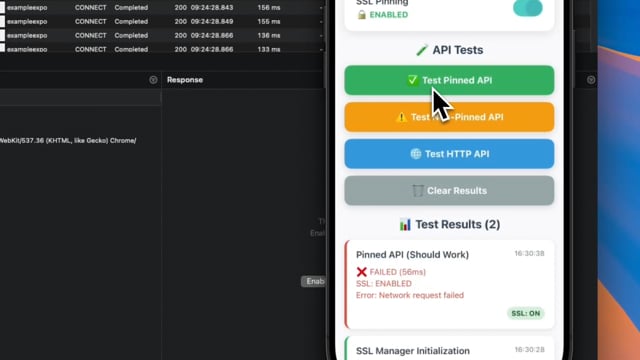 |
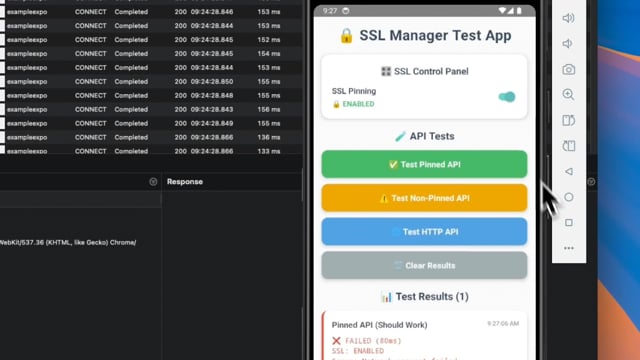 |
git clone https://github.com/huytdps13400/react-native-ssl-manager.git
cd react-native-ssl-manager
yarn install
yarn test
See CONTRIBUTING.md.
MIT