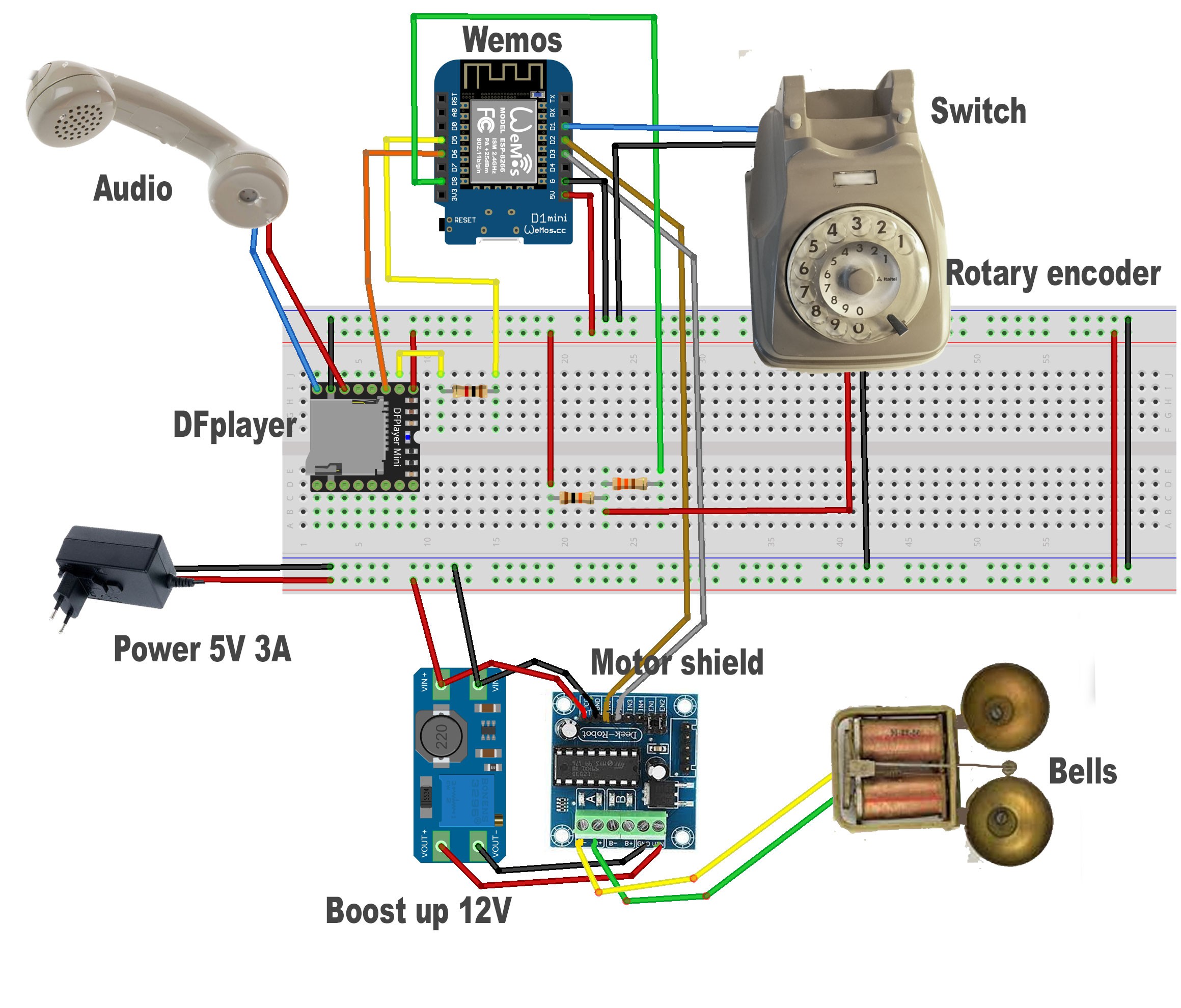
This repository contains the code used to retrofit an old rotary phone and bring new functionalities, along with its fascinating vintage style.
You can find more details here: https://hackaday.io/project/184686-old-rotary-phone-retrofitting
Numbers you can dial with the rotary dial to get messages and services (the voice clips are in Italian). Lift the handset, wait for the tone and dial the number without the #; the call is answered after a ring.
| Number | Function |
|---|---|
#1 |
Tell the current time |
#12 ... #1999 |
Set an alarm in 2 ... 999 minutes (#1 followed by the minutes, e.g. #15 or #1005 = in 5 minutes) |
#1HHMM |
Set an alarm at a given time (e.g. #11000 = at 10:00, #10730 = at 07:30) |
#2 |
Delete the alarm |
#4 |
Weather forecast (needs Wi-Fi) |
#9 |
Ring the bells after 5 seconds (test) |
#21 |
Restart the Wemos |
#22 |
Adjust the time of the Wemos from the internet |
#22HHMM |
Adjust the time manually |
#22YYYYMMDD |
Adjust the date manually |
#23 |
Activate the Wi-Fi configuration access point (see below) |
#24 |
Play heads or tails |
#25 |
Say yes or no |
#26 |
Randomly announce the name of a family member (a random track of folder 04 of the SD card; the number of tracks is counted at boot: name them 001.mp3, 002.mp3, ... with no holes) |
#3456789 |
Your custom number: add your code in runPhoneNumber() |
Any other number plays a "number not available" message.
When an alarm rings, pick up the handset: it tells you how much time has passed (or the time, for an alarm set at a given time).
The 0 on the rotary dial sends ten pulses, so dial it as usual: #1005 is 1, 0, 0, 5.
Dial #23: the phone opens an access point named vintagephone_XXXXXX. Connect to it and open the page that appears (or any address) to set the Wi-Fi name and password, and the location used for the weather. When you press "stop AP" (or save the Wi-Fi settings) the phone restarts and connects to your Wi-Fi. A pending alarm is lost.
When the phone is connected to your Wi-Fi it also has a small web server. The address is http://vintagephone_XXXXXX.local or the IP of the phone.
| Endpoint | Function |
|---|---|
/hello |
Is the phone online? Answers {"name":"vintagephone_XXXXXX","uptime":3600} (uptime in seconds) |
/status |
Current time and, if set, the next alarm time: {"now":"2026-09-27 14:35:00","alarm":"2026-09-27 15:05:00"}, or "alarm":null if no alarm is set |
/dial?number=NNNN&key=KEY |
Dial a number from the phone book, remotely |
/dial works like this:
- The phone rings 10 times (about 40 seconds).
- If somebody picks up the handset, the service for the number runs, like when the number is dialed on the rotary dial. If nobody answers, nothing else happens.
- The alarm numbers are silent:
#2(delete the alarm) and#1followed by 1 to 4 digits (set the alarm, e.g.15= in 5 minutes,10730= at 07:30) are executed immediately and the phone does not ring.
KEY is the token set in the sketch with #define DIAL_KEY: change it before uploading the sketch and do not publish your own.
#21 (restart) and #23 (access point) can't be dialed remotely.
Answers, as json ({"status":"..."}):
| Code | Status | Meaning |
|---|---|---|
200 |
ringing |
The phone is ringing! |
200 |
alarm set / alarm deleted |
The alarm number was executed |
400 |
bad number |
The number is empty, longer than 10 digits, has non-digit characters, or is 21 or 23 |
400 |
bad time |
Alarm 1HHMM with an invalid time |
403 |
forbidden |
Wrong key |
409 |
busy |
The handset is up, there is a call in progress or the access point is active |
Examples:
curl "http://vintagephone_XXXXXX.local/hello"
curl "http://vintagephone_XXXXXX.local/dial?number=4&key=KEY"       # ring, weather if answered
curl "http://vintagephone_XXXXXX.local/dial?number=15&key=KEY"      # alarm in 5 minutes, no ringing
curl "http://vintagephone_XXXXXX.local/dial?number=2&key=KEY"       # delete the alarm
On your local Arduino libraries folder create a folder vintagephone and put all the files of this repository.
The files in the mp3-files folder are the files that must be moved to the micro-sd card for the DFplayer mini.
The files in data folder are uploaded by Arduino IDE to Wemos SPIFFS file system.