
Stratipi turns a Raspberry Pi into a highly accurate Stratum-1 NTP network time server by using a connected GPS receiver under FreeBSD.
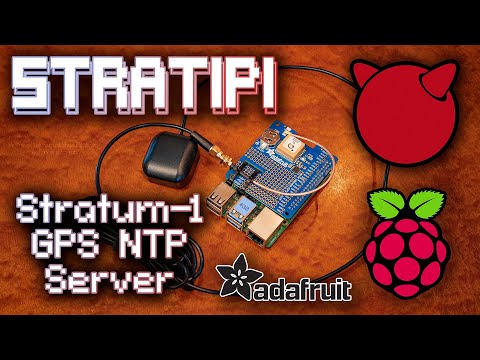
- Uses GPS with PPS for precise timekeeping
- Runs on FreeBSD via Raspberry Pi
- Provides Stratum-1 NTP service
- Compatible Single Board Computers
- Compatible GPS Receiver (semi-optional, see FAQ)
- Adafruit Ultimate GPS HAT for Raspberry Pi
- More in the future..?
- External GPS Antenna (optional, for better signal)
- Ethernet/network connectivity (wired only, no wireless)
- Micro-SD card
- Sandisk Industrial (recommended)
- Others will work, reliability/performance may vary
- Download the Stratipi image file from Releases.
- Flash Stratipi image onto the SD card.
- Insert flashed SD card into the Raspberry Pi.
- Attach the GPS HAT to the Raspberry Pi.
- Plug in Ethernet cable to Raspberry Pi.
- Power on the Raspberry Pi.
- ...
- PROFIT!
The Raspberry Pi will attempt to acquire an IPv4 address via DHCP automatically.
Chrony NTP server will also start serving time as soon as the OS fully boots up, synced to other public NTP servers to start with. As soon as GPS signal is fully locked and registering in gpsd, Chrony will shift time synchronization over to GPS+PPS automatically.
Upon first bootup, Stratipi will automatically launch into a visual, non-interactive TUI dashboard to show system status.
This dashboard will show the acquired DHCP IP address in the bottom status bar, the most important piece of information for using Stratipi as a time server. Along with this, the dashboard also shows the system load over 1/5/15 minutes, the CPU temperature, and the consumed/total storage. The temperature metrics over time may become important as crystal oscillators used for clocks can drift faster/slower as thermal characteristics change which can be seen in the "Frequency" ppm metric in the middle of the screen.
The dashboard also shows the output of chronyc tracking, chronyc sourcestats, chronyc sources, chronyc clients as well as cgps. These combined should give a solid indication as to the health of the unit.
cgps on the top-right: this displays the current health of the GPS signal, such as the number of visible satellites with their signal strength and relative location in the sky, as well as the number that are currently in use for triangulation.
chronyc sources + chronyc sourcestats on the bottom: these are combined into a single displays and show what chrony is using to determine the current time, as well as the accuracy of each source. When GPS is locked, the "Last sample" column should eventually fall to around 500-1500 nanoseconds after the clock jitter has settled down. This may take several minutes to a few hours after bootup for the clocks to reach this level of accuracy.
chronyc tracking on the very center: this displays how well the time is being applied to the local system clock as well as how accurate the clock is over time.
chronyc clients on the middle-right: this displays the most recently connect clients to the server and how long ago their last query was.
tty-clock on the middle-left: displays the current system time in UTC.

Q) What are the default credentials
Local console via HDMI/USB?
root(there will be no password prompt)
SSH? None, as SSH is not enabled by default.
Q) Is a GPS Hat required to use this distribution?
No! With the GPS Hat you will have Stratum-1 accuracy, without the hat you will have Stratum-2 or lower accuracy depending on the up stream server's time accuracy.
Q) Are other GPS Receivers supported?
Any GPS receiver that sends NMEA data over serial should be recognized.
Any PPS device connected to GPIO #4 should be recognized for precise time. In the future, this pin will be configurable as well.
Q) Does Stratipi support Precision Time Protocol (PTP)?
Yes-ish. It is installed and running by default. However, it has had very minimal testing so far. Additionally, the Raspberry Pi 4 and older hardware do not support
hardware time-stampingon their network cards, so PTP falls back tosoftware time-stampingwhich lowers the accuracy.
Q) I see a pastel rainbow screen on boot, help!
This usually indicates you're using the
HDMI 1port which is closer to the audio jack. Try theHDMI 0jack which is closer to the USB power port, as this is the only one that will initialize with this image.
Q) I see a RGB rainbow screen on boot, help!
This usually indicates the Raspberry Pi firmware is having issues reading from the SD card. Please ensure the SD card was flashed properly and then inserted all the way into the Raspberry Pi. Note that some Raspberry Pi models use a spring loaded eject mechanism for the SD slot, so you may need to insert/remove, then insert again the card to reset this mechanism.
Contributions are welcome. Please submit issues and pull requests to make Stratipi more AWESOME!
On a FreeBSD 15.0 or newer system, run the following:
git clone https://github.com/circuitrewind/stratipi.git
cd stratipi
./build.sh
Yes, it is literally that simple and easy to run the build process to generate your own disk image file!
This project is licensed under the BSD License.
See LICENSE file for details.