Simple colaborative lib/sample showing how to translate and use a comic book app with accessibility on.
This project is in a really early state and I´ll be trying to update it as soon as possible. The lib has a extension method that add a list of itens and override the default behavior of the Talkback, having now multiple itens (texts and position on screen) on the same UI object. We have a UI component to facilitate the creation of this lists, basically creating Boxes on top of it and the user right what it suppose to be there, just like that:
Simply use of the AccessibilityCanvas:
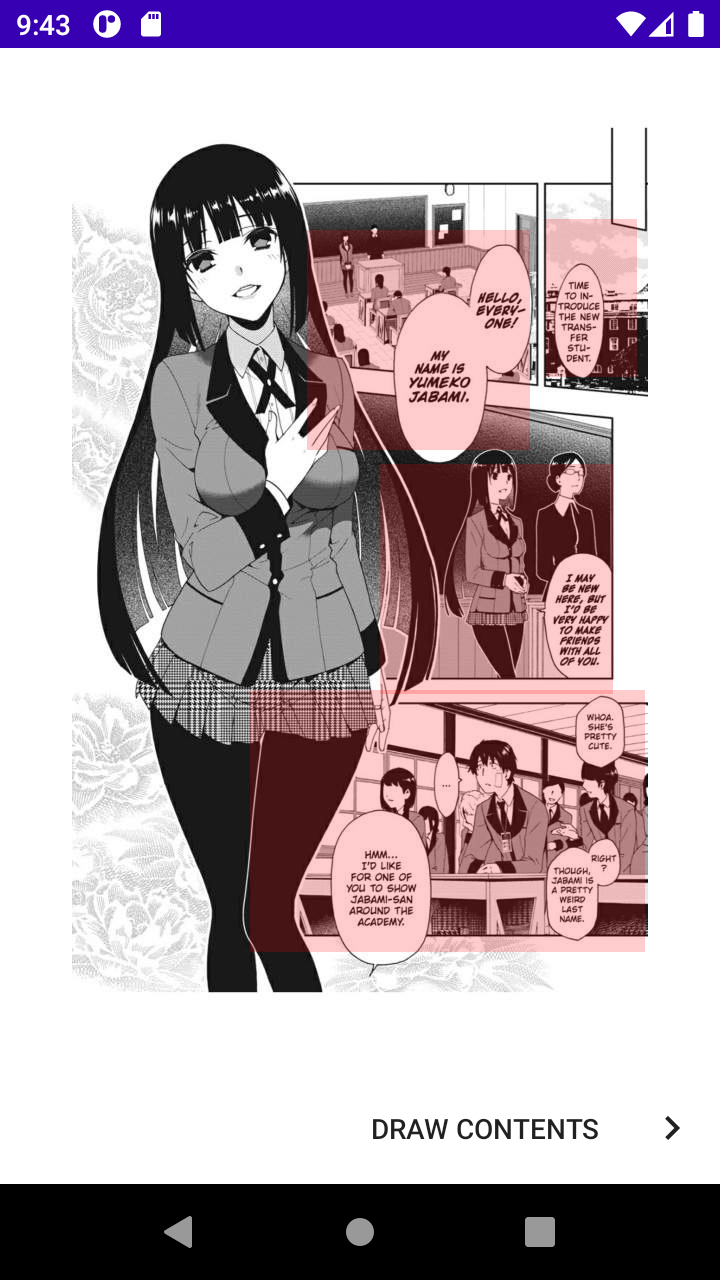
After that you can generate a simple json with that: Example of a json:
[{"text":"At the school class: Time to introduce the new transfer student, says the teacher","frame":{"left":542,"top":190,"right":651,"bottom":342}},{"text":"Hello Everyone! My name is Yumeko Jabami. Says the beautifull Young Lady","frame":{"left":275,"top":151,"right":532,"bottom":396}},{"text":" I may be new here but i´d be very happy to make friends with all of you.","frame":{"left":262,"top":406,"right":631,"bottom":641}},{"text":" Whoa. She´s pretty cute. Whispers a student. Right? Though Jabami is a pretty weird last name.\n Says another. Hmm...","frame":{"left":449,"top":656,"right":651,"bottom":934}},{"text":"I`d like for one of you to show jabami-san around the academy. Says the teacher","frame":{"left":202,"top":726,"right":430,"bottom":935}}]You can use it easily on any ImageView:
binding.imgManga.setAccessibilityList(list)This is a personal project that is in really early state, the structure and architecture is not ready yet.