
Skip to content

Latest commit


History

25 Commits

Folders and files

NameName
Last commit message
Last commit date


Repository files navigation

Typst Package MIT License User Manual

Typst GHS and HP Statements

Quickly display and format hazard and precautionary statements.

Usage

Easily Display Hazard and Precautionary statements in four languages (english, french italian and german):

#import "@preview/typsium-ghs:0.1.2":*

#h-statement(310)\
#p-statement(310)\
#hp("P305+P351+P338", only-statement:true)

at the top a hazard statement, in the middle a protectionary statement, at the bottom a combined statement with the number hidden and only the text shown.

Use the display statements method to quickly display a bunch of statements you copied from wikipedia or other sources. It will automatically separate and detect statements.

#display-statements("H315,H319 - P273 - P302 + P352 - P305 + P351 + P338")

A list of properly formatted statements separated by newline characters and combined statements automatically detected.

There are variants for some statements:

#p-statement(310, only-statement: true)\
#p-statement(310, variant:1)\
#p-statement(310, variant:2)
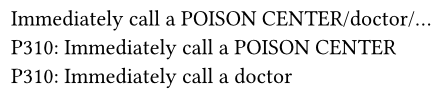
at the top a statement with the number hidden and only the text shown, this displays as 'call a poison center/doctor/...'. In the middle a statement with the first variant selected, this displays as 'call a poison center'. At the bottom a statement with the second variant selected, this displays as 'call a doctor'.

You can also add parameters when needed:

#h-statement(370)\
#h-statement(370, parameters:"the lungs")\
#h-statement(370, parameters:("the lungs", "when inhaled"))\
#h-statement(370, variant:1)\
#h-statement(370, variant:1, parameters:"when inhaled")\

statements with default parameters, custom text inserted as a parameter and variants with parameters.

Use the #ghs(<number>) command to display a GHS pictogram, to get more information about each pictogram use #ghs-info

#import "@preview/typsium-ghs:0.1.2": *
#grid(
  columns: 9,
  ..range(1,10).map(x=> ghs(x))
)

all of the ghs pictograms displayed next to each other.

About

Display and format Hazard & Precautionary statements and GHS pictograms in Typst

Resources

Stars

1 star

Watchers

2 watching

Forks

Releases

Packages

Used by

Contributors

Languages