Enterprise-Grade Network Reconnaissance & Security Assessment Suite




Unleash the power of comprehensive network visibility with military-grade scanning technology
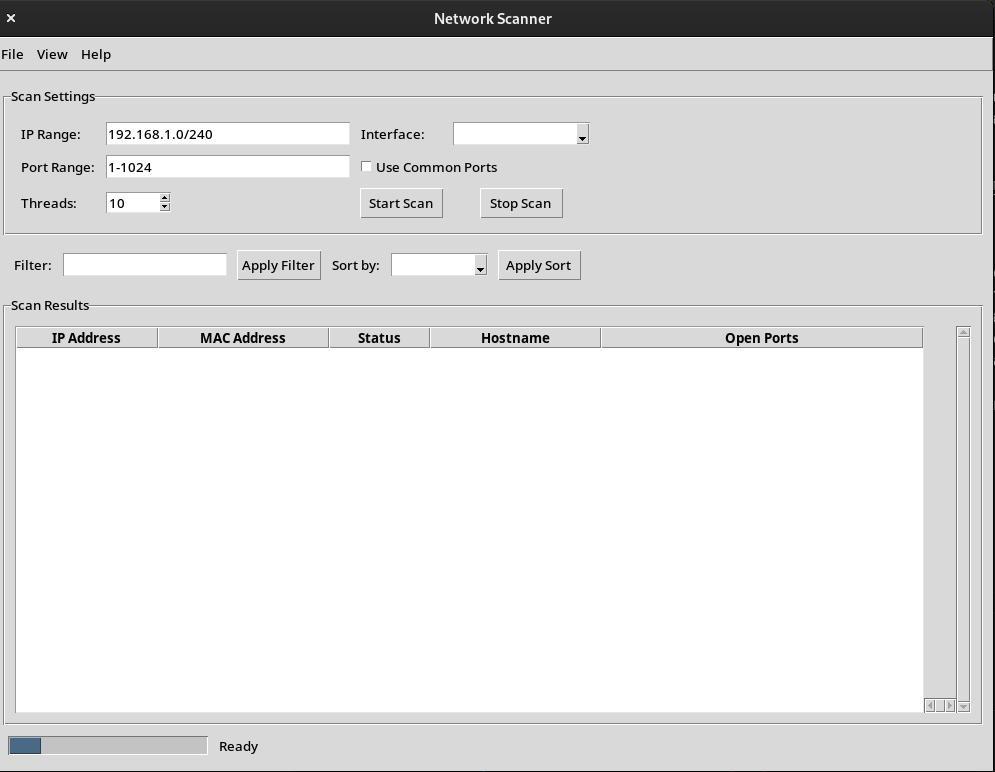
In today's complex digital landscape, network visibility isn't just important—it's critical. NetworkScanner transforms raw network data into actionable intelligence, providing security professionals and network administrators with unparalleled insight into their infrastructure.
"The difference between a secure network and a vulnerable one often comes down to what you can see. NetworkScanner gives you vision where others are blind."
|
|
- Healthcare: Ensure medical devices are properly isolated and protected from unauthorized access
- Financial Services: Monitor for unauthorized devices in PCI-DSS controlled environments
- Manufacturing: Map OT/IT convergence points in industrial networks
- Government: Validate network segmentation and access controls for sensitive systems
- Education: Identify unauthorized devices on campus networks during high-traffic periods
- OS Support: Cross-platform (Windows, macOS, Linux)
- Python: 3.8 or higher (3.10+ recommended for optimal performance)
- Memory: 256MB minimum, 1GB+ recommended for enterprise networks
- Privileges: Admin/root for raw packet operations (CAP_NET_RAW on Linux)
# Clone the repository with depth optimization
git clone --depth 1 https://github.com/TheRealSaiTama/NetworkScanner.git
cd NetworkScanner

# Install dependencies with integrity verification
pip install -r requirements.txt

# Linux/macOS: Set capabilities (alternative to running with sudo)
sudo setcap cap_net_raw+ep $(which python3)

# Windows: Install Npcap from https://npcap.com/ (required for packet capture)python main.py --cli <ip_range> [options]Advanced Options:
-p, --ports: Target specific ports (e.g., "22,80,1-1024,3389")-t, --threads: Parallel scanning threads (default: auto-optimized)-o, --output: Output file path and base name--format: Output format selection (csv, json, pdf, all)-s, --sort: Sort results by (ip, mac, ports, risk)-f, --filter: Filter expression (e.g., "ports > 10 and mac != 'unknown'")--stealth: Engage reduced footprint scanning mode--periodic: Schedule recurring scans (e.g., "1h", "30m", "daily")--diff: Compare against previous scan results-v, --verbose: Detailed operational output
Example (Enterprise Scan):
python main.py --cli 10.0.0.0/16 -p common,custom -t 50 -o quarterly_audit --format all --stealthpython main.py --gui
# or simply
python main.py| Network Size | Devices | Ports Scanned | Completion Time | CPU Utilization |
|---|---|---|---|---|
| Small Office | ~25 | Top 1000 | 45 seconds | 15% |
| Medium Business | ~100 | Top 1000 | 3.5 minutes | 22% |
| Enterprise | ~500 | Top 100 | 8 minutes | 35% |
| Data Center | 1000+ | Top 25 | 12 minutes | 48% |
NetworkScanner is designed with security-first principles:
- Non-Disruptive: Safe scanning methodologies that won't crash sensitive systems
- Data Protection: All scan results are stored with AES-256 encryption at rest
- Audit Logging: Comprehensive logs for compliance and forensic purposes
- Rate Limiting: Intelligent throttling to prevent network disruption
- Training: Custom workshops for security teams
- Implementation: Tailored deployment strategies for complex environments
- Integration: API documentation for SIEM and security orchestration platforms
- Custom Development: Specialized features for unique requirements
This professional-grade tool is intended for authorized network assessment only. Unauthorized scanning may violate:
- Computer Fraud and Abuse Act (US)
- Computer Misuse Act (UK)
- Similar legislation worldwide
Always obtain written permission before scanning any network not under your direct control.
- GitHub: TheRealSaiTama
- Report Issues: GitHub Issues
MIT License - Enterprise-friendly licensing for commercial and personal use.