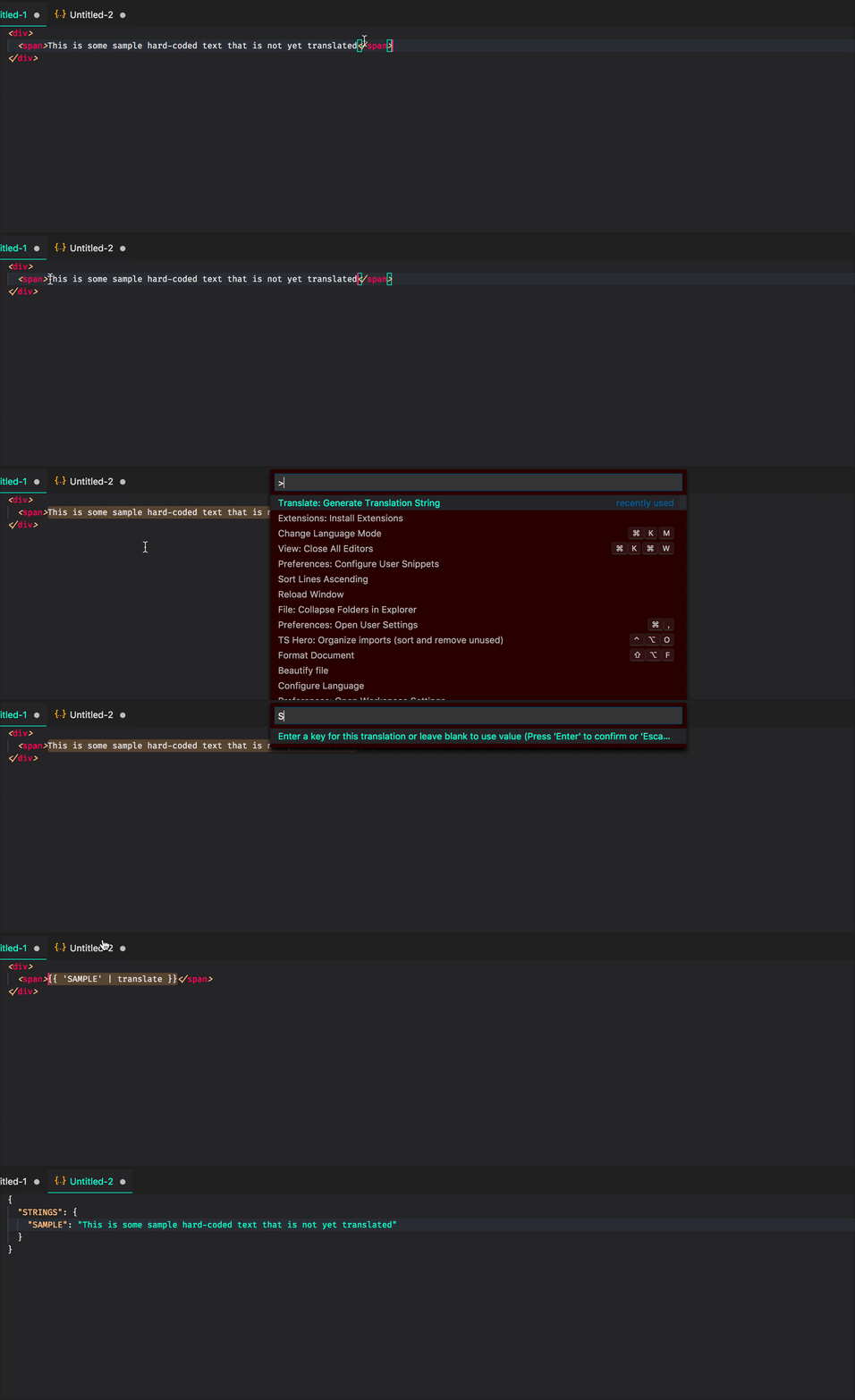
This project contains VSCode extension ngx-translate-quickcreate.
For usage in an Angular project that uses @ngx-translate.
This extension contributes the following commands:
Turns your selected text into a ngx-translate string and pipe.
- Select word(s) that you want to translate
- Open up the command palette (⇧⌘P (Windows, Linux Ctrl+Shift+P))
- Search for
Translate: Generate Translation String - Input a name you wish to refer to this value as, e.g. hello world
- Selected text is now changed to the translation key with the pipe and translation copied to clipboard
- Open your translations
.jsonfile and paste the clipboard contents
This extension contributes the following settings:
ngx-translate-quickcreate.autocapitalize: Automatically capitalize the translation string key - only applies in snake case mode.ngx-translate-quickcreate.caseMode: Type of case to use for translation string - options are 'camel' and 'snake'.ngx-translate-quickcreate.replaceOnTranslate: Replace the selected text after generating a translation string.ngx-translate-quickcreate.translatePipeName: The name of the pipe to handle the translation.ngx-translate-quickcreate.quote: Which quote to use around the inserted translation key.ngx-translate-quickcreate.padding: Add spaces inside the curly bracket pair.ngx-translate-quickcreate.autoFileModify: Enables to automatically modifies transilation files that are specified in the extension settings.ngx-translate-quickcreate.transilationDirectory: Specifies the directory from which the transilations are located in.ngx-translate-quickcreate.languageFrom: The source language to be translated from.ngx-translate-quickcreate.languageTo: The source language to be translated to (Now supports multi languages by passing ar,en,es).
- Added extra settings for automatically insert selected strings as key : pairs directly to the transilation files.
- Added setting to use camel or snake case
- Added setting for capitalization
- Fixed using only workspace settings
- Fixed only the first space being underscored
Initial release of ngx-translate-quickcreate
Contributions are welcome. After updating the version, run npm run package to create a .vsix file to upload.
See Microsofts guide on publishing extensions.


