Releases: SamXop123/Paraline
Release list
Paraline v2.2.0

The Ember Ambience & Controls Update
🚀 Core Features & Enhancements
1. 🌅 New Theme: Crimson Dusk
- Description: Introduces the desert-sunset-inspired Crimson Dusk visualizer theme with warm amber and crimson glows. Features bottom full-width, compact, side, or combined bar layouts, drifting ember particles, and optional film grain textures.
- Release Notes Copy: “Introduced Crimson Dusk! Bask in a warm desert-sunset visualizer featuring edge-to-edge bottom and side bar layouts, floating ember particles, and vintage film grain.”
2. ⌨️ Global Keyboard Shortcuts & System Integration
- Description: Exposes a new hotkeys tab in the Settings panel, allowing users to bind custom system hotkeys for theme cycling, overlay visibility toggles, and performance adjustments, complete with duplicate conflict checks.
- Release Notes Copy: “Control Paraline system-wide. Register custom global hotkeys to toggle visibility, cycle presets, and adjust settings in real-time.”
3. 🖥 Multi-Monitor Overlay Spawning
- Description: Overhauled the window rendering engine to support spawning visualizer overlays across all connected desktop monitor displays simultaneously.
- Release Notes Copy: “Expanded screen setups. Paraline now coordinates overlay windows across all connected multi-monitor displays cleanly.”
4. 🌐 Landing Page Live Theme Previews
- Description: Integrated client-side visualizer simulators directly on the marketing website. Users can click "Apply" on any theme card to see a live full-viewport edge visualizer preview running in their browser.
- Release Notes Copy: “Try before you install. Click 'Apply' on the landing website to see full-viewport theme simulation overlays reacting live on the browser.”
5. 💾 Settings Backup Import & Export Dashboard
- Description: Full backup import/export controls added to the settings panel to allow saving user profiles to JSON files and restoring them with full format checking.
- Release Notes Copy: “Backup and migrate your setups. Export your profiles to JSON and import them with built-in schema checks.”
6. 🔄 Auto-Updater Integration
- Description: Integrated client auto-update checks in Electron to streamline distributing new desktop releases.
- Release Notes Copy: “Stay up to date. Electron auto-updates now download and alert you to new Paraline releases automatically.”
🐛 Bug Fixes & Stability
1. 🛡 Settings Self-Healing & Repair
- Description: Built a recovery protocol that detects corrupted settings files on startup, back them up, notifies the user, and restores a stable configuration.
- Release Notes Copy: “Self-healing configuration. Paraline now auto-detects, backs up, and repairs corrupted settings files on startup.”
2. 🎚 Sliders & UI Reference Guards
- Description: Added reference safety checks to sliders and selection elements in the Settings UI to prevent null-reference runtime page crashes.
- Release Notes Copy: “UI Stability. Added element guards to sliders and selections to prevent settings page crashes.”
3. 🔊 Audio Bridge stdout Overflow Control
- Description: Monitored stdout stream overflows to protect system memory, recovering the C# WASAPI audio capturing helper process dynamically under high output load.
- Release Notes Copy: “Hardened audio bridge. Cap stdout overflow streams to protect system memory and recover WASAPI processes under high load.”
4. 🤖 Day/Night Automation Selectors
- Description: Fully synchronized the daytime and nighttime automation dropdowns to support Crimson Dusk, and restored validations ensuring equal hours are sanitized safely.
🔒 Security Hardening & Input Sanitization
1. 🎨 Hex Colors & Preset Prototype Pollution Protection
- Hardened settings stores to reject prototype properties and restricted customization inputs to strict format standards.
2. 🔗 Outbound Link Warning & Target Sanitization
- Restored secure properties (
rel="noopener noreferrer") and added warning indicators to external URLs inside settings tabs.
Main Desktop Client Files Changed:
themes/crimsonDusk.js(+494 / -0) — Crimson Dusk draw functions and physics.main.js(+323 / -76) — Global shortcut management, multi-monitor spawning, tray selections, theme cycling.settings.js(+580 / -43) — Settings backup import/export and global hotkeys UI.settingsStore.js(+106 / -1) — Settings corruption self-healing, custom schemas.renderer.js(+97 / -1) — Syncing theme selections and slider mappings.audioBridge.js— stdout overflow handlers.settings.html(+61 / -6) — Layout structures for backup options and version indicators.- `test/settingsStore.test.js](file:///c:/B-TECH/Projects/Paraline/test/settingsStore.test.js) (+121 / -0) — Unit tests for configs validation.
test/audioBridge.test.js(+116 / -0) — Unit tests for stdout overflow limits.
Media:


Notes
- Installer artifact name:
Paraline-Setup-2.2.0.exe - Backward compatibility: Automatically migrates previous config settings and schemas to the 2.2.0 format.
Thank You ❤️
A huge thank you to all the open-source contributors and developers who worked on this release. Version 2.2.0 significantly elevates the customization and reliability of Paraline.
All Pull Requests ✨
- fix: dynamically resolve app version from visualizer settings by @Kirtan-pc in #217
- fix: respect theme automation mode in ThemeAgent by @Kirtan-pc in #218
- feat: add global keyboard shortcuts configuration and system integration by @Kirtan-pc in #219
- fix: apply startup settings in resetAllSettings (issue #207) by @vipul674 in #223
- fix: reset isHidden state in resetAllSettings (issue #208) by @vipul674 in #224
- fix: use updateSettings in loadThemeProfile (issue #210) by @vipul674 in #225
- Improved Readme by adding navigation box by @Yogender-verma in #231
- docs: add contributors section to README by @Yogender-verma in #233
- fix(settings): guard slider label updates against missing elements by @mayurigade-hub in #235
- fix(settings): guard theme selector event binding by @mayurigade-hub in #240
- fix(security): add rel attributes to external settings link by @mayurigade-hub in #241
- Fix external link failures with warning by @Puneet04-tech in #248
- feat: expose full settings backup export/import in Settings UI by @Kirtan-pc in #249
- fix: validate and prevent duplicate global hotkey assignments by @Kirtan-pc in #250
- fix: validate and prevent duplicate global hotkey assignments by @Kirtan-pc in #255
- fix: sanitize Aurora Drift custom presets loaded from localStorage by @Kirtan-pc in #257
- Add multi-monitor overlay manager by @Aarushiprajapati in #212
- feat(architecture): enhance startup and background behavior by @Aditya948351 in #251
- feat(release): improve packaging and release polish by @Aditya948351 in #254
- fix: log, backup, and notify user on settings.json corruption by @Kirtan-pc in #263
- fix: validate profile name in settings UI to avoid silent save failure by @Kirtan-pc in #264
- fix: validate contact form fields and payload size in API route by @Kirtan-pc in #265
- feat: add unit tests for settingsStore sanitization and migration logic by @Kirtan-pc in #266
- fix: update audioBridge status on stdout buffer overflow by @Kirtan-pc in #268
- fix: add missing accessibility labels for interactive elements by @Aditya948351 in #269
- docs: fix heading hierarchy in Usage section by @Mohit-001-hash in #270
- fix(#275): update Discord support link by @Shreya-nipunge in #285
- fix: handle identical theme automation hours by @Shreya-nipunge in #280
- feat: add Crimson Dusk theme with bottom and side bar modes by @sweetylearner-max in #291
New Contributors
- @vipul674 made thei...
Contributors


Assets 3
Paraline v2.1.0
The Onboarding & Optimization Update
🚀 Core Features & Enhancements
1. 🛈 First-Time Welcome & Onboarding Overlay
- Description: Introduces a beautiful onboarding sequence window (
onboarding.html,onboarding.js,onboarding-styles.css) that pops up on first-time launch. It guides users through microphone/audio permissions, visualizer edge alignments, and dynamic tray menu operations. - Release Notes Copy: “First-time users are now greeted with a sleek, interactive onboarding guide that simplifies setup and introduces Paraline's core visualizer modes and settings.”
2. 👥 Profile Duplication Flow
- Description: Users can now duplicate any of their custom visualizer profiles in the Settings tab, allowing them to create variations of themes without starting from scratch.
- Release Notes Copy: “Introduced profile duplication! Easily clone any custom visualizer configuration in the settings tab to experiment with different visual setups.”
3. 💾 Settings Configuration Backup (Import & Export)
- Description: Implemented robust profile settings export/import controls. Backups are verified with rigorous JSON type checks before importing to prevent corrupted states.
- Release Notes Copy: “Never lose your settings again. You can now backup and restore your entire Paraline custom visualizer configurations with a simple JSON import/export tool.”
4. 🧭 Configurable Sunrise & Sunset Automation Hours
- Description: Upgraded the Theme Automation system to allow manual scheduling of Sunrise and Sunset transition hours, removing the hardcoded sunrise/sunset clock constraints.
- Release Notes Copy: “Take command of your desk ambience schedule. Custom sunrise and sunset transition hours can now be defined manually in the automation tab.”
5. 🛠 Focus Mode Tweaks & UI controls
- Description: Added fine-grained control sliders for Focus Mode (idle timeouts and dim opacity ranges) in the settings window.
- Release Notes Copy: “Enhanced Focus Mode control. Adjust idle timeout durations and custom dim opacity percentages directly within the settings window.”
6. 🌐 Landing Page Next.js Migration & Previews
- Description: Migrated the entire landing page website from Vite to Next.js.
- Rewrote all 11 theme visualizer previews in HTML5 Canvas to precisely mimic desktop backend behaviors.
- Added a brand new Theme Comparison Mode enabling side-by-side visualizer comparisons.
- Restored Vercel and Google Analytics with complete click-event tracking.
🐛 Bug Fixes & Stability
1. 🔊 Self-Healing Dynamic Audio Capture
- Description: The C# audio helper capture loop now detects system device and output stream changes dynamically, preventing audio capture interruptions and self-healing connection breaks without app restarts.
- Release Notes Copy: “Improved audio source reliability. The audio capturing engine now dynamically heals and reconnects to your stream when changing Windows default audio output devices.”
2. 🪟 App Freeze & Taskbar Ghost Window Fix
- Description: Resolved a critical context menu leak that spawned taskbar ghost windows and caused visualizer crashes or locks.
- Release Notes Copy: “Fixed a critical leak where opening visualizer context menus caused ghost taskbar windows and visualizer freezes.”
3. 🛑 Prevent Audio Helper Spawning on Intentional Stops
- Description: Fixed a bug where the C# audio capture helper would loop/restart during intentional user pauses or stops.
- Release Notes Copy: “Fixed audio capturing loop bugs, ensuring the C# capture helper rests when the visualizer is intentionally paused or hidden.”
4. 🎨 Ripple Flow Theme Gradient Fix
- Description: Restored proper three-color custom gradients on the Ripple Flow theme, which was previously failing to load the middle color stop.
- Release Notes Copy: “Fixed a color rendering bug in the Ripple Flow theme, restoring full three-color custom gradient support.”
5. 🤖 Automation Selectors Sync
- Description: Correctly synchronized
auroraDriftin the day/night theme dropdown selections.
🔒 Security Hardening & Input Sanitization
1. 🛑 Preset Name Prototype Pollution Guard
- Description: Settings parser now rejects preset names carrying prototype properties (like
__proto__orconstructor) to ensure sandbox execution safety. - Release Notes Copy: “Hardened configuration parsers against prototype pollution vulnerabilities.”
2. 🧪 Boundary Validation and Numeric Type Guards
- Description: Added strict boundary validation and type checking to all custom input configuration fields (e.g., thickness, sensitivity, gap sliders) to prevent invalid values.
- Release Notes Copy: “Stricter input bounds check ensures visualizer variables always stay within safe parameters.”
3. 🎨 Hex Color Sanitization
- Description: Restricted CSS color inputs to exactly 6-character hex formats to prevent code injection vulnerabilities.
- Release Notes Copy: “Sanitized visualizer color code inputs to verify safe format standards.”
4. 🗄 Stderr Output Buffer Capping
- Description: Capped the audio stdout/stderr stream processing buffer sizes to prevent high memory overhead during status floods.
- Release Notes Copy: “Restricted logging stream sizes to secure memory usage during system events.”
Main Desktop Client Files Changed:
- [main.js] (+170 / -150) — App freeze fix, ghost window leak fix, IPC duplicate profiles.
- [audioBridge.js] (+180 / -40) — Hardened stdout/stderr stream capturing, buffer caps.
- [audio-helper/Program.cs] (+26 / -16) — Dynamic audio device capture loop self-healing.
- [settingsStore.js] (+110 / -35) — Settings duplication, type guards, hex validation.
- [settings.js] (+160 / -75) — Backup import/export, profile duplication UI.
- [settings.html] (+45 / -13) — Backup and Tweaks UI.
Media:


Notes
- Installer artifact name:
Paraline-Setup-2.1.0.exe - Backward compatibility: Automatically migrates previous config settings to the 2.1.0 schema.
Thank You ❤️
A huge thank you to our users, testers, and contributors! Version 2.1.0 makes Paraline significantly more reliable, customisable, and user-friendly.
Paraline v2.0.0
The Ultimate "Audio Visualization Studio" Update
Welcome to Paraline v2.0.0! This is the largest milestone release in the project's history. We have transitioned Paraline from a simple desktop overlay into a highly advanced, secure, and power-efficient audio visualization suite.
Version 2.0.0 introduces two stunning new themes (Aurora Drift and Side Braids), a completely overhauled Settings Dashboard, deep Windows OS Integrations, Secure Preset Management, and next-gen resource-saving systems like Focus Mode and Silent Idle Throttling.
📸 Visual Showcases & Screenshots
The Settings Window :


The Tray Menu:

The New Themes:
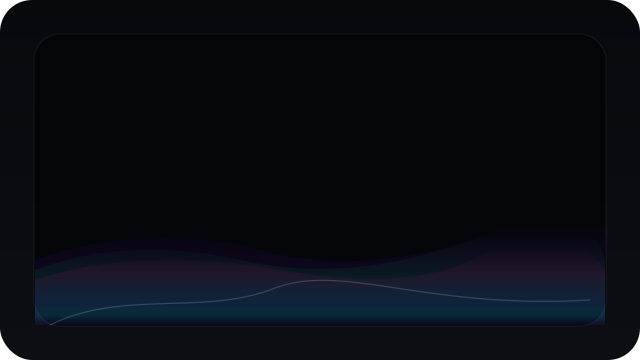
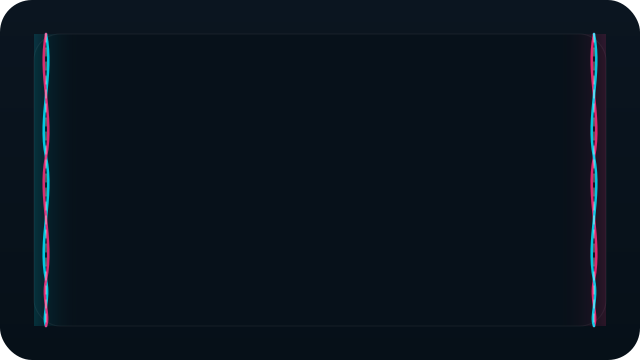
| 🌌 Aurora Drift Theme | 🎀 Side Braids Theme |
|---|---|
 |
 |
🌟 Major Highlights & Feature Spotlights
🎨 1. Two Beautiful New Premium Themes
- 🌌 Aurora Drift: A cinematic, wave-based aurora visualizer. Choose between Ambient, Cinematic, and Vivid glow styles, and fine-tune your parameters with dedicated intensity, height, and speed controls.
- 🎀 Side Braids: An elegant double-braided flow visualizer framing your screen. Highly customizable flow directions, braid widths, spacing gaps, thickness, and motion dynamics.
🔋 2. Next-Gen Performance & Battery-Saving Technology
Paraline now runs cooler and lighter than ever, designed to sit in the background without affecting your gaming performance:
- 🤫 Intelligent Silent Idle Throttling: Automatically monitors your system audio. If silent for more than 4 seconds, the rendering loop drops down to 12 FPS to save CPU/GPU cycles. It instantly reactivates at full speed the millisecond music starts!
- 🧠 Focus Mode: Automatically suspends/pauses visual rendering when your computer is idle or when you are AFK using Electron's
powerMonitor.getSystemIdleTime(). - 📉 Frame Rate Limiting & V-Sync: Toggle V-Sync or set hard FPS targets (30, 60, 120, 144, or fully uncapped). Use Battery Saver Mode to lock performance to 30 FPS.
- ⚡ Shadow & Border Optimizations: Completely overhauled theme rendering pipelines to minimize GPU overhead and reduce draw calls.
🎛️ 3. Redesigned Settings Dashboard & Glassmorphic UI
We have completely retired the old inline settings overlays:
- 🗂️ Clean Tabbed Navigation: Easily jump between General, Themes, Customization, Performance, and Advanced Settings.
- 🍎 Custom Glassmorphism Context Menu: Redesigned tray menus with premium macOS-inspired glassmorphic visuals, quadrant-based repositioning, and Windows taskbar overflow support.
- 🔄 Isolated Theme Resets: Resetting individual theme parameters is now isolated, meaning you can reset your active theme without wiping out your global configurations.
⚙️ 4. Advanced Time-Based Theme Automation
Schedule your desktop's mood! Our new background Automation Agent dynamically transitions between daytime and nighttime themes depending on the time of day, optimizing local caching layers to prevent theme loading lag.
💾 5. Secure Theme Profile Manager (Import/Export)
You can now backup, share, and import your custom presets!
- Export your customized configurations as
.jsonprofile files. - 🔒 Security Hardened: Includes robust JSON schema validation, strict file size checks, and protection against prototype pollution to ensure imported presets are 100% safe to load.
🔌 6. Seamless Windows OS Integration
- 🌈 Real-Time Accent Color Sync: Automatically pull, extract, and match active Windows accent colors dynamically in real-time.
- 🚀 Startup Launch Toggle: Enable auto-starting Paraline when you sign in on Windows, manageable via the dashboard or tray toggle.
- 🏷️ Crisp Native Title Bar Icons: Replaced Electron's default window logos with Paraline's crisp, multi-resolution branded icons across title bars, Alt-Tab lists, and the taskbar.
🛠️ Detailed Changelog
🚀 New Features & Enhancements
- Added
Aurora Driftvisualizer theme with robust rendering properties. - Added
Side Braidsvisualizer theme with detailed custom widths and spacing inputs. - Added dedicated tabbed Settings Dashboard UI.
- Added Theme Profile Manager with visual Import/Export commands.
- Added Focus Mode (AFK resource-saving suspend).
- Added 12 FPS silent idle throttling loop.
- Added time-based automation configuration agent.
- Added real-time Windows Accent color sync.
- Added Auto-Start toggle for Windows logins.
- Added crisp, high-definition native
.icotitle-bar branding. - Added compact glassmorphic "Scroll to Top" button to landing site.
- Added comprehensive "System Requirements" page and navigation link to landing site.
🔒 Security & Stability Hardening
- URL Scheme Validation: Implemented strict scheme validation before calling Electron's
shell.openExternal()to block arbitrary remote execution exploits. - Prototype Pollution Protection: Added validation routines on profile names during import to prevent
Object.prototypepollution. - Audio Bridge Safety Timer: Added cleanup and fallback timers to keep the visualizer UI stable if the C# Audio helper disconnects.
- Upload Safety: Enforced file size checks and strict sanitization rules on imported JSON settings profiles.
🐛 Bug Fixes & Refactorings
- Fixed custom color pickers falling back to black; color gradients now persist reliably across restarts.
- Fixed theme resetting behavior to restrict defaults to the active profile only.
- Fixed context menu positioning overlap in Windows overflow system tray panels.
- Refactored theme automation settings and wired up IPC bridge pathways.
- Cleaned up redundant inputs like
braidRotationto optimize the configuration schema.
📚 New Documentation
We have expanded our resources for creators and contributors:
- 🎨 Theme Development Guide: A comprehensive, step-by-step developer walkthrough for scripting your own custom visual themes.
- 🔧 Troubleshooting Guide: Detailed procedures for configuring audio drivers, managing inputs, and resolving C# audio bridge captures.
📦 Installer Details
- Installer Artifact Name:
Paraline-Setup-2.0.0.exe - Configuration Schema: Backwards compatible. It will automatically migrate your older configs to the new
2.0.0formats.
❤️ A Huge Thank You to Our Contributors!
This massive release was made possible by the incredible developers, testers, and designers in the community. Thank you for helping shape the future of desktop audio visualization!
🥰 Free Wallpapers created for Paraline Users by me 🥰 :


Paraline v1.2.0
Paraline 1.2.0 expands the landing site, refreshes visuals, and polishes packaging plus workflows for a smoother release experience.
Highlights
- New and improved visuals: Reactive Border enhancements, Snow Particles, and Ripple Flow updates
- Landing site expansion with FAQ, Privacy Policy, Terms, and Installation Guide pages
- Refined UI on the landing site: footer, sidebar, icons, and scrollbar styling
- Packaging polish with a multi-resolution Windows tray/installer icon
- CI and release workflow improvements plus new community/docs files
What's New
Landing Site
- Added FAQ, Privacy Policy, Terms, and Installation Guide pages
- Added a footer with contact and legal links
- Sidebar improvements and new icon set
- New sitemap and robots.txt
Packaging and Project
- Updated Windows tray/installer icon assets
- Release and CI workflow updates
- New Code of Conduct and CONTRIBUTING guide
Notes
- Installer artifact name:
Paraline-Setup-1.2.0.exe - No migration required; existing settings remain compatible
Thank You
Thanks to everyone contributing and testing Paraline. This update keeps the project moving forward with better visuals and a stronger public presence.
Paraline v1.1.0
Paraline 1.1.0 is a support and polish update focused on improving the overall experience around the app.
This release introduces the new Paraline landing web page, improves tray-based controls, and adds a few quality-of-life upgrades that make the app feel more stable.
Highlights
- New Paraline landing page for presentation and downloads
- Improved system tray experience with clearer status and quick actions
- Better fallback behavior when the audio helper is unavailable or stops
- New reset actions for theme settings and full app settings
- Improved handling for duplicate launches and overlay recovery
What's New
Tray and App Controls
- Added app version display in the tray menu
- Added audio capture status in the tray menu
- Added reset action for the currently selected theme
- Added reset action for all saved settings
- Added quick links to the landing page and GitHub repository
Stability and Support
- Improved recovery when the audio helper exits or errors
- Simulated fallback now resumes automatically when helper capture is unavailable
- Added single-instance protection to avoid multiple app instances running accidentally
- Improved overlay recovery when display metrics change or the app is launched again
Public Presence
- Launched the new Paraline landing page. Visit Here
- Improved download flow and project visibility around releases
Notes
- Windows installer artifact name for this release will be
Paraline-Setup-1.1.0.exe - Existing settings are preserved and sanitized as before
Thank You
Thanks to everyone checking out Paraline. This update is a small but important step toward making the app feel more polished, dependable, and actively supported.
Paraline v1.0.0
The first public release of Paraline.
For people who want music to feel like part of the desktop.
A desktop audio visualizer built for atmosphere.
Paraline transforms the edges of your screen into motion through a transparent, always-on-top overlay. It reacts to real system audio in real time and is built to feel elegant, immersive, and desktop-native.
Features
- Real-time system audio capture with WASAPI loopback
- Transparent, click-through overlay
- Multiple edge-based visualizer themes
- Theme-specific saved settings
- Lightweight tray controls
- Rendering optimized for continuous background use
Themes
- Ambient Wave
- Reactive Border
- Flow Border
- Side Bars
- Pulse Lines
- Dot Particles
- Ripple Flow
- Snow Particles
- Edge Crystals
Install
- Download
Paraline-Setup-1.0.0.exe - Run the installer
- Launch Paraline
- Configure themes and settings from the system tray
Platform
- Windows only currently
Feedback
If you run into bugs, visual inconsistencies, theme issues, or audio reactivity problems, feedback is welcome and helps shape future releases.