Our team wants to create an online daily puzzle in this web application - N-Puzzle, that can help users improve their logical reasoning ability.
N-Puzzle is a sliding-block puzzle that is easy for everyone to get started. All ages could enjoy that game. The player can click the block and move it to the space block. When the numbers are in numerical order, the player wins the game.
Here is the demo video to show how to play the eight-Puzzle:

The team designs an eight-Puzzle game. The game will cost around 2-4 minutes. Users can play it during their break time or on the bus. After users complete their game, they can share their achievements to their social network and check their performance rank.
Model View Controller
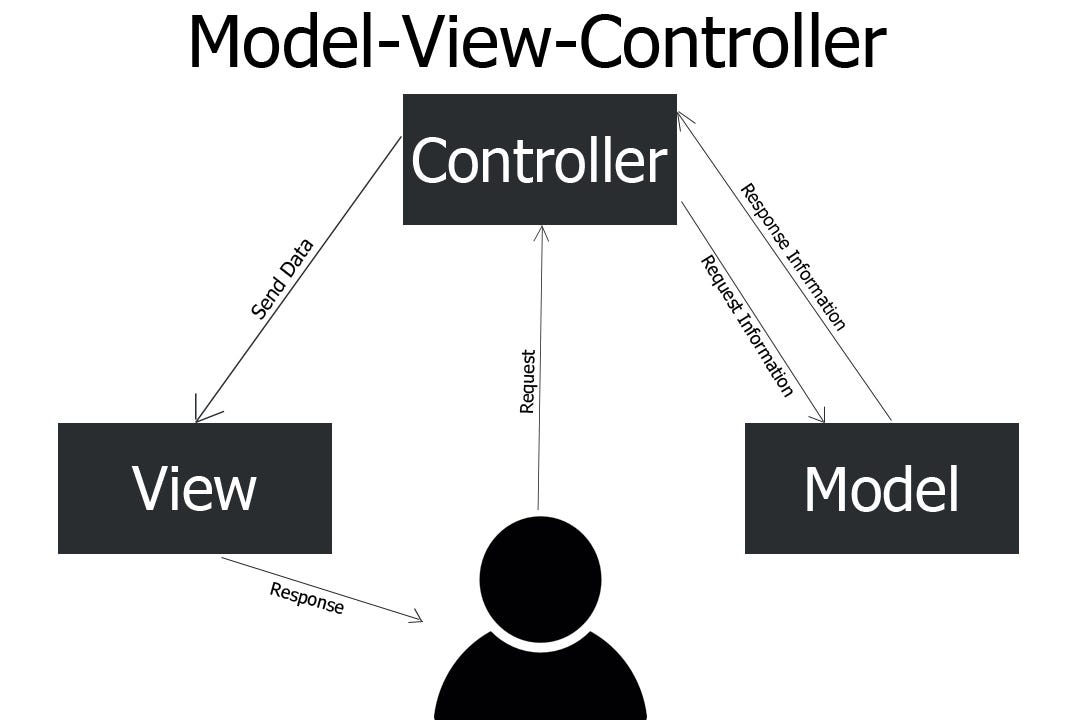
MVC was reportedly invented by Trygve Reenskaug in the 1970's and becomes one of the most popular patter for server side web applications.
Model
The model represents the data and logic of the app. It will be paired with an entity in a database.(e.g. User in this app)
After receive the request from controller, model will pick up the required data back to controller.
Controller
The controller is the go-between for models and views. It relays data from browser to app and from app to browser.
In this project routes.py work as controller.
When the users want to move to new page, they send the request to controller. And controller will render the view.
View
The view is the only part of the app the user interacts with directly. It is attached to the model and in turn displays the model’s data.
The html files in the templete folder work as view.
Users can read information and intercat with it.
Clone this application to loacl direscotry git clone https://github.com/RickWangPerth/CITS5505-Project2.git
Set up python virtual environment python3 -m venv venv
Activate the python virtual environment source venv/bin/activate
Download the required packages pip install -r requirements.txt
Upgrade the database: flask db upgrade
Launch the web application: flask run
Go to the generated url, you can see the application on the website.
Stop the web application: ^C
Exit the environment: deactivate
Step One: Register
Input the Username & Email & Password and Repeat Password
Administrators need to input the adminkey to create an admin account
The Username and Email must be unique.
Then the user gets their account.
Step Two: Login
Use the username and password to sign in to the game.
Users can tick the Remember Me to record their account information on the website.
Step Three: Concise History and How to Play
To give users a brief introduction to the N-Puzzle game and show them how to play it.
Step Four: Play the game
- Click the Game button in the navgation bar
- Click the Start button in the game page
- Play the game!
- The elapsed time and steps will be recorded
- If the users cannot figure out they can click restart button to restart the game
- When the blocks are in numerical order, user win
- Every user just can play the game once a day
Step Five: Share achievements and check daily improvement
After user win the game, they can click "Save prfomance" button to save their result as image in thier divice.
And then, they can show it to their friends or post on the socail network.
Users can click the Statistics in the navigation bar to see their daily progress and cpmpare with the best player.
Step Six: Work as administrator
Administrator can use their own account to move to the admin page, where can updata and vet the game, manage User and Rank database.
Our group designed five tests
Run unit tests python3 -m test.unittest
Test Config
Our group test the 'SECRET_KEY' in TestingConfig.
Test password hash
After user created their account, their password will be saved as hash.
Ourgroup test if the paasword hash generated correctly.
Test database
Our team created three database test.
We inserted two elements into each database(User,Rank,GamePool), and check if they are stored correctly.
System Test
Our group also made some system test on FireFox browser.
To start the system test:
Switch to testing model export FLASK_ENV=testing
Run system tests python3 -m test.systemtest
Our group set up a log file: logs.md to
show every member contribute in detailed
by git log --all --decorate --graph