A beautiful, open-source tool for generating embeddable Quranic verses for websites.
أداة مفتوحة المصدر لإنشاء آيات قرآنية قابلة للتضمين في المواقع الإلكترونية.


Live Demo: https://ayatembed.adelenazi.cloud
جربها هنا: https://ayatembed.adelenazi.cloud
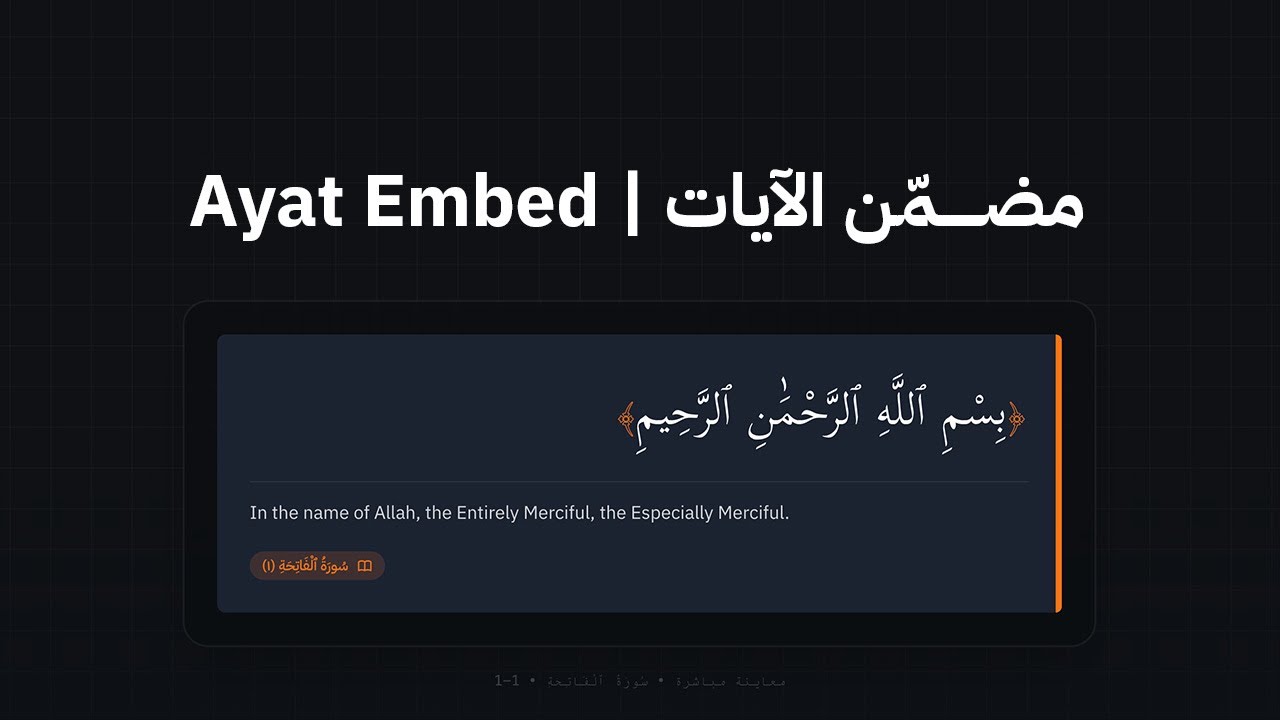
Ayat Embed is a Micro-SaaS tool designed to help developers and content creators easily embed Quranic verses into their websites. It provides a highly customizable interface to select verses, adjust styles, and generate embed codes (iFrame or HTML) that look great on any device.
مضمّن الآيات هو أداة مصغرة (Micro-SaaS) صممت لمساعدة المطورين وصناع المحتوى على تضمين الآيات القرآنية في مواقعهم بسهولة. توفر الأداة واجهة قابلة للتخصيص بالكامل لاختيار الآيات، وتعديل الأنماط، وتوليد أكواد التضمين (iFrame أو HTML) التي تظهر بشكل رائع على جميع الأجهزة.
Built with Next.js 16, Tailwind CSS v4, and TypeScript, it prioritizes performance, accessibility, and aesthetics.
تم بناؤه باستخدام Next.js 16، Tailwind CSS v4، و TypeScript، مع التركيز على الأداء، وإمكانية الوصول، والجماليات.
-
High-Quality QPC V2 Script | الرسم العثماني (QPC V2) Uses the industry-standard QPC V2 (King Fahd Complex) fonts with dynamic loading for pixel-perfect Quranic script.
استخدام خطوط مجمع الملك فهد (QPC V2) مع تحميل ديناميكي لضمان دقة الرسم العثماني.
-
Complete Quran Access | الوصول الكامل للقرآن Access all 114 Surahs with authentic script.
الوصول إلى جميع السور الـ 114 بالرسم العثماني الأصيل.
-
Verse Ranges | نطاق الآيات Select single verses or a range of verses (e.g., Al-Fatiha 1-7).
اختيار آية واحدة أو مجموعة من الآيات (مثل: الفاتحة 1-7).
-
Bilingual Interface | واجهة ثنائية اللغة Full support for both English (LTR) and Arabic (RTL) interfaces.
دعم كامل للواجهتين الإنجليزية (LTR) والعربية (RTL).
-
Live Preview | معاينة مباشرة See your changes in real-time as you customize.
شاهد تغييراتك في الوقت الفعلي أثناء التخصيص.
-
Advanced Customization | تخصيص متطور
- Colors | الألوان: Custom presets and pickers for Accent, Background, and Text colors.
- Display Options | خيارات العرض: Show/Hide translations, verse numbers, and references.
- Dynamic Layout | تخطيط ديناميكي: Support for continuous verse display or one verse per line.
-
Smart Export | تصدير ذكي
- iFrame: Specific auto-resizing script to prevent scrollbars.
- Pure HTML: Static HTML for full control and offline usage.
- Framework: Next.js 16 (App Router)
- Language: TypeScript (React 19)
- Styling: Tailwind CSS v4
- Icons: FontAwesome
- Fonts:
- QPC V2 (Quranic Text | الخط القرآني من مجمع الملك فهد)
- Amiri Quran (Quranic fallback | خط أميري للقرآن)
- IBM Plex Sans Arabic (Arabic UI | واجهة عربية)
- Inter (English UI | واجهة إنجليزية)
- API: Quran.Foundation Content API (v4)
- Performance: Secure server-side proxy with Response Caching (1-hour TTL) to minimize latency and upstream calls.
- Node.js 20+
- npm 9+
-
Clone the repository | استنساخ المستودع:
git clone https://github.com/AdelEnazi1117/ayat-embed.git cd ayat-embed -
Install dependencies | تثبيت الاعتمادات:
npm install
-
Configure Environment Variables | تهيئة متغيرات البيئة:
Copy
env.example→.env.localand set your credentials: قم بنسخenv.exampleإلى.env.localوقم بتعيين بيانات الاعتماد الخاصة بك:QF_CLIENT_ID: Your Quran.Foundation Client ID.QF_CLIENT_SECRET: Your Quran.Foundation Client Secret.QF_ENV:preliveorproduction.
-
Run the development server | تشغيل خادم التطوير:
npm run dev
-
Open locally | الفتح محلياً: Visit
http://localhost:3000in your browser. قم بزيارةhttp://localhost:3000في متصفحك.
The project includes a Dockerfile for easy containerization.
يتضمن المشروع ملف Dockerfile لسهولة الحاويات.
-
Build the image | بناء الصورة:
docker build -t ayat-embed . -
Run the container | تشغيل الحاوية:
docker run -p 3000:3000 --env-file .env.local ayat-embed
src/
├── app/
│   ├── page.tsx            # Main Builder Dashboard
│   ├── layout.tsx          # Root Layout
│   ├── globals.css         # Tailwind v4 Theme & Base Styles
│   ├── api/quran/          # Security-hardened Proxy with Caching
│   └── embed/              # Dynamic Embed Route System
├── components/
│   ├── QuranCard.tsx       # Core rendering component (Dynamic Fonts)
│   ├── Footer.tsx          # Application footer
│   └── LanguageToggle.tsx  # Locale switcher
├── lib/
│   ├── api.ts              # API utilities & data mapping
│   ├── quranFonts.ts       # Font loading logic for QPC V2
│   └── constants.ts        # Style presets & Defaults
└── types/
    └── index.ts            # TypeScript definitions
-
Search & Select | بحث واختيار: Use the dropdown to find a Surah by name or number.
(استخدم القائمة للبحث عن السورة بالاسم أو الرقم).
-
Set Range | تحديد النطاق: Choose the starting and ending Ayah.
(اختر آية البداية والنهاية).
-
Style | التنسيق:
- Toggle Translation for English meaning. (تبديل ظهور الترجمة).
- Toggle Verse Numbers or Reference. (تبديل ظهور أرقام الآيات والسورة).
- Adjust Accent Color to match your brand. (تعديل لون التمييز ليناسبك).
-
Export | تصدير:
- Click Export Code to copy the snippet. (اضغط على "تصدير الكود").
- Paste it into your HTML or CMS. (لصقه في كود HTML أو مدونتك وموقعك).
Contributions are welcome! Please feel free to submit a Pull Request.
المساهمات مرحب بها! لا تتردد في إرسال طلب سحب (Pull Request).
- Fork the project. (عمل نسخة من المشروع).
- Create your feature branch (
git checkout -b feature/AmazingFeature). (إنشاء فرع للميزة الجديدة). - Commit your changes (
git commit -m 'Add some AmazingFeature'). (حفظ التغييرات). - Push to the branch (
git push origin feature/AmazingFeature). (رفع التغييرات للفرع). - Open a Pull Request. (فتح طلب سحب).
Distributed under the MIT License. See LICENSE for more information.
موزع تحت رخصة MIT. انظر ملف LICENSE للمزيد من المعلومات.
Adel Enazi (عادل العنزي)
- Website: adelenazi.dev
- X (Twitter): @AdelEnizy
- GitHub: @AdelEnazi1117
- LinkedIn: Adel Enazi
- Quran.Foundation for the comprehensive API and QPC V2 assets. (شكر لمؤسسة القرآن على الواجهة البرمجية الشاملة).
- KFQPC for the King Fahd Complex Quranic fonts. (شكر لمجمع الملك فهد لطباعة المصحف الشريف على الخطوط القرآنية).