Releases: orendain/DemeoMods
AdvancedStats v1.1.0

 orendain
Edgar Orendain
orendain
Edgar Orendain
✨ Features/Enhancements
- Introduce BepInEx 5.x as a compilation target for AdvancedStats mod. (#510)
🧰 Maintenance
- Use recommended
.yamlextension for YAML files, rather than.yml. (#537) - Bump version to 1.1.0. (#529)
- Split long lines and perform some maintenance. (#520)
- Apply general maintenance. (#474)
How To Install
Important
First, make sure you have installed either one of two modloaders: BepInEx or MelonLoader.
If you have not, go here for instructions on how to do that first.
If you have BepInEx
Download the DLL file ending in .BIE.dll below and place it into your BepInEx/plugins folder, located in Demeo's root game directory.
If you have MelonLoader
Download the DLL file ending in .ML.dll below and place it into your Mods folder, located in Demeo's root game directory.
Highlighter v1.0.0
 orendain
Edgar Orendain
orendain
Edgar Orendain
Highlighter provides in-game highlighting/coloring. Currently, the only highlighting this mod makes available is for displaying a character's line-of-sight.
This was inspired by a mod written by MuKen which was once in the scene.
Features:
- When hovering the local player's character over a square, the board will be highlighted with all squares that would be in that character's line-of-sight if they were to move there.
Known Concerns:
- There is a limit to how far the line-of-sight highlighting reaches. This may be improved later.
Screencast.from.09-18-2023.02.28.54.AM.webm
RoomFinder v1.8.0

- Ensure compatibility with Demeo patch as of 9/7/23
HouseRules v1.7.0
To install,
Make sure you've installed MelonLoader v0.5.7 into your Demeo game directory! You must un-check the 'Latest' box then select v0.5.7 from the drop-down list. See the wiki for more detailed instructions.
Unzip the contents of HouseRules_1.7.0.zip directly into your Demeo game directory.
<Updated 9/9/23> IF YOU'RE USING OCULUS PCVR OR STEAM you need to also download the Demeo.dll file and copy it into your \MelonLoader\Dependencies\CompatibilityLayers folder and overwrite the existing file!
Merged pull requests:
- Recognize GitHub pipeline changes when labelling PRs. (#493)
- Update the
authorfield to correctly reflect the team behind the development effort (#492) - Update build dependencies for 2023-09-08. (#491)
- Time for the next published HR release - Moving on up! (490)
- Update build dependencies for 2023-09-08. (#489)
- Fix HouseRules for 9/7/23 Demeo update (#487)
- Ruleset update and addition (#486)
- Update README.md (#485)
- Fix blank Longdesc (#484)
- Fix rules displays (#483)
- Fix mis-spelled rule (#482)
- Update README.md (#481)
- Long descriptions for rulesets (#480)
- In game rules list UI (#479)
- New rule and ruleset using it (#478)
RoomFinder v1.7.2
- Ensure compatibility with Demeo v1.30 patch as of 5/16/23
- Fixed menu not appearing for Desktop version when using Steam combined version
HouseRules v1.6.2
To install,
Make sure you've installed MelonLoader v0.5.7 into your Demeo game directory! You must un-check the 'Latest' box then select v0.5.7 from the drop-down list. See the wiki for more detailed instructions.
Unzip the contents of HouseRules_1.6.2.zip directly into your Demeo game directory.
IF YOU'RE USING OCULUS PCVR OR STEAM you need to also download the Demeo.dll file and copy it into your \MelonLoader\Dependencies\CompatibilityLayers folder and overwrite the existing file!
Merged pull requests:
- Separate GitHub workflow CIs into mod-specific individual ones. #468
- Update HouseRules for compatibility with Demeo's 2023-05-16 update. #470
- Dependency inject an IElementCreator into Page stacks rather than creating one internally. #471
- Update Build Version for new release #473
- Fix LevelExitLockedUntilAllEnemiesDefeatedRule not correctly unlocking door when all enemies were defeated. #476
- Fix menu not appearing for Desktop version when using Steam combined edition. #477
RoomFinder v1.7.1
- Ensure compatibility with v1.29 #460
HouseRules v1.6.1
To install, unzip the contents of Unofficial_HouseRules_1.6.1.zip directly into your Demeo game directory.
IF YOU'RE USING PCVR you need to also download the Demeo.dll file and copy it into your \MelonLoader\Dependencies\CompatibilityLayers folder and overwrite the existing file!
See the wiki for more detailed instructions.
Merged pull requests:
- Fixed bugs with incompatibility with the latest version of Demeo
- Added new rule
PotionAdditionOverriddento specify Potion Stand card potentially gained - Added new rule
CardChestAdditionOverriddento specify Chest cards potentially gained - Added new rule
CardEnergyAdditionOverriddento specify Energy cards potentially gained - Added new rule
ApplyEffectOnHitAdjustedto specify effects that should apply when a BoardPiece is damaged
RoomCode v1.2.1
To install, unzip the contents of RoomCode_1.2.1.zip directly into your Demeo game directory.
See the RoomCode readme for information on how to set your preferred room codes.
- Make Roomcode compatible with v1.29 of Demeo. #460
AdvancedStats v1.0.0
To install, unzip the contents of AdvancedStats_1.0.0.zip directly into your Demeo game directory.
Features/Enhancements:
- Introduce the AdvancedStats mod
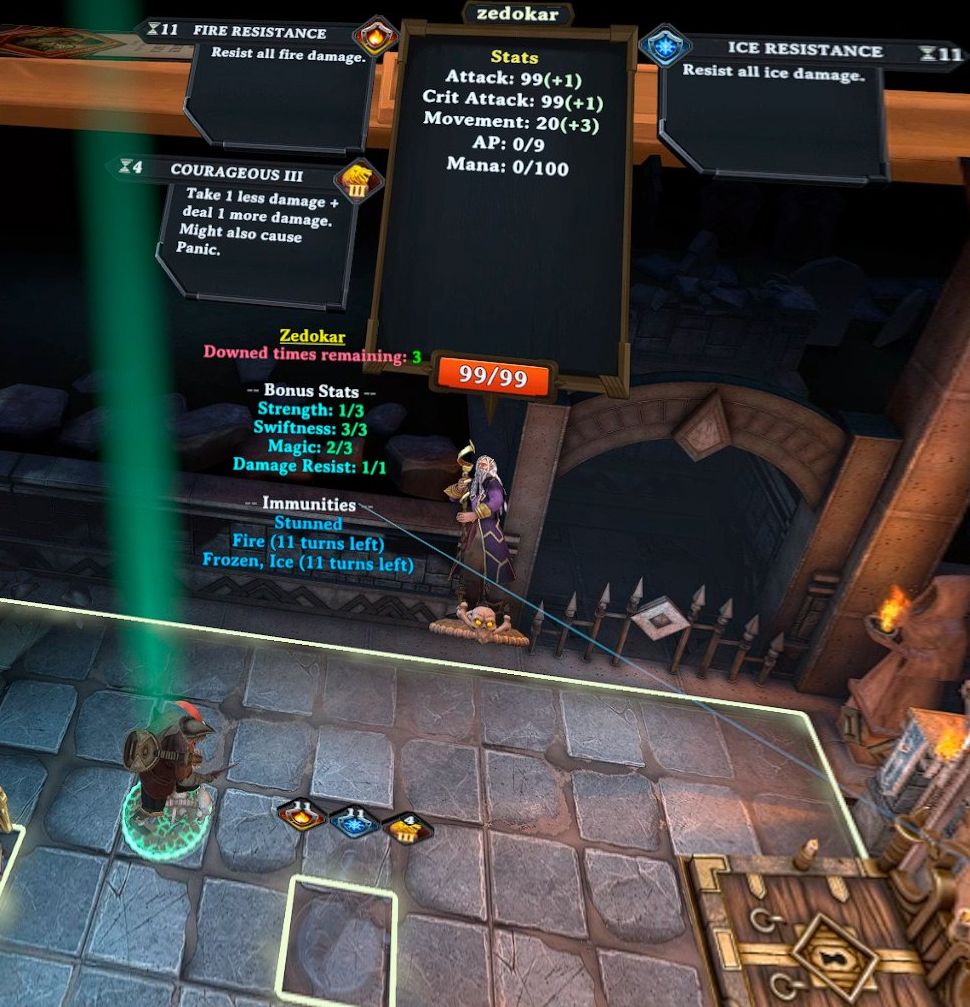
- Displays text when a player piece is left-clicked (PC) or grabbed (VR)
- Displays number of downed times remaining
- Displays number of Strength, Swiftness, Magic, and Damage Resist used
- Displays all immunities (including from potions)
- Works on both modded and non-modded games
Desktop screenshot example
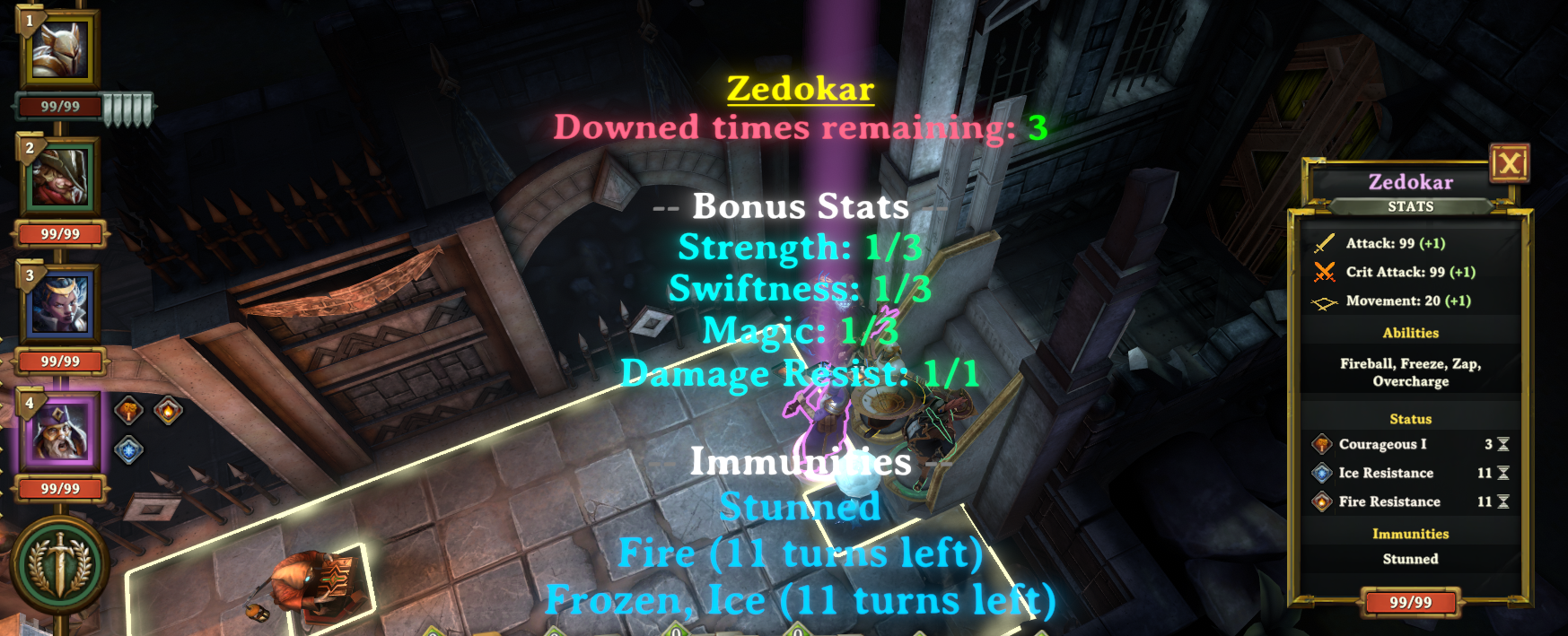
VR Screenshot example