Website • Docs • Community • Github
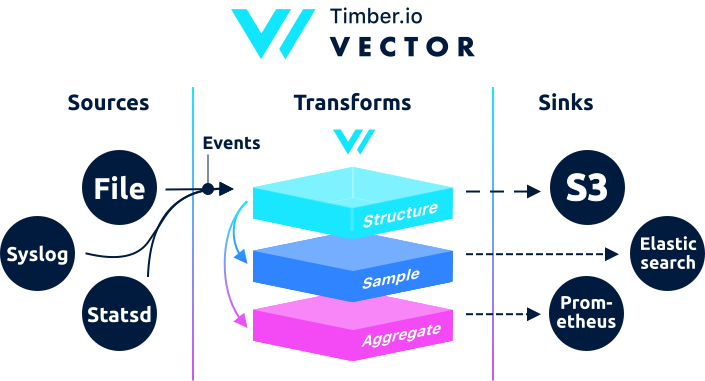
Vector is a high-performance observability data router. It makes collecting, transforming, and sending logs, metrics, and events easy. It decouples data collection & routing from your services, giving you control and data ownership, among many other benefits.
Built in Rust, Vector places high-value on performance, correctness, and operator friendliness. It compiles to a single static binary and is designed to be deployed across your entire infrastructure, serving both as a light-weight agent and a highly efficient service, making the process of getting data from A to B simple and unified.
docker run timberio/vector:latest-alpine- The
vectorbinary is located at/usr/local/bin/vector, which should be in your$PATH. - The default configuration file is located at
/etc/vector/vector.toml.
The Vector Docker images ship with a default /etc/vector/vector.toml configuration file.
To use your own configuration file:
-
Create your own Vector configuration file and save it as
vector.toml. -
Run the Vector Docker image with the following command:
docker run -v $PWD/vector.toml:/etc/vector/vector.toml:ro timberio/vector:latest-alpineModify
$PWDto the directory where you store your localvector.tomlfile.
This image is based on the alpine Docker image, which is
a Linux distribution built around musl libc and BusyBox. It is considerably
smaller in size than other Docker images and statically links libraries. This
is the image we recommend due to it's small size and reliability.
This image is based on the debian-slim image,
which is a smaller, more compact variant of the debian image.
Vector's Docker images include a special latest version that will be updated
whenever Vector is released. All other
releases are available via the X.X.X tag:
docker run timberio/vector:X.X.X-alpineSimply run the with the latest tag:
docker run timberio/vector:latest-alpineOr specify the exact version:
docker run timberio/vector:X.X.X-alpine