| title | Anthropic Slack Thread TLDR | |||
|---|---|---|---|---|
| description | Summarizes a Slack thread using Claude | |||
| integrations |
|
|||
| categories |
|
|||
| tags |
|


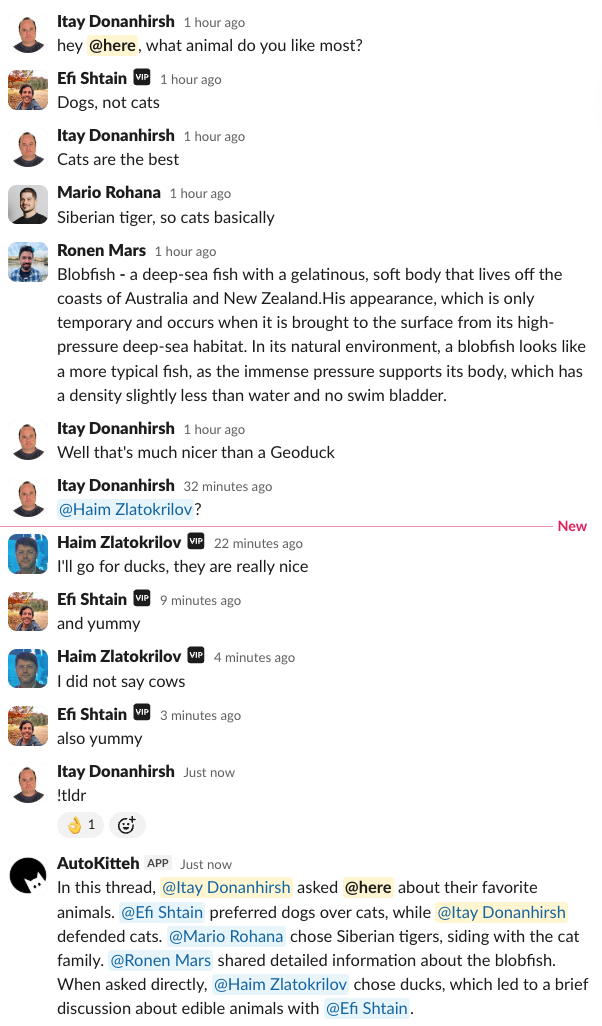
Allows Slack users to summarize a Slack thread by posting !tldr in a thread.
-
In any Slack thread in a channel where the bot is present, use the command:
!tldr [optional topic to focus on] -
The bot will reply with a concise thread summary.
- Initialize Slack connection
- Configure the
ANTHROPIC_API_KEYproject variable with your API key - Configure the
INVOCATION_CMDvariable to set the command prefix (default: "tldr") - Configure the
MAX_TOKENSvariable to limit maximum tokens per interaction (default: 1000) - Deploy project
Important
Ensure the Slack connection is initialized; otherwise, the workflow will raise a ConnectionInitError.
In any Slack thread in a channel where the bot is present, use the command:
!tldr