This page covers all methods for updating Sitecore items using SPE, from simple property changes to complex field type handling and bulk operations.
SPE provides multiple ways to edit items, each suited to different scenarios:
- Automated Properties - Simple, intuitive syntax for single-field updates
- Set-ItemProperty - PowerShell-standard cmdlet for property updates
- BeginEdit/EndEdit - Explicit editing for multiple fields or special cases
- BulkUpdateContext - High-performance updates for large datasets
The most convenient way to edit items is through SPE's automated properties. These properties automatically handle BeginEdit and EndEdit operations.
Example: Update a field using automated properties.
$item = Get-Item -Path "master:\content\home"
$item.Title = "New Title"
Example: Update a field with spaces in the name.
$item = Get-Item -Path "master:\content\home"
$item."Closing Date" = [datetime]::Today
{% hint style="info" %} Field names containing spaces must be wrapped in quotes (single or double). {% endhint %}
Example: Update system fields.
$item = Get-Item -Path "master:" -ID "{110D559F-DEA5-42EA-9C1C-8A5DF7E70EF9}"
$item."__Display name" = "Custom Display Name"
Example: Dynamically reference fields by variable.
$item = Get-Item -Path "master:" -ID "{110D559F-DEA5-42EA-9C1C-8A5DF7E70EF9}"
$fieldName = "Title"

# All variations work
Write-Host ($item.$fieldName)
Write-Host ($item."$fieldName")
Write-Host ($item."$($fieldName)")

# To update (all variations work)
$item.$fieldName = "New Value"The PowerShell-standard approach using Set-ItemProperty is also supported.
Example: Update a property using Set-ItemProperty.
Set-ItemProperty -Path "master:\content\home" -Name "Title" -Value "New Title"For multiple field updates or special scenarios, use explicit BeginEdit and EndEdit calls.
Example: Update multiple fields in a single edit context.
$item = Get-Item -Path "master:\content\home"
$item.Editing.BeginEdit()
$item["Title"] = "New Title"
$item["Text"] = "New text content"
$item.BranchId = [Guid]::Empty
$item.Editing.EndEdit()
{% hint style="warning" %}
Always match BeginEdit() with EndEdit(). If an error occurs between them, the item remains locked. Consider using try/finally blocks for safety.
{% endhint %}
Example: Safe edit context with error handling.
$item = Get-Item -Path "master:\content\home"
$item.Editing.BeginEdit()
try {
    $item["Title"] = "New Title"
    $item["Text"] = "New text content"
    $item.Editing.EndEdit()
} catch {
    $item.Editing.CancelEdit()
    throw
}SPE provides intelligent handling for different Sitecore field types through automated properties.
DateTime fields automatically convert between Sitecore's string format and .NET DateTime objects.
Example: Read and write DateTime fields.
$item = Get-Item -Path "master:" -ID "{110D559F-DEA5-42EA-9C1C-8A5DF7E70EF9}"

# Read returns System.DateTime
$item.__Created
# Monday, April 07, 2008 1:59:00 PM

# Write accepts System.DateTime
$item.__Created = [DateTime]::Now
$item.__Created
# Tuesday, March 17, 2020 12:00:00 PM
Image fields accept item references from the Media Library.
Example: Assign an image to an Image field.
$homeItem = Get-Item -Path "master:\content\home"
$homeItem.Image = Get-Item -Path "master:\media library\logo"
Link fields accept item references and automatically create the link XML.
Example: Assign a content item to a GeneralLink field.
$homeItem = Get-Item -Path "master:\content\home"
$homeItem.GeneralLink = Get-Item -Path "master:\content\home\about-us"Multi-value fields (Multilist, Treelist, etc.) accept arrays of items.
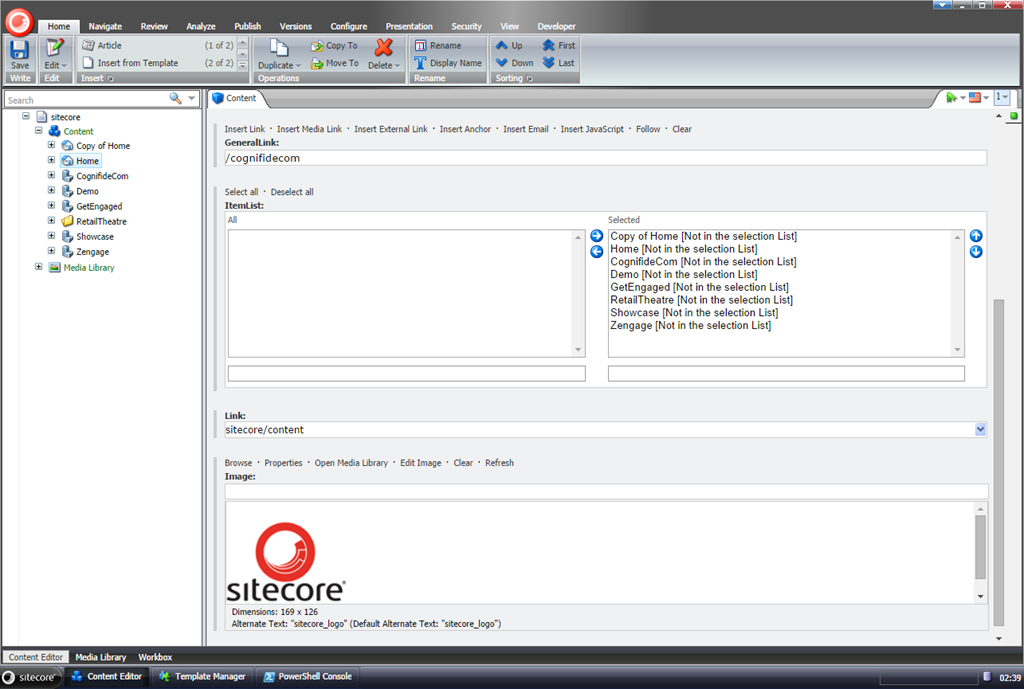
Example: Assign multiple items to a list field.
$homeItem = Get-Item -Path "master:\content\home"
$homeItem.ItemList = Get-ChildItem -Path "master:\content\home"
Result in Content Editor:
Use the ._ or .PSFields property to access strongly-typed field objects.
Example: Access typed Image field properties.
$item = Get-Item -Path "master:\content\home"
$item._.Image.Alt          # Access Alt property
$item._.Image.Width        # Access Width property
$item._.Image.Height       # Access Height property
Example: Access typed LinkField properties.
$currentItem = Get-Item -Path "master:\content\home\sample-item"
$linkField = $currentItem.PSFields."LinkFieldName"

# Access all LinkField properties
$linkField.Anchor
$linkField.IsInternal
$linkField.LinkType
$linkField.TargetID
$linkField.TargetItem
$linkField.Text
$linkField.Url
Output:
Anchor       :
Class        :
InternalPath : /sitecore/content/home/sample-item/
IsInternal   : True
IsMediaLink  : False
LinkType     : internal
MediaPath    :
QueryString  :
Target       :
TargetID     : {263293D3-B1B3-4C2C-9A75-6BD418F376BC}
TargetItem   : Sitecore.Data.Items.Item
Text         : CLICK HERE
Title        :
Url          :
Example: Find all TextField instances on an item.
$item = Get-Item -Path "master:\content\home"
foreach($field in $item.Fields) {
    $typedField = $item.PSFields."$($field.Name)"
    if ($typedField -is [Sitecore.Data.Fields.TextField]) {
        Write-Host "$($field.Name): $($typedField.Value)"
    }
}- Updating a single field or a few fields
- Readability is important
- Working with small datasets
Example:
Get-ChildItem -Path "master:\content\home" |
    ForEach-Object {
        $_.Title = "Updated: $($_.Name)"
}- Updating many fields on a single item
- Needing explicit control over save timing
- Working with system properties (like BranchId)
Example:
$item = Get-Item -Path "master:\content\home"
$item.Editing.BeginEdit()
$item["Title"] = "Sample Item"
$item["Text"] = "Sample Text"
$item["Date"] = [datetime]::Now.ToString("yyyyMMddTHHmmss")
$item.BranchId = [Guid]::Empty
$item.Editing.EndEdit()- Updating many items (hundreds or thousands)
- Performance is critical
- You need to bypass certain Sitecore events
Example:
New-UsingBlock (New-Object Sitecore.Data.BulkUpdateContext) {
    foreach($item in Get-ChildItem -Path "master:\content\home" -Recurse) {
        $item.Editing.BeginEdit()
        $item["Title"] = "Sample Item"
        $item["Text"] = "Sample Item"
        $item.Editing.EndEdit() > $null
    }
}
{% hint style="warning" %} Automated properties call BeginEdit/EndEdit on every assignment, which can impact performance when updating many fields. Use explicit BeginEdit/EndEdit for multiple updates on the same item. {% endhint %}
$items = Get-ChildItem -Path "master:\content\home" -Recurse |
    Where-Object { $_.TemplateName -eq "Sample Item" }

New-UsingBlock (New-Object Sitecore.Data.BulkUpdateContext) {
    foreach($item in $items) {
        $item.Editing.BeginEdit()
        $item["Title"] = "Updated Title"
        $item["Text"] = "Updated Text"
        $item.Editing.EndEdit() > $null
    }
}$items = Get-ChildItem -Path "master:\content\home" -Recurse
$total = $items.Count
$current = 0
foreach($item in $items) {
$current++
Write-Progress -Activity "Updating items" -Status "Processing $($item.Name)" `
-PercentComplete (($current / $total) * 100)
$item.Title = "Updated: $($item.Name)"
}
Write-Progress -Activity "Updating items" -CompletedGet-ChildItem -Path "master:\content\home" -Recurse |
Where-Object { $_.TemplateName -eq "Sample Item" -and [string]::IsNullOrEmpty($_.Title) } |
ForEach-Object {
$_.Title = $_.Name # Use item name as title if title is empty
}$data = Import-Csv "$($SitecoreDataFolder)\import\updates.csv"
foreach($row in $data) {
$item = Get-Item -Path "master:" -ID $row.ItemId
if ($item) {
$item.Title = $row.Title
$item.Text = $row.Text
}
}SPE provides the New-UsingBlock function for working with Sitecore context switchers and disposable objects.
Example: Generate relative URL with site context.
$site = [Sitecore.Sites.SiteContextFactory]::GetSiteContext("usa")
$relativeUrl = New-UsingBlock (New-Object Sitecore.Sites.SiteContextSwitcher $site) {
    $pageItem = Get-Item -Path "master:" -Id "{50BE527C-7241-4613-A7A9-20D0217B264B}"
    [Sitecore.Links.LinkManager]::GetItemUrl($pageItem)
}Use these classes with New-UsingBlock for various scenarios:
Sitecore.SecurityModel.SecurityDisabler- Bypass security checksSitecore.Data.BulkUpdateContext- Optimize bulk updatesSitecore.Globalization.LanguageSwitcher- Switch language contextSitecore.Sites.SiteContextSwitcher- Switch site contextSitecore.Data.DatabaseSwitcher- Switch database contextSitecore.Security.Accounts.UserSwitcher- Switch user contextSitecore.Data.Items.EditContext- Item editing contextSitecore.Data.Proxies.ProxyDisabler- Disable proxiesSitecore.Data.DatabaseCacheDisabler- Disable database cacheSitecore.Data.Events.EventDisabler- Disable events
Example: Read items with security disabled (use with caution).
New-UsingBlock (New-Object Sitecore.SecurityModel.SecurityDisabler) {
    $items = Get-ChildItem -Path "master:\content" -Recurse
    # Process items without security checks
}
Example: Update items with events disabled.
New-UsingBlock (New-Object Sitecore.Data.Events.EventDisabler) {
    foreach($item in $itemsToUpdate) {
        $item.Title = "Updated"
    }
}$item = Get-Item -Path "master:\content\home" -Language "en-US"
$item.Title = "English Title"
$itemDanish = Get-Item -Path "master:\content\home" -Language "da"
$itemDanish.Title = "Danish Title"$item = Get-Item -Path "master:\content\home" -Language "en-US" -Version 2
$item.Title = "Updated Version 2"$sourceItem = Get-Item -Path "master:\content\source"
$targetItem = Get-Item -Path "master:\content\target"
$targetItem.Editing.BeginEdit()
foreach($field in $sourceItem.Fields) {
if (-not $field.Name.StartsWith("__")) { # Skip system fields
$targetItem[$field.Name] = $sourceItem[$field.Name]
}
}
$targetItem.Editing.EndEdit()$template = Get-Item -Path "master:\templates\Sample\Sample Item"
$standardValues = Get-Item -Path "$($template.ProviderPath)\__Standard Values"
$standardValues.Title = "Default Title"# Inefficient - calls BeginEdit/EndEdit for each field
foreach($item in $items) {
$item.Title = "Title" # BeginEdit/EndEdit
$item.Text = "Text" # BeginEdit/EndEdit
$item.Date = [datetime]::Now # BeginEdit/EndEdit
}# Efficient - single BeginEdit/EndEdit per item
foreach($item in $items) {
$item.Editing.BeginEdit()
$item["Title"] = "Title"
$item["Text"] = "Text"
$item["Date"] = [Sitecore.DateUtil]::ToIsoDate([datetime]::Now)
$item.Editing.EndEdit()
}# Most efficient for bulk operations
New-UsingBlock (New-Object Sitecore.Data.BulkUpdateContext) {
foreach($item in $items) {
$item.Editing.BeginEdit()
$item["Title"] = "Title"
$item["Text"] = "Text"
$item.Editing.EndEdit() > $null
}
}# BAD - item remains locked if error occurs
$item.Editing.BeginEdit()
$item["Title"] = "New Title" # If this throws, EndEdit never called
$item.Editing.EndEdit()# GOOD - use try/finally
$item.Editing.BeginEdit()
try {
$item["Title"] = "New Title"
$item.Editing.EndEdit()
} catch {
$item.Editing.CancelEdit()
throw
}# Be careful with system fields - some should not be modified
$item."__Updated" = [DateTime]::Now # OK - updating audit field
$item."__Updated by" = "sitecore\admin" # OK - updating audit field
# Avoid modifying these unless you know what you're doing:
# $item."__Revision"
# $item."__Created"
# $item."__Created by"# BAD - throws error if item doesn't exist
$item = Get-Item -Path "master:\content\missing"
$item.Title = "New Title"# GOOD - check for existence
$item = Get-Item -Path "master:\content\maybe-exists" -ErrorAction SilentlyContinue
if ($item) {
$item.Title = "New Title"
}- Retrieving Items - Find items to edit
- Best Practices - Performance optimization
- Item Languages - Manage language versions
- Appendix - Common Commands - Full cmdlet reference