During AMM operation, data transmitted between modules fall into one of three broad categories: The first is the state of the scenario being simulated, which broadly consists of the state of the patient and their environment. The second category is data that are generated as a result of some event. Events are frequently caused by a user intervention, but are sometimes triggered by the scenario. The third category of data is information about the state of the simulator, including configuration of Modules and control of the simulation data & progression.
For the first category, the long-term goal is to develop an abstract, extensible, engine-agnostic data model for patient simulations, including patient physiology and anatomy data, as well as environmental data. However, AMM version 1 will rely on the BioGears Common Data Model (CDM) for simulation data. Data element names are the same as those in the BioGears CDM.
BioGears data can be accessed by a module using two different modes: low frequency Physiology Values and high frequency Physiology Waveforms. Physiology Values are sent on a best-effort basis, and are not necessarily sent for every BioGears frame. Physiology Waveforms are delivered reliably and are sent for every BioGears frame. Both Physiology Values and Waveforms have the same format; their only difference is in their respective Quality of Service (QoS) settings for DDS-RTPS.
Generated and assigned by the Module Manager (or equivalent) when a Scenario is loaded. This value is used to uniquely identify the instance of a Scenario being run.
Value of the simulated clock, in milliseconds since UTC Unix epoch. Because this is tightly coupled to the simulated physiology, the simulated clock must be managed by the physiology engine. When a scenario is loaded, a starting time shall be part of the physiology engine configuration.
Real-world timestamp of when Topic value was updated, in milliseconds since UTC Unix epoch.
Name of the data element, taken from the BioGears CDM. [TODO: Add more detail about how the 'nodepath' names are generated.]
This field is used as a DDS Topic Key.
The numerical value of the data.
The units for the value.
For AMM version 1, all environmental data is defined, accessed, and controlled through BioGears, using the same pathways as physiology data.
Broadly speaking, Events occur when “something happens” during the simulation. The most obvious example of Events are interventions taken by a practitioner while treating the patient.
When a Module detects that an event has occurred, it publishes an Event Record. Based on the data included in the Event Record, one or more Modules may publish additional data generated by the event, such as a change to physiology or a performance assessment. Each Event Record has a unique ID that is referenced by all other data generated from the event.
For an Advanced Modular Manikin to respond to an event, two things must happen: a Module must publish an Event Record, and one or more Modules must publish data generated from the event. This generated data comes in three categories: a change to physiology (e.g. a hemorrhage), an assessment of how the event was performed, and a change to what information is rendered by modules. Data from any of these categories may be generated from an Event Record. These generated data may be published by Modules other than the publisher of the Event Record, when appropriate.
In some cases, an Event Record may contain information provided by multiple Modules, such as an instrument that can sense when it’s used, but cannot sense where. In such cases, Modules shall utilize the Event Fragment Protocol, described below, to combine data from multiple sources into a single Event Record.
These data are published primarily in order to review “what happened” over the course of a simulation. They do not directly influence the behavior of an AMM during operation, but serve as a reference for the data that does cause direct influence.
In order for a Module to interact with the rest of the manikin, it needs to publish and/or subscribe to this Topic.
UUID of the Event. This is used as a reference by other AMM Topics to link them to a specific event.
Real-world timestamp of when the Event was recorded, in milliseconds since UTC Unix epoch.
Generated and assigned by the Module Manager (or equivalent) when a Scenario is loaded. This value is used to uniquely identify the instance of a Scenario being run.
This field is used as a DDS Topic Key.
Where the event occurred. For AMM version 1, this value is restricted to the body of the patient.
The allowed values for location those described by the
Foundational Model of Anatomy (FMA).
The data type for the location field consists of the numeric FMAID and canonical name, as described by FMA.
The category of entity that caused the Event.
The value shall be one of the following: LEARNER, INSTRUCTOR, SCENARIO, or PHYSIOLOGY.
The LEARNER and INSTRUCTOR types indicate the event was caused by a user action.
If an Instructor is triggering an event on behalf of the Learner (e.g. administering a drug via a tablet interface),
the agent_type shall be INSTRUCTOR in order to uniquely identify which individual triggered the Event Record.
The SCENARIO type indicates the event was triggered by the Scenario, either via run-time scripting, or as part of
initial patient state.
The PHYSIOLOGY type indicates the event was triggered by the patient physiology crossing a pre-defined threshold
and entering into a specific state, as determined by the physiology Module.
UUID for the entity that caused the Event.
For the LEARNER and INSTRUCTOR agent types, the agent_id value shall uniquely correspond to the individual who
triggered the Event.
For the SCENARIO agent type, the agent_id value shall be the module_id value of the Module evaluating the
Scenario and triggering the Event.
For the PHYSIOLOGY agent type, the agent_id value shall be the module_id value of the physiology Module
triggering the Event.
In the common case where a Module cannot uniquely identify the individual who triggered the Event, Modules shall
follow the Event Fragment Protocol, described below, with an initial value of null for the agent_id.
Modules should always be able to differentiate agent_type, based on the presumed user role in the educational
encounter.
If there is no mechanism for identifying which individual has performed an action,
the AMM core software shall be able to respond to Event Fragments to supply a special agent_type of UNKNOWN.
This functionality shall be controllable by configuration of the core Modules.
[TODO: Implementation details of UNKNOWN UUID]
A word or concise phrase describing the precise category of the Event. The type field is provided as a convenient
way for Modules to filter Event Records without having to parse the XML of the data field, below.
An XML document containing the data describing the event details.
data entries shall conform to the appropriate entry in the Event Types Glossary maintained
in this repository.
See below for further details.
This field shall have XML version & encoding of <?xml version="1.0" encoding="UTF-8"?>.
While the format of Events Records has fixed metadata (needed for DDS),
the actual data content of the Event Record depends on the type of the event.
The Event Record metadata already includes time, location, and agent,
so the data field needs to encapsulate only information specific to the type of event that occurred.
The structure of the data field for each Event type is maintained in the
Event Types Glossary in this repository.
While no list of Event types and their associated data formats could be exhaustive,
Modules must use a shared lexicon in order to interoperate.
As such, Module developers should attempt to conform to the Event types defined here, if possible.
New Event types will be added to this glossary as needed, though the acceptance criteria and cadence of additions
(and associated 'point' releases of the AMM standard) has yet to be determined.
Where possible, Event types shall have names that are concise and familiar to those with a medical background.
data formats are exclusively XML (1.0, UTF-8 encoding) and shall consist of a single tag, EventRecord,
with a single attribute, name, which shall contain the same value as the Event Record type field.
Child tags of the EventRecord tag vary according to the Event Record type,
and should be re-used when creating new Event types, where feasible.
For the Patient Events generated in BioGears, the type field of the Event Record shall be taken from the
Patient Event Table in the BioGears CDM.
For AMM Version 1.0.X, the Data field shall be left blank (empty string).
As such, BioGears Patient Events do not have a corresponding Glossary entry.
The BioGears Actions, as listed in the BioGears CDM, need to have an appropriate Event Record created to capture metadata about the Event. Furthermore, Physiology Modification (see below) messages must be tied to an Event Record.
For these specific Events, the Event Record Type field shall use the appropriate BioGears CDM name,
including capitalization and spaces.
Additionally, the Data field tags should match those used in the XML definitions of the BioGears Actions.
Specifically, the children of the EventRecord tag should match the children tags of the BioGears Action tag where
possible.
Some Action tags have additional attributes, and may necessitate additional child tags,
e.g. Substance Bolus.
Whereas Events are the record of 'what happened' during a Scenario, messages published to the PhysiologyModification
Topic contain the details of how the patient's physiology should change in response to a particular Event.
Common examples include drug administration, ventilation, and causing or stopping a hemorrhage.
Because development of an engine-agnostic data model is outside the scope of AMM version 1,
the BioGears Actions are used directly for this data category.
All PhysiologyModification messages are tied to a specific Event Record via the event_id field,
and shall only be published when triggered by an EventRecord message.
When an EventRecord has a location value on the body of the patient
and there is a Module simulating that part of the body,
that Module is the only Module allowed to publish PhysiologyModifications in response to that EventRecord.
This restriction is required because there may be local state in the Module that is unknown to the rest of the manikin
that may impact the physiological reaction to a given Event.
For example, a 'smart syringe' Module can use the Event Fragment Protocol to discover it has been used to perform an
injected into an arm and then publish the appropriate drug administration Event, but the Module simulating the arm
must publish the PhysiologyModification message, because there could be sufficient swelling in the arm to limit
the effectiveness of the injection.
UUID of the message.
The id field from the EventRecord that triggered the PhysiologyModification message.
Much like EventRecords the type field is a concise name of the PhysiologyModification message, and the data
field is the actual payload describing the changes to be made. These details are tracked in the
Physiology Modification Glossary.
The type and data fields of PhysiologyModification messages will frequently be nearly identical to those in the
EventRecord that triggered the PhysiologyModification message.
However, as mentioned above, there may still be local state in a Module which alters the data values between the
EventRecord and the PhysiologyModification messages.
Additionally, there can be cases where a particular type of PhysiologyModification is triggered by a different
type of EventRecord.
The data field shall be an XML document with a version & encoding of <?xml version="1.0" encoding="UTF-8"?>.
The data field shall have a single root element, PhysiologyModification, which has a single attribute, type.
The type attribute of the PhysiologyModification XML tag shall be identical to the type field of the
PhysiologyModification Topic message.
The RenderModification Topic encompasses changes to any of the information being actively rendered by Modules
during a simulation.
This includes physical findings, placements of medical devices, internal injuries,
and even the presence or absence of data on a patient monitor due to sensor placement.
Render Modifications do not modify the state of the simulated patient, merely how that state is displayed to the
practitioners.
Not all changes to how the state of the simulated patient is rendered require Render Modifications. If the information being rendered is derived from physiological values, the rendered state can simply change along with changing patient physiology. For example, if a Module has a 'smart skin' that alters the color of its tissue based on the patient's core body temperature, this coloration can change in accordance with changing body temp without the need for Render Modification messages.
Much like Physiology Modifications, Render Modifications occur only as a response to an Event, and are similarly tied to that event.
UUID of the message.
The id field from the EventRecord that triggered the RenderModification message.
As with the EventRecord Topic, the type and data fields of the RenderModification are linked and defined in
the Render Modification Glossary.
The type field is a concise name that will be readily understood by medical practitioners.
The data field is an XML document describing the details of what is to be rendered,
and shall have a version & encoding of <?xml version="1.0" encoding="UTF-8"?>.
The data field shall have a single root element, RenderModification, which has a single attribute, type.
The type attribute of the RenderModification XML tag shall be identical to the type field of the
RenderModification Topic message.
Messages on the Assessment Topic are published by Modules in order to evaluate learner performance of specific
activities.
While Assessment messages don't impact the behavior of the manikin in any way,
they are a crucial component of Module behavior.
As with Physiology and Render Modifications, they are tied to a specific Event that generated the performance
Assessment.
UUID of the message.
event_id shall have the same value as the id field from the EventRecord that triggered the Assessment message.
The Assessment message is recording how well the learner performed the action that triggered the associated Event.
The value of an Assessment shall take on one of four values:
SUCCESS, EXECUTION_ERROR, COMMISSION_ERROR, or OMISSION_ERROR.
SUCCESS shall indicate the learner performed the task adequately.
EXECUTION_ERROR shall indicate the learner performed the task inadequately.
COMMISSION_ERROR shall indicate the learner performed a task that was inappropriate at the time of performance.
Usually this indicates the learner performed an action that was not part of the appropriate procedure,
or performed a step of the procedure out-of-order.
OMISSION_ERROR shall indicate the learner failed to take an action that was required.
Because this is an assessment of an Event that didn't happen, the event_id for Assessments with a value of
OMISSION_ERROR shall match the id field of an OmittedEvent message, discussed below.
A phrase or sentence describing the nature of the error.
Sometimes, in the course of a procedure, actions that were supposed to have been taken are missed.
For proper Assessment, these omissions must be captured.
Because performance Assessment records are tied to a specific Event Record,
and because Omitted Events are things that did not happen and, therefore, should not cause changes in physiology,
OmittedEvents are published on a distinct Topic from EventRecords.
OmittedEvents share the same fields with EventRecords, but some of the semantic meanings have changed.
UUID of the Omitted Event. This is referenced only by Assessment messages with a value of OMISSION_ERROR.
Real-world timestamp of when the omission was detected, in milliseconds since UTC Unix epoch. This is not the time that the Omitted Event should have been performed, but the time when the omission was confirmed to be erroneous.
Generated and assigned by the Module Manager (or equivalent) when a Scenario is loaded. This value is used to uniquely identify the instance of a Scenario being run.
This field is used as a DDS Topic Key.
Where the event should have occurred. Location shall be an entry in the
Foundational Model of Anatomy (FMA).
If location cannot be adequately determined by the Module detecting the Omission,
this value may have an appropriate 'null' value. [TODO: Clarify "appropriate 'null'" for FMA_Location type]
The category of entity that should have performed the Event.
The value shall be one of the following: LEARNER, INSTRUCTOR, SCENARIO, or PHYSIOLOGY.
The value will probably be LEARNER.
UUID for the entity that should have caused the Event.
For the LEARNER and INSTRUCTOR agent types, the agent_id value shall uniquely correspond to the individual who
should have triggered the Event.
For the SCENARIO agent type, the agent_id value shall be the module_id value of the Module evaluating the
Scenario and should have triggered the Event.
For the PHYSIOLOGY agent type, the agent_id value shall be the module_id value of the physiology Module that
should have triggered the Event.
As with EventRecords, Modules that are unable to determine who should have performed the action shall use the Event
Fragment Protocol with an initial agent_id value of null.
The category of Event that should have occurred. The value of this field shall be an entry in the Event Types Glossary.
If the information for this field can be determined by the Module that detects the Omission,
the Module shall provide the appropriate values, matching the type.
If the Module is not able to determine the appropriate values, this field shall be an empty string.
In some cases, a Module may not have all of the information required to publish an Event Record. For example, a 'smart syringe' should publish an Injection Event, but has no way of knowing where the injection was performed.
To account for these cases, Modules may follow a multi-step process called the Event Fragment Protocol:
- The initiating Module, which has insufficient information, publishes an
EventFragmentmessage. - Another Module may 'respond' to the
EventFragmentwith aFragmentAmendmentRequest(FAR) containing the missing information. - The initiating Module updates the
statuson theFragmentAmendmentRequesttoacceptorrejectthe FAR. - The initiating Module publishes the full
EventRecordwith either data provided by aFAR, or with an appropriate 'null' value.
An illustrated example of the Event Fragment Protocol is maintained here.
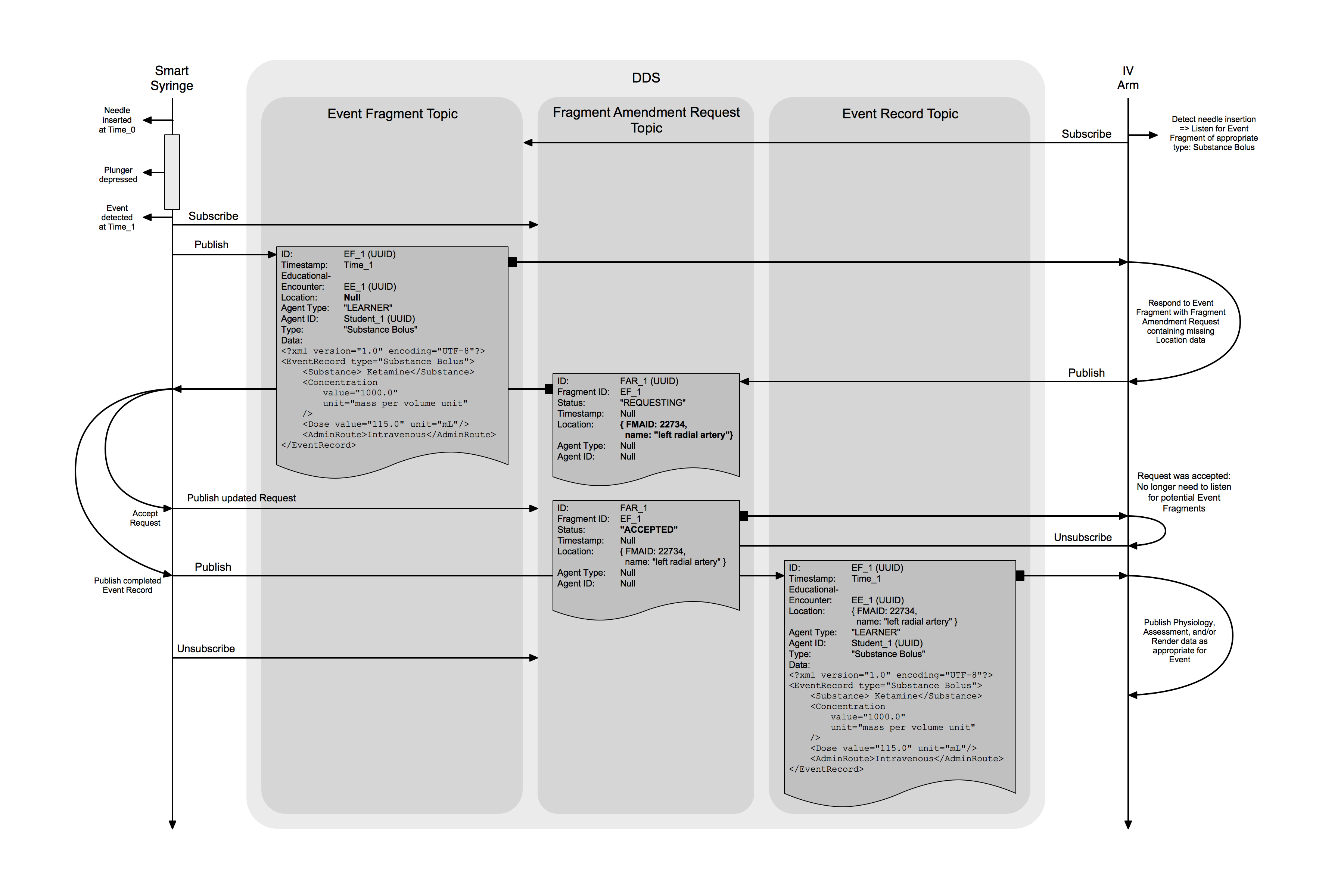
EventFragments contain the same data fields as EventRecords,
but are published on a separate Topic from EventRecords because certain fields may be published with a null value.
The Module that first publishes an EventFragment shall be the only Module to post 'update' messages with the same
id value.
UUID of the Fragment message.
This id is unrelated to the id of the future EventRecord that will derive from
this Fragment.
This field is used as a DDS Topic Key.
Real-world timestamp of when the EventFragment was recorded, in milliseconds since UTC Unix epoch.
This value shall not change as part of the Event Fragment Protocol.
Generated and assigned by the Module Manager (or equivalent) when a Scenario is loaded. This value is used to uniquely identify the instance of a Scenario being run.
The FMA location for the EventFragment.
This value may have an appropriate 'null' value, indicating the initiating Module is seeking missing location
information. [TODO: Clarify "appropriate 'null'" for FMA_Location type]
The category of entity that caused the Event.
The value shall be one of the following: LEARNER, INSTRUCTOR, SCENARIO, or PHYSIOLOGY.
Meaning of these values is identical to that of EventRecord agent_type values.
Modules should infer this value based on the Event type.
UUID for the entity that caused the Event.
May be null if the initiating Module cannot uniquely determine who caused the Event.
This is likely to be the most commonly missing piece of information sought by the Event Fragment Protocol.
These fields are identical to those of EventRecord.
Initiating Modules shall not provide 'null' values for either of these fields as part of the Event Fragment Protocol.
Responding Modules will likely filter EventFragment messages based on type.
Once a Module publishes an EventFragment indicating it is seeking information that it is missing,
other Modules that are subscribed to the EventFragment Topic may publish a FragmentAmendmentRequest (FAR)
when they have data that is applicable to a particular EventFragment.
Because FragmentAmendmentRequests are published on their own Topic,
Modules can subscribe to & unsubscribe from FARs as necessary.
Each FragmentAmendmentRequest (FAR) includes a status field.
Modules that ‘respond' to an Event Fragment with a FAR publish a FAR with a status of REQUESTING.
The module that published the Event Fragment will then respond to the FAR by publishing a new version of the FAR
with the status field updated to either ACCEPTED or REJECTED.
Once the initiating Module has ‘accepted’ a FAR by publishing an updated version of the FAR with the ACCEPTED status,
the initiating Module will then publish a complete EventRecord.
Finally, it will publish updates to any outstanding FragmentAmendmentRequest with a status of REJECTED.
In the case of multiple missing data fields in an Event Fragment,
the initiating Module may post incremental updates to the EventFragment, keeping the same id,
based on Accepted FAR data.
UUID of the FAR.
This field is used as a DDS Topic Key.
Modules publishing a FragmentAmendmentRequest shall also subscribe to this Topic and listen for update messages
with a matching id.
The value of the fragment_id field shall match the value of the id field of the EventFragment that this message
is requesting to amend.
The status of the amendment request.
This field shall have one of three values: REQUESTING, ACCEPTED, or REJECTED.
The initial value shall be REQUESTING.
The value shall be updated to ACCEPTED or REJECTED by the Module that published the EventFragment that this
message is requesting to amend.
These fields may contain the missing information being supplied to the EventFragment.
These fields shall have the same type as their respective EventRecord fields,
or may have an appropriate 'null' value. [TODO: Determine "appropriate 'null' value" for FMA_location]
This third category of data encapsulates the state of the Module hardware and software. This includes Control of when the simulation is running, the Statuses published by every Capability of every Module, and all Logging.
These messages are used to control the state of the simulation.
All modules must subscribe to this Topic and behave appropriately in order for the simulation to function correctly.
Control of the simulation has been distilled down to four explicit commands: RUN, HALT, RESET, and SAVE.
Further 'load scenario' control functionality is implicitly provided by publishing to the ModuleConfiguration Topic,
as described further in the Configuration Data Model document.
While the names of the Simulation Controls are designed to be as clear as possible,
further detailed descriptions of required Module behavior are provided in the
Module Behavior Requirements document.
Real-world timestamp of when the SimulationControl was issued, in milliseconds since UTC Unix epoch.
One of: RUN, HALT, RESET, or SAVE.
Generated and assigned by the Module Manager (or equivalent) when a Scenario is loaded. This value is used to uniquely identify the instance of a Scenario being run.
This field is used as a DDS Topic Key.
Modules report their ability to participate in a simulation by updating the Status for each of the Capabilities provided by the Module (as selected by the Scenario). Module readiness is broken-up this way because some Module functionality may require resources that other functionality does not. The Scenario may specify that only certain functionality is required for a simulation.
Modules shall report a status value that takes one of three values: OPERATIONAL, INOPERATIVE, or EXIGENT.
The OPERATIONAL status indicates that the Module is able to run, or is currently running, the current Scenario.
The INOPERATIVE status indicates that the Module is currently unable to participate in a simulation.
This may be because a Scenario hasn't been loaded, hardware has failed,
or a fluid reservoir is empty, for example.
The EXIGENT status indicates that a Module is currently able to participate in the simulation,
but will not be able to continue participating in the simulation without human intervention.
The EXIGENT status should be used primarily to raise alerts to the AMM operator that action is required in
order to continue the simulation.
The most obvious use-case is to alert users when resources (primarily battery power or fluids)
are in danger of being exhausted and causing unexpected termination of the simulation.
Generated by the Module and shall be unique per module instance. Used to uniquely identify Module in AMM system.
This field is used as a DDS Topic Key.
A human friendly short identifier for the Module. Used for user interface displays.
Generated and assigned by the Module Manager (or equivalent) when a Scenario is loaded. This value is used to uniquely identify the instance of a Scenario being run.
The specific Capability of the Module for which Status is being reported.
This field is an XML document with a single root element of Capability.
The type and other attributes of the Capability element shall conform to an entry in the
Capabilities Glossary.
This field shall have XML version & encoding of <?xml version="1.0" encoding="UTF-8"?>.
This field is used as a DDS Topic Key.
Real-world timestamp of when Status value was last updated, in milliseconds since UTC Unix epoch.
One of OPERATIONAL, INOPERATIVE, or EXIGENT.
A brief phrase or sentence to provide further insight or context into a status value, if applicable. This field is intended to be used primarily by user interface displays.
Modules may publish logging messages during operation which may be collected and presented to end users, or saved for later review. Log messages should not be used to generate alerts or notifications for the main manikin UI. Capability Status(es) are the correct source for these UI alerts, which should be generated by the Core Software (Module Manager in the reference implementation). However, additional interface (e.g. technician’s view) may wish to leverage logging data directly.
For consistency, AMM defines six log levels, with specific meanings and behavior expectations attached. They are listed here from 'most' to 'least' severe:
This indicates the Module must cease normal operations and will shut down, or enter a non-recoverable error state.
Modules publishing FATAL log messages shall also publish Capability Status updates of INOPERATIVE as appropriate.
Error messages the Module cannot operate as expected, but may be able to recover.
If the cause of the Error messages also causes a change in Module functionality,
the Module shall update its Capability Statuses appropriately, usually to INOPERATIVE.
ERROR message publication frequency shall be limited to approximately 1 Hz.
Warnings usually caused by a Module receiving unexpected data or entering an undesired state,
but still able to function.
If the warning requires time-critical action to avoid a loss of functionality,
the Module shall also update the appropriate Capability Status value(s) to EXIGENT.
INFO message publication frequency shall be limited to approximately 1 Hz.
These are informational messages that do not indicate any problems, but provide additional insight into Module functionality. These are usually messages about changes in connectivity, Module operation, sensing user actions, etc.
INFO message publication frequency shall be limited to approximately 1 Hz.
These messages shall be disabled during 'normal' Module operation.
Commercial/Production Modules shall not publish DEBUG messages unless specifically enabled via configuration value.
DEBUG messages, if specifically enabled via configuration, may be published more frequently than 1 Hz,
but Module developers should take care not to flood the network.
A limit of approximately 10 Hz is generally recommended.
Trace messages are included in the AMM standard only for Module developer convenience.
Commercial/Production Modules shall never publish TRACE level messages.
Real-world timestamp of the Log message, in milliseconds since UTC Unix epoch.
Generated by the Module and shall be unique per module instance. Used to uniquely identify Module in AMM system.
This field is used as a DDS Topic Key.
One of FATAL, ERROR, WARN, INFO, DEBUG, or TRACE.
See above for usage details.
The content of the Log message, usually a short phrase or sentence.